1. Introduction
PEAT (Process Extraction and Analysis Tool) is a multifunction utility and library for interrogating and mapping ICS and OT devices, including network discovery, acquiring and parsing artifacts (firmware, logic, etc.), uploading artifacts, and sending commands. It runs on most systems, including Linux, Windows, macOS, and as a Docker Container. Refer to Supported platforms for full details on supported platforms.
1.1. High-level flow
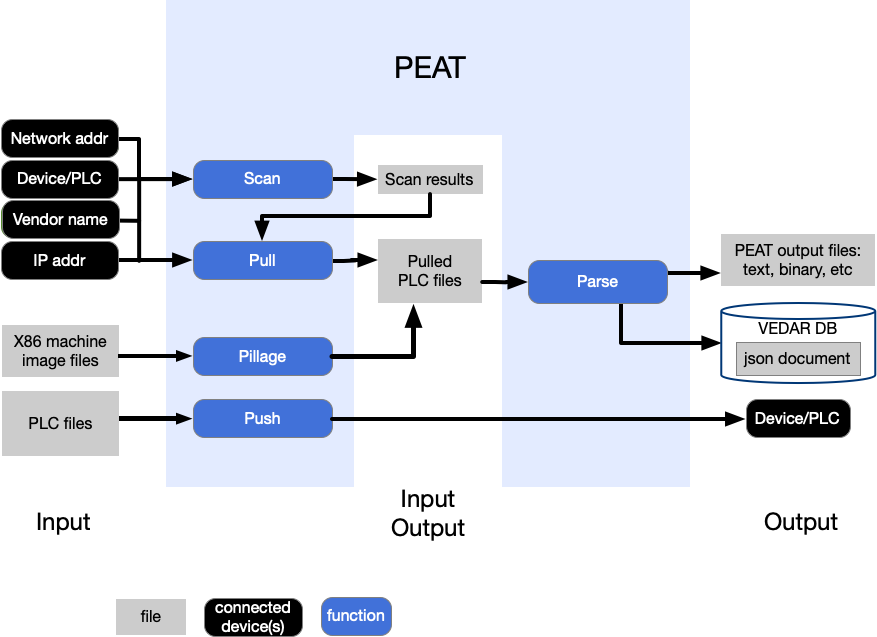
1.2. Supported ICS/OT devices
1.2.1. Description of functions
Scan: discover and identify the device on a network and gather basic information about it (such as the vendor, model and other basic information)
Pull: actively interrogate devices to retrieve detailed information and artifacts (e.g. configurations, logic, firmware, logs, etc.) from a device via a communication link (Ethernet, serial, etc.).
Parse: ability to extract information from the device’s configuration, programming, or firmware files. This can be file(s) from the device itself or exported from the vendor software used to program the device, with the latter form commonly known as a “project file”. The amount of information extracted varies by device and TRL level.
1.2.2. CSV files
CSV files for the tables that are listed in the sections that follow.
Supported devices:
supported_devices.csvUnintegrated devices:
unintegrated_devices.csvTCP/IP protocols currently used by PEAT:
tcp_ip_protocols_used_by_peat.csv
1.2.3. Included devices
Devices that are included with PEAT “out of the box” and are fully-integrated as PEAT modules. The “Firmware Versions” column lists firmware versions that PEAT has been known to work with, and is not exhaustive or indicative of if PEAT will or will not work with a particular firmware version.
Warning
The estimated Technology Readiness Levels (TRL) for each module are estimates only and are only intended to provide insight into the maturity of a module’s development level and reliability
Vendor |
Device |
Supported Functions |
Protocols |
Firmware Versions |
Notes |
Estimated TRL |
|---|---|---|---|---|---|---|
Rockwell |
Allen-Bradley ControlLogix 1756 PLC. L7 and L8-series CPUs. EN2T/D, EWEB, EN2TR, and EN2TR/C communication modules and L8 CPU built-in Ethernet. |
Scan, Pull logic, Push firmware, Parse pulled logic |
FTP, HTTP, SNMP, CIP |
L74/B CPU v30.13, L74/B EN2T/D v10.7, L74/B EWEB/A v4.11, L81E/B CPU v33.11, L81E/B EN2TR/C v11.2, L81E/B EWEB/A v5.1, L83E/B CPU v33.11, L83E/B EN4TR/A v2.1, L83E/B IF8/A v1.5, L83E/B IF8/A v1.5 |
This has been run with some success against a PanelView HMI, so it may work with those devices and possibly other Rockwell CIP devices. Supported protocols and amount of data collected vary by model and type of the communication module being interrogated. For example, the L8-series CPUs built-in Ethernet interface doesn’t have a HTTP interface PEAT can retrieve data from. Why TRL 6? The module was tested against a significant number of PLCs with real logic in a high-fidelity emulation in Summer 2021, which meets the requirement of testing a prototype or representative of a deliverable in an actual environment or in a high-fidelity laboratory environment that emulates the actual environment. PEAT module: |
TRL 6 |
Rockwell |
Studio5000/RSLogix5000 L5X files |
Parse |
Parsing of |
TRL 4 |
||
Rockwell |
PanelView Plus HMI |
Parse |
N/A |
WindowsCE 6.0 |
Parsing of output from the |
TRL 4 |
Camlin |
Totus G9 Dissolved Gas Analyzer (DGA) |
Scan, Pull config |
HTTP |
PEAT module: |
TRL 5 |
|
GE |
Multilin D25 RTU |
Pull config, logs, and logic |
Telnet |
Why TRL 5? Used in several exercises in a realistic environment. PEAT module: |
TRL 5 |
|
GE |
Multilin T60 and L90 relays |
Pull config, logs, and logic |
HTTP |
Why TRL 5? Used in several exercises in a realistic environment. Should be compatible with D30 and N60 as well, but these have not been tested. PEAT module: |
TRL 5 |
|
GE |
Multilin F35 relays |
Pull config, logs, and logic |
HTTP |
Compatibility of GERelay module with the F35 Relay has not been tested after major integration changes that were made in 2021 since we don’t have one available for testing. Everything should still work, but it’s not TRL 5. PEAT module: |
TRL 4 |
|
SEL |
311C |
Scan, Pull basic info, Parse config, Parse project file, Pull memory |
Telnet |
311C-2 R508.V0 (D2015-02-19) |
PEAT has been tested against at least one SEL-311C over Telnet, with some success. PEAT module: |
TRL 4 |
SEL |
311L |
Scan, Pull basic info, Parse config, Parse project file, Pull memory |
Telnet |
311L-7 R502.V0 (D2014-11-06) |
PEAT is able to pull basic information from the 311L, but not full configs, due to lack of |
TRL 5 |
SEL |
300G, 387, 587Z |
Scan, Pull config, Parse config, Parse project file |
FTP, Telnet |
Active operations (Scan, Pull) have NOT been tested against actual devices for these models. We’re confident they’ll work like the other relays, perhaps with slightly different credentials, however your mileage may vary. PEAT module: |
TRL 4 |
|
SEL |
351, 351S, 451 protection relays |
Scan, Pull config, Pull logs, Push config, Parse config, Parse project file |
FTP, Telnet, HTTP, HTTPS, RS-232 (Serial) |
351 Firmware R510.V0 (D2011-04-29), 351 Boot Firmware R102, 351S Firmware R516.V2 (D2019-01-11), 351S Boot Firmware RS209.V0, 451 Firmware R322.V0 (D2018-06-30), 451 Boot Firmware R209.V0 |
PEAT module: |
TRL 6 |
SEL |
411L, 487E protection relays |
Scan, Pull config, Parse config, Parse project file |
FTP, Telnet |
411L Firmware R124.V0 (D2019-01-30) 487E Firmware R317.V1 (D2019-02-11) |
PEAT module: |
TRL 5 |
SEL |
700G, 710, 751 generator and motor protection relays |
Scan, Pull config, Push config, Parse config, Parse project file |
FTP, Telnet |
700G Firmware R200.V0 (D2018-06-29), 710 Firmware R411.V0 (D2017-06-23), 751 Firmware R201.V1 (D2018-09-21), 751 Firmware R300.V3 (D2021-01-04) |
PEAT module: |
TRL 6 |
SEL |
2032 Communications Processor |
Scan, Pull config, Push config, Parse config, Parse project file |
FTP, Telnet |
2032 Firmware R115.V1 (D2015-10-28) |
PEAT module: |
TRL 4 |
SEL |
3530, 3530-4, 3350 RTACs |
Scan, Pull config, Parse project file |
HTTP, PostgreSQL |
3530 Firmware R144.V2 (D2019-02-16), 3530 Firmware R149.V1 (D2021-12-14), 3530-4 Firmware R144.V1 (D2019-01-11), 3350 Firmware R152.V0 (D2023-11-07) |
PEAT module: |
TRL 6 |
SEL |
3620 Security Gateway |
Scan, Pull config |
HTTPS |
SEL-3620 R212 V0 Z017006 (D2022-10-03) |
PEAT module: |
TRL 3 |
Sandia |
SCEPTRE Virtual Field Device |
Scan, Pull config, Pull firmware, Push firmware, Push config, Parse config |
FTP |
PEAT module: |
TRL 6 |
|
Siemens |
Siprotec 4 relay |
Scan, Pull network config |
HTTP, SNMP |
PEAT module: |
TRL 4 |
|
Siemens |
SIMATIC TP700 Comfort HMI |
Parse |
WindowsCE 6.0 |
Parsing of output from the |
TRL 4 |
|
Schneider Electric |
Modicon M340 PLC (BMXP 3020 Ethernet module) |
Scan, Pull config, Pull logic, Parse config, Parse logic |
FTP, SNMP, Modbus/TCP (UMAS) |
CPU v02.90 IR2, ETH v03.20 IR2 |
This has been run once with some success against a Quantum 140 PLC, so it may work against that device. PEAT module: |
TRL 6 |
Schneider Electric |
Sage 2400 and 3030M RTUs |
Scan, Pull config, Parse config, Parse firmware (rudimentary support for firmware parsing) |
FTP, Telnet, SSH, HTTP, HTTPS |
PEAT module: |
TRL 5 |
|
Woodward |
2301E |
Scan, Pull config |
RS-232 serial (Servlink protocol) |
PEAT module: |
TRL 4 |
|
Woodward |
easYgen 3500XT |
Scan, Pull config |
FTP, ServLink/TCP, RS-232 serial (Servlink protocol) |
The parsing code for |
TRL 4 |
|
Woodward |
MicroNet Plus |
Scan, Pull config, logic, and logs |
FTP |
PEAT module: |
TRL 4 |
|
Fortinet |
FortiGate FG-100 Firewall |
Parse config, Parse logs |
N/A |
7.0.2 |
PEAT module: |
TRL 3 |
iDirect |
iDirect X-Series modems (X3, X5, X7) |
Scan, Pull config and logs |
SSH, HTTPS |
PEAT module: |
TRL 4 |
|
Windows |
WindowsCE devices |
Parse config |
N/A |
WindowsCE 6.0 |
Special functionality leveraging a Windows binary called |
TRL 4 |
UEFI |
UEFI SPIExtract dump parser |
Parse |
N/A |
PEAT module for parsing a UEFI SPIExtract Dump. Right now this tool will parse |
TRL 3 |
1.2.4. Unintegrated devices
Devices that have code and some amount of work done for, but are not included with PEAT “out of the box” and aren’t yet integrated as PEAT modules. The analysis work is done, they just need a modest amount of development effort to integrate them as PEAT modules.
Vendor |
Device |
Supported Functions |
Protocols |
Notes |
Estimated TRL |
|---|---|---|---|---|---|
ABB |
RTU 560 RTU |
Pull config, Pull firmware |
HTTP |
Standalone module. Not currently open-source. |
TRL 2 |
Allen-Bradley |
Micrologix 1100 PLC |
N/A |
Exists as an Independent script. Not currently open-source. |
TRL 2 |
|
Siemens |
S7 PLCs |
N/A |
SNAP7 |
Exists as an Independent script. Not currently open-source. |
TRL 2 |
1.2.5. TCP/IP protocols currently used by PEAT
Protocol |
Port |
Transport protocol(s) |
PEAT Module(s) |
Notes |
|---|---|---|---|---|
FTP |
21 |
TCP |
|
|
SSH |
22 |
TCP |
||
SFTP |
22 |
TCP |
||
Telnet |
23 |
TCP |
||
HTTP |
80 |
TCP |
|
|
HTTPS |
443 |
TCP |
|
|
SNMP |
161 |
UDP |
SNMP (Simple Network Management Protocol). |
|
Modbus/TCP |
502 |
TCP |
||
UMAS |
502 |
TCP |
UMAS is a proprietary protocol built on top of Modbus/TCP. Used by Schneider Electric Modicon devices. |
|
ServLink/TCP |
666, 667 |
TCP |
ServLink is a Woodward-proprietary protocol for communicating with various devices over either TCP or Serial, including the easYgen 3500XT, 2301E, and potentially other devices. ServLink typically uses port 666, but it may use port 667. |
|
MySQL |
3306 |
TCP |
MySQL/MariaDB initial handshake and query protocol. Used for unauthenticated server fingerprinting via the TCP greeting packet and authenticated enumeration of database server version, schemas, users, and configuration. |
|
postgres |
5432 |
TCP |
PostgreSQL database communication. Commonly known as the ‘wire protocol’. |
|
ION |
7700, 7701, 7702 |
TCP |
|
Proprietary protocol for Schneider Electric PowerLogic ION power meters. Used for reading and updating device configuration, firmware updates, and general communications between ION Setup software and a ION meter. ION uses port 7700 by default, but can also use ports 7701 or 7702. |
CIP |
44818 |
TCP, UDP |
CIP (Common Industrial Protocol) is a Rockwell/Allen-Bradley-developed protocol used by Rockwell devices and others. |
1.3. Why use peat?
1.3.1. Use cases
Network inventory, enumeration, discovery. Going into a unknown network, what’s here? Even on a known system, documentation is often out of date.
Forensics and incident response. If an incident happened, run PEAT to collect logs, file artifacts, hashes, and carve out memory reads. Was the firmware modified? The logic? Is the config correct and expected? What happened in the logs?
Monitoring for malicious activity. Regular pulls over time. Compare them using Hipparchus, or analytics and anomaly detection with Archimedes.
Backups. There are 100 relays, point a PEAT pull at all of them, backup done in 10 minutes. Imagine having to do that individually with SEL aCCelerator…your engineer will be unhappy. And how do you automate that?
Health monitoring. Ensure the system is healthy and no errors are in the logs. PEAT can help fill the gaps where vendor capabilities are lacking.
Recovery. PEAT push can upload configs or firmware to bring a device back to a known-good state (if it exists).
- Red Team tool
Sneakypeat is a lighter weight PEAT designed to be used for red team exercises.
PEAT can be used as a reconnisance tool during red team exercises or engagements.
1.3.2. Why use PEAT instead of Vendor software or other tools?
Immensely difficult or even impossible to automate. Getting data out is hard, let alone operating it.
Licensing costs/ability (there is vendor software that costs ~$11,000 USD for a SINGLE license).
Often can’t run headless, need a heavy Windows VM, and it’s a GUI (and that Windows VM needs a license…).
Automating Windows GUI is time consuming and brittle - This is typically just a one-off type of ability that’s expensive to develop and maintain.
Vendor software usually only supports their latest and greatest, older devices require older software, which results in multiple bespoke VMs that require upkeep.
Data is limited to what vendor has chosen to implement in this particular software, not what’s possible to obtain. They do not (typically) pull down raw meter values, certain configuration values, running process, network states, raw files, file hashes, etc.
It isn’t very portable, and system requirements are heavy (virtualization software, system with resources to run a VM, can’t do headless)
Doesn’t scale, if you want to pull from 10 power meters at the same time, you’ll need 10 VMs.
Performance. PEAT is often faster.
System load. Few or no ways to limit what data is pulled, it could pull a little or a ton of data, depending on the software, causing undesirable load on the device. PEAT also causes load, but you can configure it to just pull what’s needed.
Standardized output. PEAT standardizes the data so downstream tools and SIEM platforms can ingest the data. - There is Consistency across vendors by using PEAT - The power of a defined data model and standardized schema
Integration. PEAT has a variety of output formats that are both machine-parsable by other tools, and readable by humans. Additionally, it integrates with Elasticsearch.
Automation. PEAT is trivial to automate, and in fact has been automated many times in the past.