8.5. Device module implementations
Code documentation for the DeviceModule implementations included with PEAT.
Note
The source code for documented classes and functions is available by clicking the source to the right of the documentation for the class or function.
8.5.1. Class diagram
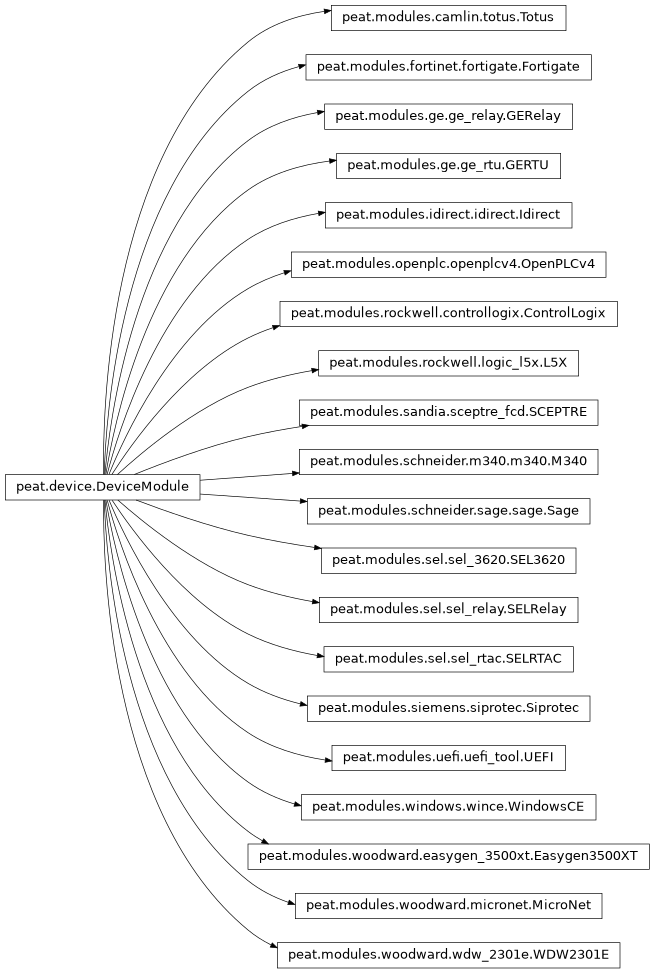
8.5.2. Rockwell Automation
8.5.2.1. Allen-Bradley ControlLogix PLC
PEAT module for the Allen-Bradley ControlLogix device.
Listening services (EN2TR)
FTP (TCP 21) (if enabled in config)
HTTP (TCP 80)
SNMP (UDP 161)
ENIP (UDP 2222)
CIP (UDP 44818 and TCP 44818)
Listening services (EWEB)
FTP (TCP 21) (if enabled in config)
HTTP (TCP 80)
SNMP (UDP 161)
ENIP (UDP 2222)
CIP (UDP 44818 and TCP 44818)
Authors
Christopher Goes
Mark Woodard
- class ControlLogix[source]
Allen-Bradley ControlLogix devices.
Supported communication modules: EN2T/D, EWEB, EN2TR, EN2TR/C, L8 CPU
- device_type: str = 'PLC'
Type of device, e.g “PLC”, “Relay”, “RTU”, “RTAC”, etc. Elasticsearch field:
host.type.
- vendor_id: str = 'Rockwell'
Short-form vendor name. Elasticsearch field:
host.description.vendor.id.
- vendor_name: str = 'Rockwell Automation/Allen-Bradley'
Long-form vendor name. Elasticsearch field:
host.description.vendor.name.
- brand: str = 'ControlLogix'
Device brand. Elasticsearch field:
host.description.brand.
- model: str = '1756'
Device’s default model (if not known). Elasticsearch field:
host.description.model.
- default_options: dict[str, Any] = {'ftp': {'pass': '', 'user': 'Administrator'}, 'rockwell': {'pull_methods': ['cip', 'ftp', 'http', 'snmp']}, 'web': {'pass': '', 'user': 'Administrator'}}
Define module-specific options and/or override global defaults, such as default ports for protocols or default credentials.
- annotate_fields: dict[str, Any] = {'os.name': 'VxWorks', 'os.vendor.id': 'WindRiver', 'os.vendor.name': 'Wind River Systems'}
Fields that will be annotated (populated) by default for most operations, such as scan pull, parse, etc. Examples include known OS versions or hardware architecture. These fields will populated ONLY IF they are already unset on the device being annotated. Format is the path to the field to populate, e.g.
os.name,os.vendor.id, etc.
- module_aliases: list[str] = ['clx', 'allen-bradley']
Alternative names for looking up the module, e.g. for the
-dCLI option. Aliases that can be used to refer to the device via the PEAT’s Module API (peat.module_manager).
- classmethod update_dev(dev)[source]
Update the device’s data with metadata, inferences, and lookups.
Note
Data values are only changed if they’re unset. In other words, existing values will NOT be overwritten.
What’s populated:
Basic Module attributes, e.g.
cls.vendor_name => dev.description.vendor.name.Any Module-defined fields in
cls.annotate_fields, if present.Calls
populate_fields(), which populates fields such as adding description values, network interfaces, and other values. This call will also implicitly lookup MAC addresses, IP addresses, and/or hostnames, unless disabled with the appropriate PEAT global configuration options.
- Parameters:
dev (
DeviceData) -- DeviceData instance to annotate.- Return type:
- classmethod pull_ftp(dev)[source]
Pull files from a EWEB communication module via FTP.
Files pulled
*.edsReadMe.txtAnything else on the device
- Return type:
- Returns:
If the pull was successful
- classmethod pull_snmp(dev)[source]
Pull data via SNMP from EWEB/EN2T communication modules.
- Return type:
- Returns:
If the pull was successful
- classmethod pull_http(dev)[source]
Pull device metadata, memory, syslog, and other data from a EN2T communication module via HTTP.
Note
Raw data pulled via each HTTP method is saved to a JSON file in the device results directory with a label of
raw-<method>, where<method>is the method name, e.g.raw-home.- Return type:
- Returns:
If the pull was successful
- classmethod pull_logic(dev)[source]
Pull raw process logic from the device via CIP.
By default, any slots (modules) that aren’t “Adapter” or “I/O” type are queried for logic.
- classmethod parse_logic(dev, logic_values)[source]
Parse logic pulled from the device via CIP.
- Return type:
- ip_methods: list[IPMethod] = [IPMethod(name='ControlLogix FTP', description='Verify via FTP for devices with EWEB communication modules.', identify_function=<bound method ControlLogix._verify_ftp of <class 'peat.modules.rockwell.controllogix.ControlLogix'>>, reliability=8, protocol='ftp', transport='tcp', type='unicast_ip', default_port=21), IPMethod(name='ControlLogix HTTP page scraping', description='Verify via HTTP for devices with EN2T/EN2TR communication modules.', identify_function=<bound method ControlLogix._verify_http of <class 'peat.modules.rockwell.controllogix.ControlLogix'>>, reliability=8, protocol='http', transport='tcp', type='unicast_ip', default_port=80), IPMethod(name='ControlLogix SNMP sysDescr', description='Verify via SNMP for devices with EN2T/EN2TR communication modules by\n querying for SNMP :term:`OID` ``1.3.6.1.2.1.1.1.0`` (``sysDescr``) and\n checking the value.', identify_function=<bound method ControlLogix._verify_snmp of <class 'peat.modules.rockwell.controllogix.ControlLogix'>>, reliability=6, protocol='snmp', transport='udp', type='unicast_ip', default_port=161), IPMethod(name='ControlLogix CIP ListIdentity unicast', description='Verify via a unicast :term:`CIP` ListIdentity packet.', identify_function=<bound method ControlLogix._verify_cip_unicast of <class 'peat.modules.rockwell.controllogix.ControlLogix'>>, reliability=9, protocol='cip', transport='udp', type='unicast_ip', default_port=44818), IPMethod(name='ControlLogix CIP ListIdentity broadcast', description='Send a :term:`CIP` broadcast packet to broadcast IP and\n wait for responses from devices.', identify_function=<bound method ControlLogix._verify_cip_broadcast of <class 'peat.modules.rockwell.controllogix.ControlLogix'>>, reliability=9, protocol='cip', transport='udp', type='broadcast_ip', default_port=44818)]
Methods for identifying devices via IP or Ethernet.
8.5.2.1.1. Rockwell Scanning
Methods for enumerating Allen-Bradley ControlLogix devices on a IP network.
Authors
Casey Glatter
Christopher Goes
Patricia Schulz
- broadcast_scan(ip, port=44818, timeout=5.0)[source]
Scan by sending a broadcast packet and waiting for responses from devices.
- fingerprint_device(sock)[source]
Listen for response from a device, verify it is a Allen-Bradley, then determine basic metadata about it.
- enumerate_device_modules(ip, port=44818, chassis_size=8, timeout=5.0)[source]
Enumerate ControlLogix device modules.
- Parameters:
- Return type:
- Returns:
Metadata of any modules discovered during enumeration, keyed by slot number
8.5.2.1.2. Rockwell Communications
ControlLogix Common Industrial Protocol (CIP) implementation.
Originally based on code from Agostino Ruscito’s pycomm library and heavily modified.
Authors
Craig Buchanan
Christopher Goes
- class ClxCIP(ip, port, timeout=5.0, cpu_slot=0)[source]
Common Industrial Protocol (CIP) implementation for Allen-Bradley ControlLogix devices.
- get_attributes(instance_path, attribute_list=None)[source]
Returns attributes for a single instance at a given instance path.
- get_attributes_multi(class_path, attribute_list=None, instance_list=None)[source]
Returns attributes for multiple instances at a given class path.
Example:
attr = self.get_attributes_multi((CLASS_CODE['X Object'],))- Parameters:
- Return type:
- Returns:
{<instance_id>: {<attribute_id>: <attribute_value>,..},..}
- get_template_data(path=())[source]
Returns a tuple (template_attributes, template_tags) for all template instances at the given path.
- get_io_module_data(path=())[source]
Returns a tuple (io_module_attributes, io_module_tags) for all io_module instances at a given path.
- get_program_data(path=())[source]
Returns a tuple (program_attributes, program_symbol_attributes, program_routine_attributes, program_routine_tags) for all program instances at a given path.
- Parameters:
path (
tuple) -- Path to the instance containing the program class- Return type:
- Returns:
(attr, sym_attr, rout_attr, rout_tags)
attr =
{<prog_id>:{<attr_id>:<attr_value>,..},..}sym_attr =
{<prog_id>:{<sym_id>:{<attr_id>:<attr_val>,..},..},..}rout_attr =
{<prog_id>:{<rout_id>:{<attr_id>:<attr_val>,..},..},..}rout_tags =
{<prog_id>:{<rout_id>:[tag_data],..},..}
- get_routine_data(path=())[source]
Returns a
tuple(routine_attributes, routine_tags) for all routine instances at a given path.
- get_map_data(path=())[source]
Returns a
tuple(map_attributes, map_cxn_attributes) for all map instances at a given path.
- get_unknown6e_data(path=())[source]
Returns a
tuple(unknown6e_attributes, unknown6e_tags) for allunknown6einstances at a given path.
- get_instance_list_tag_buffer(class_path)[source]
Returns a data buffer representing a
listof all instance IDs of a specified class path.
- get_attributes_tag_buffer(instance_path, attribute_list)[source]
Returns a data buffer representing the specified attributes of an instance at a specified path.
- read_tag(instance_path, tag_offset=0)[source]
Return a data buffer representing the tag data of an instance at a specified path (at a specified offset).
- read_tag_fragmented(instance_path, tag_offset=0)[source]
Return a data buffer representing the tag data of an instance at a specified path (at a specified offset).
- read_template(instance_path, size, offset=0)[source]
Return a data buffer representing the tag data of a template instance at a specified path (at a specified offset).
- get_size_of_type(type_id, template_attributes, type_size_d1=0, type_size_d2=0, type_size_d3=0)[source]
Returns the size of the given type.
- Parameters:
- Return type:
- Returns:
Integer value of the size of the type (in bytes)
- get_instance_list_data_from_reply(cip_data)[source]
Returns a tuple (instance_list_data, next_instance_id) from get_instance_list reply data.
- get_attributes_data_from_reply(cip_data)[source]
Returns the tuple (attribute_data, attribute_count) from get_attributes reply data.
- read_tag_data_from_reply(cip_data)[source]
Return the tuple (tag_data, tag_size) from read_tag reply data.
- read_tag_fragmented_data_from_reply(cip_data)[source]
Return the tuple (tag_data, tag_size, tag_address) from read_tag_fragmented reply data.
- read_tag_with_size_data_from_reply(cip_data)[source]
Return the tag_data from
read_tag_with_sizereply data.
- parse_get_instance_list(cip_data)[source]
Returns a list of instance ids (int) from raw instance list CIP data.
- parse_get_attributes(cip_data, cip_class)[source]
Returns a dictionary of attributes from the raw CIP data and the CIP class id (
int).
- parse_template(cip_data, member_count)[source]
Parses a template tag and returns a data structure representing the template.
- Parameters:
- Return type:
- Returns:
{"Name":<template_name>,
"Structure":{
   <member_offset1>:{
       "Name":<member_name>,
       "Type":<member_type>,
       "Info":<member_info>,
       }, ..
   }
}
- class ClxHTTP(*args, **kwargs)[source]
HTTP interface for Allen-Bradley ControlLogix Ethernet communication modules.
Supported communication modules and functions
- EN2TR: all functions except
serverlog memorynetworkhomedevice_identitysyslogdiagnetworkmodulesmodule_list
- EN2TR: all functions except
- EWEB: all functions except
memory,syslog, anddevice_identity networkhomeserverlogdiagnetworkmodulesmodule_list
- EWEB: all functions except
- L8 CPU (built-in Ethernet):
network(no other functions work) network
- L8 CPU (built-in Ethernet):
- MEMORY_GROUPS = [{'name': 'watchdog_log', 'page': 'WatchDog', 'search': 'WatchDog Log'}, {'name': 'internal_memory', 'page': 'Internal%20Memory', 'search': 'Internal Memory'}, {'name': 'parameter_area', 'page': 'Parameter%20Area', 'search': 'Parameter Area'}]
- HOME = 'home.asp'
Device metadata page.
- SERVERLOG = 'serverlog.asp'
HTTP server log page.
- DIAGNETWORK = 'diagnetwork.asp'
Network diagnostics page.
- CHASSIS_WHO = 'chassisWho.asp'
Page with a list of modules.
- UPTIME_RE = re.compile('((?P<years>\\d+) years)?[ ,]*((?P<months>\\d+) months)?[ ,]*((?P<days>\\d+) days)?[ ,]*(?P<hours>\\d{1,2})h:(?P<minutes>\\d{1,2})m:(?P<seconds>\\d{1,2})\\.?(?P<milliseconds>\\d{3})?s', re.IGNORECASE|re.ASCII)
- SYSLOG_PAGE_RE = re.compile('rokform/SysListDetail\\?name=Full List&id=(\\d+)&comp=SysLog', re.IGNORECASE|re.ASCII)
- retrieve_memory_page(memory_page)[source]
Parses memory from webpage to the values as a hex string.
- Return type:
- static add_padding(input_data)[source]
Adds padding for memory values, e.g. convert
01to00000001.- Return type:
- classmethod process_memory(dev, memory_regions)[source]
Add data from the parsed memory to a
DeviceDataobject.- Return type:
- retrieve_net_table(name)[source]
Retrieves and parses a table from a network information page into a dictionary.
- classmethod process_network(dev, info)[source]
Add data from the parsed network information pages to a
DeviceDataobject.- Return type:
- classmethod process_home(dev, info)[source]
Add data from the parsed home page to a
DeviceDataobject.- Return type:
- classmethod process_syslog(dev, syslog)[source]
Add data from the parsed syslog pages to a
DeviceDataobject.- Return type:
- get_serverlog(username='Administrator', password='')[source]
Get
serverlogdata from a EWEB module. :rtype:list[dict]Note
This page requires authentication. The default credentials are attempted but could differ on other devices. They are configurable via the “web” option in the PEAT configuration file.
- classmethod process_serverlog(dev, serverlog)[source]
Add data parsed EWEB
serverlogpage to aDeviceDataobject.This log contains a history of web page requests to the EWEB module and the source IP of those requests. :rtype:
NonePossible values for
event.category: network, webPossible values for
event.kind: event, pipeline_errorPossible values for
event.type: access, allowed, denied, error, user
- get_diagnetwork()[source]
Retrieve and parse network interface settings page (
diagnetwork).- Return type:
- classmethod parse_diagnetwork(text)[source]
Parse and extract data from
diagnetwork.aspHTML page data.- Return type:
- classmethod process_diagnetwork(dev, info)[source]
Add data from the parsed
diagnetworkpage to aDeviceDataobject.- Return type:
- classmethod parse_module_page(text)[source]
Parse and extract information about a PLC rack module from HTML text.
- Return type:
- classmethod process_modules(dev, raw_modules)[source]
Add data from the parsed modules to a
DeviceDataobject.- Return type:
8.5.2.1.3. Rockwell Parsing
Rockwell Allen-Bradley ControlLogix PLC logic parsing methods.
Authors
Craig Buchanan
Christopher Goes
- parse_logic(logic_dict, driver=None)[source]
Parse memory layout, symbol list, and logic from a attributes
dict.The logic dict should have the following keys
template_attributestemplate_tagssymbol_attributesprogram_attributesprogram_symbol_attributesprogram_routine_attributesprogram_routine_tagsmap_attributesmap_cxn_attributes
- extract_memory_layout(symbol_attributes, program_attributes, program_routine_attributes, program_symbol_attributes, map_attributes, map_cxn_attributes)[source]
- memory_layout_to_str(memory_list)[source]
Parses a memory list into a formatted layout of the memory.
- parse_process_logic(program_routine_tags, program_routine_attributes, symbol_list, template_tags, driver=None)[source]
- Return type:
ControlLogix ladder logic parsing libraries.
Authors
Craig Buchanan
Christopher Goes
Greg Walkup
- decompile_ladder_process_logic(process_logic, symbol_list, template_tags, starting_address=0)[source]
Transforms device bytecode into a string representing the ladder logic.
- Parameters:
- Return type:
- Returns:
String representing the source code of a relay ladder routine from the respective bytecode format from the device
- disassemble_ladder_process_logic(process_logic, starting_address=0)[source]
Disassembles a buffer (list of bytes) representing the process logic.
- Return type:
- instruction_buffer_to_instruction_list(instruction_buffer)[source]
Converts an instruction buffer to an instruction list.
- decompile_process_logic_segment(instruction_list, starting_address, indent_level=0)[source]
Decompiles a segment of process logic.
Decompiles a segment of process logic by calling each instruction’s decompile method. Note that each decompile call may consume more than one instruction and may recursively call this function.
- Parameters:
instruction_list (
list[int]) -- The list of instructions to decompile. It is implicitly assumed that if any operation is in the list, the list also contains all of the instructions required by its decompiliation function.starting_address (
int) -- The address of the first instruction in the listindent_level (
int) -- The indentation level to use
- Return type:
- Returns:
A string representing the decompiliation of the given instructions
- disassemble_instruction(instruction)[source]
Obtains the human-readable instruction from the bytecode instruction.
ControlLogix structured text logic parsing libraries.
Authors
Craig Buchanan
Christopher Goes
- decompile_string_process_logic(logic_string, template_tags=None, driver=None)[source]
Returns the original source code of the structured text logic from the zlib-compressed string of the disassembled process logic.
- disassemble_string_process_logic(logic_bytes, logic_language)[source]
Returns the disassembled logic of a text-based program as it is stored on the Logix5000 device.
- Parameters:
- Return type:
- Returns:
Tuple of a string of the disassembled text-based process logic and a string of the text-based logic
- format_logic_string_fbd(logic_string_raw)[source]
Returns the meaningful logic string from the raw string buffer stored on the Logix5000 device (function block diagram).
8.5.2.2. Studio5000/RSLogix 5000 L5X file parsing
PEAT module to consume L5X files that have been exported by a Rockwell IDE. This could be RSLogix 50, 500, 5000, Studio 5000, or whatever it is/was called. Only more recent versions of the Rockwell IDE can export/import L5X, and only some of those can process “full L5X” as opposed to sections of the logic file.
The L5X format is documented by Rockwell. While the descriptions of fields is not great, it can be helpful for figuring out what a field does. The reference is available on the PEAT wiki (go to Allen-Bradley section).
Authors
John Mulder
Jennifer Trasti
Christopher Goes
- class L5X[source]
Parser for consuming L5X files that have been exported by Rockwell IDE.
- device_type: str = 'Project'
Type of device, e.g “PLC”, “Relay”, “RTU”, “RTAC”, etc. Elasticsearch field:
host.type.
- vendor_id: str = 'Rockwell'
Short-form vendor name. Elasticsearch field:
host.description.vendor.id.
- vendor_name: str = 'Rockwell Automation/Allen-Bradley'
Long-form vendor name. Elasticsearch field:
host.description.vendor.name.
- filename_patterns: list[str] = ['*.l5x', '*.L5X']
Patterns of files the module is capable of parsing, if any. Patterns are a literal name (
*SET_ALL.TXT) or a Unix shell glob (*.rdb), are case-insensitive, and must start with a wildcard character (*). Globs can be anything accepted byglob.
- module_aliases: list[str] = ['Logic_L5X', 'L5X_logic', 'l5x_logic', 'Rockwell_l5x']
Alternative names for looking up the module, e.g. for the
-dCLI option. Aliases that can be used to refer to the device via the PEAT’s Module API (peat.module_manager).
- default_options: dict[str, Any] = {}
Define module-specific options and/or override global defaults, such as default ports for protocols or default credentials.
8.5.2.2.1. Parsing
Functionality for pulling some interesting fields out of RSLogix L5X files.
Uses the l5x library for parsing, most functions return data structured
for PEAT.
Authors
John Mulder
Jennifer Trasti
Christopher Goes
- get_ip_address(project)[source]
Takes a
l5x.Projectobject. Returns a string of the IP communication path.- Return type:
- get_programs(project)[source]
Takes a
l5x.Projectobject. Returns dict of programs where key is the program name and value is a dict of some known interesting attributes of the program.- Return type:
8.5.3. Camlin
8.5.3.1. Totus DGA
- class Totus[source]
PEAT module for the Camlin Totus G9 Dissolved Gas Analyzer (DGA).
Listening services
SSH (TCP 22)
HTTP (TCP 80)
Data collected
Metadata
Status
Network configuration
DNP3 registers
Modbus registers
Authors
Christopher Goes
Thomas Byrd
- device_type: str = 'DGA'
Type of device, e.g “PLC”, “Relay”, “RTU”, “RTAC”, etc. Elasticsearch field:
host.type.
- vendor_id: str = 'Camlin'
Short-form vendor name. Elasticsearch field:
host.description.vendor.id.
- vendor_name: str = 'Camlin Ltd'
Long-form vendor name. Elasticsearch field:
host.description.vendor.name.
- brand: str = 'Totus'
Device brand. Elasticsearch field:
host.description.brand.
- model: str = 'G9'
Device’s default model (if not known). Elasticsearch field:
host.description.model.
- default_options: dict[str, Any] = {'http': {'pass': '', 'user': ''}}
Define module-specific options and/or override global defaults, such as default ports for protocols or default credentials.
- ip_methods: list[IPMethod] = [IPMethod(name='Totus DGA scrape HTTP homepage', description='Verify the device is a DGA via HTTP.', identify_function=<bound method Totus._verify_http of <class 'peat.modules.camlin.totus.Totus'>>, reliability=6, protocol='http', transport='tcp', type='unicast_ip', default_port=80)]
Methods for identifying devices via IP or Ethernet.
8.5.3.1.1. Totus HTTP
- class TotusHTTP(*args, **kwargs)[source]
HTTP interface for the Camlin Totus Dissolved Gas Analyzer (DGA).
- DEFAULT_HEADERS: dict = {'User-Agent': 'Mozilla/5.0 (Windows NT 10.0; Win64; x64) AppleWebKit/537.36 (KHTML, like Gecko) Chrome/90.0.4430.212 Safari/537.36', 'X-Requested-With': 'XMLHttpRequest', 'sec-ch-ua': '" Not A;Brand";v="99", "Chromium";v="90"', 'sec-ch-ua-mobile': '?0'}
- get_and_process_all(dev)[source]
Get all data and process any successful retrievals into device data model.
- Return type:
- Returns:
If at least one method was successful
- static process_ntp_config(dev, ntp_config)[source]
Add GPS/NTP remotes to set of “related” hosts and IPs.
- Return type:
- static process_ntp_status(dev, ntp_status)[source]
Add GPS/NTP peers to set of “related” hosts and IPs.
- Return type:
- static process_roles(dev, roles)[source]
Permissions allocated to roles.
NOTE: This MUST be called after process_users()!
- Return type:
- static process_ssh_keys(dev, ssh_keys)[source]
Extract usernames, IPs, and/or hostnames from SSH public keys.
- Return type:
- static process_openvpn(dev, openvpn)[source]
Extract hostnames and/or IPs from OpenVPN configs.
- Return type:
- static process_modbus_interfaces(dev, modbus_interfaces)[source]
Modbus configuration.
- Return type:
8.5.4. Fortinet
8.5.4.1. Fortigate Firewall
PEAT module for Fortinet Fortigate devices. It has been tested with the Fortigate FG100F firewall.
Types of files that can be parsed: - Config files (.conf) - Diagnostic output (“Debug Logs”) - Events from Fortianalyzer - Memory events
Authors
Christopher Goes
Danyelle Loffredo
Juan Dorantes Cardenas
- class Fortigate[source]
Fortinet Fortigate firewalls. This module supports the FG100F firewall.
- device_type: str = 'Firewall'
Type of device, e.g “PLC”, “Relay”, “RTU”, “RTAC”, etc. Elasticsearch field:
host.type.
- vendor_id: str = 'Fortinet'
Short-form vendor name. Elasticsearch field:
host.description.vendor.id.
- vendor_name: str = 'Fortinet, Inc.'
Long-form vendor name. Elasticsearch field:
host.description.vendor.name.
- brand: str = 'FortiGate'
Device brand. Elasticsearch field:
host.description.brand.
- filename_patterns: list[str] = ['*Fortigate*.conf', '*ortigate*.conf', 'FG100F*.log', 'fortianalyzer-event*.log', 'memory-event-*.log', 'sys_config']
Patterns of files the module is capable of parsing, if any. Patterns are a literal name (
*SET_ALL.TXT) or a Unix shell glob (*.rdb), are case-insensitive, and must start with a wildcard character (*). Globs can be anything accepted byglob.
-
can_parse_dir:
bool= True¶ If the module will accept a directory as the source path for parsing. If this is True, a Path like
Path("./some_files/")would be a valid target for parsing. Any handling of files in the directory will have to be handled by the module, not PEAT.
- module_aliases: list[str] = ['fg100', 'fg']
Alternative names for looking up the module, e.g. for the
-dCLI option. Aliases that can be used to refer to the device via the PEAT’s Module API (peat.module_manager).
- default_options: dict[str, Any] = {'fortigate': {'log_pull_timeout': 30.0, 'pull_methods': ['ssh', 'https']}, 'ssh': {'pass': '', 'user': ''}, 'web': {'pass': '', 'user': ''}}
Define module-specific options and/or override global defaults, such as default ports for protocols or default credentials.
- classmethod pull_ssh(dev)[source]
Retrieve the sys_config via SCP over SSH from
/config/sys_config. :rtype:boolWarning
SSH pull will only work if
admin-scpoption is enabled on the device. SSH to device, then runconfig system global,set admin-scp enable,end, andexit.
- classmethod pull_https(dev)[source]
Pull configuration and other data from the relay via HTTPS.
- Return type:
- ip_methods: list[IPMethod] = [IPMethod(name='Fortigate SSH login', description='None', identify_function=<bound method Fortigate._verify_ssh of <class 'peat.modules.fortinet.fortigate.Fortigate'>>, reliability=6, protocol='ssh', transport='tcp', type='unicast_ip', default_port=22), IPMethod(name='Fortigate web page check', description='None', identify_function=<bound method Fortigate._verify_https of <class 'peat.modules.fortinet.fortigate.Fortigate'>>, reliability=8, protocol='https', transport='tcp', type='unicast_ip', default_port=443)]
Methods for identifying devices via IP or Ethernet.
8.5.5. General Electric
8.5.5.1. GE D25 RTU
- class D25Telnet(ip, port=23, timeout=5.0, menu_sleep_seconds=5.0, raw_dir=None)[source]
Implementation of the command interface for the GE D25 RTU over Telnet.
- login(username, password)[source]
Logs into D25 telnet with supplied username and password.
- Return type:
Checks to see if telnet session is at main menu.
- Return type:
Sends a number, letter, or command corresponding to a menu option.
- Return type:
Navigates to desired menu in telnet sessions.
- Return type:
- class GERTU[source]
PEAT module for the GE D25 RTU.
Listening services
Telnet (TCP 23)
Authors
Christopher Goes
Justin Cox, Idaho National Laboratory (INL)
- device_type: str = 'RTU'
Type of device, e.g “PLC”, “Relay”, “RTU”, “RTAC”, etc. Elasticsearch field:
host.type.
- vendor_id: str = 'GE'
Short-form vendor name. Elasticsearch field:
host.description.vendor.id.
- vendor_name: str = 'General Electric'
Long-form vendor name. Elasticsearch field:
host.description.vendor.name.
- brand: str = 'Multilin'
Device brand. Elasticsearch field:
host.description.brand.
- model: str = 'D25'
Device’s default model (if not known). Elasticsearch field:
host.description.model.
- supported_models: list[str] = ['D25']
Device models this module supports or is known to work with.
- default_options: dict[str, Any] = {'ge': {'menu_sleep_seconds': 5.0}, 'telnet': {'pass': 'Password', 'user': 'User'}}
Define module-specific options and/or override global defaults, such as default ports for protocols or default credentials.
- ip_methods: list[IPMethod] = [IPMethod(name='GE D25 RTU Telnet', description='Verify GE D25 RTU via Telnet by attempting to connect and\n login to the Telnet user interface.', identify_function=<bound method GERTU._verify_telnet of <class 'peat.modules.ge.ge_rtu.GERTU'>>, reliability=5, protocol='telnet', transport='tcp', type='unicast_ip', default_port=23)]
Methods for identifying devices via IP or Ethernet.
- clean_up_data(data, rm_time=True)[source]
Filters and removes garbage data from telnet session.
- Return type:
Parse Digital Input and Digital Output display menus.
- Return type:
Parse Analog Input and Analog Output display menus.
- Return type:
Parse Error Log Menu.
- Return type:
Parse User Log Menu.
- Return type:
Get Internet Statistics by parsing internet stat sub-menus.
- Return type:
8.5.5.2. GE Relays
- class GERelay[source]
PEAT module for GE Multilin Relays.
Listening services
HTTP (TCP 80)
Web pages
/IEC61850InfoMenu.htm
/CustomerSupport.htm
/ProcessCardMenu.htm
- /DeviceInfoMenu.htm
/DisplayDump.htm
/DNPPoints.htm
/HF03DisableStatus.htm
/FlexInteger.htm
/FlexAnalog.htm
/FlexLogicParameters.htm
- /memoryMap.htm
?0x<HEXADDRESS>
/USBStats.htm
/FaultReport.htm
/RoutingAndArpTable.htm
- /EventRecorder.htm
?<# of alerts, 0 to show all>
/DefaultSettingsDiagnostics.htm
/FlexOperandStates.htm
Authors
Christopher Goes
Daniel Hearn, Idaho National Laboratory (INL)
- device_type: str = 'Relay'
Type of device, e.g “PLC”, “Relay”, “RTU”, “RTAC”, etc. Elasticsearch field:
host.type.
- vendor_id: str = 'GE'
Short-form vendor name. Elasticsearch field:
host.description.vendor.id.
- vendor_name: str = 'General Electric'
Long-form vendor name. Elasticsearch field:
host.description.vendor.name.
- brand: str = 'Multilin'
Device brand. Elasticsearch field:
host.description.brand.
- can_parse_dir: bool = True
If the module will accept a directory as the source path for parsing. If this is True, a Path like
Path("./some_files/")would be a valid target for parsing. Any handling of files in the directory will have to be handled by the module, not PEAT.
- supported_models: list[str] = ['D30', 'F35', 'N60', 'T60', 'L90']
Device models this module supports or is known to work with.
- ip_methods: list[IPMethod] = [IPMethod(name='GE Relay HTTP homepage', description='Verify GERelay by checking for strings in homepage.', identify_function=<bound method GERelay._verify_http of <class 'peat.modules.ge.ge_relay.GERelay'>>, reliability=7, protocol='http', transport='tcp', type='unicast_ip', default_port=80)]
Methods for identifying devices via IP or Ethernet.
8.5.6. iDirect
8.5.6.1. iDirect Modem
iDirect X-series modems (X3, X5, X7).
Authors
Christopher Goes
- class Idirect[source]
iDirect X-series modems (X3, X5, X7).
- device_type: str = 'Modem'
Type of device, e.g “PLC”, “Relay”, “RTU”, “RTAC”, etc. Elasticsearch field:
host.type.
- vendor_id: str = 'iDirect'
Short-form vendor name. Elasticsearch field:
host.description.vendor.id.
- vendor_name: str = 'iDirect, Inc.'
Long-form vendor name. Elasticsearch field:
host.description.vendor.name.
- module_aliases: list[str] = ['idirect-x3', 'idirect-x5', 'idirect-x7']
Alternative names for looking up the module, e.g. for the
-dCLI option. Aliases that can be used to refer to the device via the PEAT’s Module API (peat.module_manager).
- default_options: dict[str, Any] = {'idirect': {'pull_methods': ['ssh', 'ssl']}, 'ssh': {'creds': [('root', 'iDirect')], 'pass': '', 'user': ''}, 'telnet': {'creds': [], 'pass': '', 'user': ''}}
Define module-specific options and/or override global defaults, such as default ports for protocols or default credentials.
- ip_methods: list[IPMethod] = [IPMethod(name='Idirect SSH login', description='Verify if the given protocol can connect to the iDirect modem.\n\n !! NOTE: Telnet is not yet implemented !!\n\n Args:\n dev: Device specific data and configuration.\n protocol: Which protocol to use (telnet or ssh).\n\n Returns:\n Check if a device is a iDirect modem by logging in.', identify_function=functools.partial(<bound method Idirect._verify_protocol of <class 'peat.modules.idirect.idirect.Idirect'>>, protocol='ssh'), reliability=6, protocol='ssh', transport='tcp', type='unicast_ip', default_port=22), IPMethod(name='Idirect HTTPS SSL certificate', description='Verify a device is a iDirect modem via HTTPS SSL certificate inspection.', identify_function=<bound method Idirect._verify_https_ssl_certificate of <class 'peat.modules.idirect.idirect.Idirect'>>, reliability=9, protocol='https', transport='tcp', type='unicast_ip', default_port=443)]
Methods for identifying devices via IP or Ethernet.
8.5.7. OpenPLC
8.5.7.1. OpenPLC Runtime v4
PEAT Module for OpenPLC Runtime v4
This module allows PEAT to discover, fingerprint, pull data from, and push programs to an OpenPLC Runtime v4 by interacting with its web API. --- Usage Examples: # 1. Scan for OpenPLC Runtime v4 instances pdm run peat scan -i 192.168.1.0/24 # 2. Pull data from a discovered OpenPLC instance pdm run peat pull -i 192.168.1.50 -c ./examples/openplc-config.yaml # 3. Push a new PLC program to the device pdm run peat push -d openplcv4 -i 192.168.1.50 -c ./examples/openplc-config.yaml -- ./program.zip
- process_status_data(status_data, dev)[source]
Processes PLC status and timing stats data.
- Return type:
- process_compilation_data(compilation_data, dev)[source]
Processes compilation status data.
- Return type:
- process_plugin_data(plugin_name, command, plugin_data, dev)[source]
Processes API plugin query data.
- Return type:
- class OpenPLCv4[source]
PEAT Module for interacting with the OpenPLC Runtime v4 API over HTTPS.
- device_type: str = 'PLC'
Type of device, e.g “PLC”, “Relay”, “RTU”, “RTAC”, etc. Elasticsearch field:
host.type.
- vendor_id: str = 'Autonomy'
Short-form vendor name. Elasticsearch field:
host.description.vendor.id.
- vendor_name: str = 'Autonomy Logic, Inc.'
Long-form vendor name. Elasticsearch field:
host.description.vendor.name.
- module_aliases: list[str] = ['open', 'openplc']
Alternative names for looking up the module, e.g. for the
-dCLI option. Aliases that can be used to refer to the device via the PEAT’s Module API (peat.module_manager).
- default_options: dict[str, Any] = {'https': {'port': 8443, 'ssl': True}, 'openplcv4': {'clean_upload': True, 'password': '', 'plugins_to_query': {}, 'pull_methods': ['https'], 'username': ''}}
Define module-specific options and/or override global defaults, such as default ports for protocols or default credentials.
- ip_methods: list[IPMethod] = [IPMethod(name='OpenPLC Runtime v4 HTTPS REST API', description='Checks for the OpenPLCv4 /api/version endpoint over HTTPS.', identify_function=<bound method OpenPLCv4._verify_https_api of <class 'peat.modules.openplc.openplcv4.OpenPLCv4'>>, reliability=9, protocol='https', transport='tcp', type='unicast_ip', default_port=8443)]
Methods for identifying devices via IP or Ethernet.
- serial_methods: list[SerialMethod] = []
Methods for identifying devices via a serial connection.
8.5.8. Sandia
8.5.8.1. SCEPTRE Field Device
PEAT module for Sandia SCEPTRE virtual field devices.
Sandia SCEPTRE virtual field control devices (vFCDs), including the SCEPTRE Virtual RTU and SCEPTRE Virtual Relay.
SCEPTRE virtual relays and RTUs are running a FTP server, which is used to pull the device configuration XML file as well as the firmware binary image. The XML file is then parsed and the extracted information saved.
Development, testing, and demonstration of this module is possible without a running SCEPTRE instance by setting up a local FTP server using the Python Twisted framework. To do so, run the following command in a terminal:
pip3 install Twisted
sudo -H $(which twistd) -n ftp --auth=anonymous -r examples/devices/sceptre/
Then, in another terminal, run peat:
peat pull -d sceptre -i 127.0.0.1 --assume-online -v -c ./examples/peat-config-sceptre-testing.yaml
That config file sets the following options:
ftp.port: 2121
ftp.user: anonymous
ftp.pass: anonymous
sceptre.ftp_testing: true
Listening services
FTP (TCP 21)
Data collected
Full device configuration file
Device firmware binary image
Device type (e.g. “Relay” or “RTU”)
Device name (e.g. “relay-louie”)
Cycle time
Logic
Authors
Christopher Abate
Christopher Goes
- class SCEPTRE[source]
SCEPTRE Virtual RTUs and Virtual Relays.
- device_type: str = 'RTU'
Type of device, e.g “PLC”, “Relay”, “RTU”, “RTAC”, etc. Elasticsearch field:
host.type.
- vendor_id: str = 'Sandia'
Short-form vendor name. Elasticsearch field:
host.description.vendor.id.
- vendor_name: str = 'Sandia National Laboratories'
Long-form vendor name. Elasticsearch field:
host.description.vendor.name.
- model: str = 'SCEPTRE'
Device’s default model (if not known). Elasticsearch field:
host.description.model.
- brand: str = 'SCEPTRE'
Device brand. Elasticsearch field:
host.description.brand.
- filename_patterns: list[str] = ['*.xml', 'config.xml']
Patterns of files the module is capable of parsing, if any. Patterns are a literal name (
*SET_ALL.TXT) or a Unix shell glob (*.rdb), are case-insensitive, and must start with a wildcard character (*). Globs can be anything accepted byglob.
- default_options: dict[str, Any] = {'ftp': {'pass': 'sceptre', 'user': 'sceptre'}, 'sceptre': {'bennu_filename': 'bennu-field-deviced.firmware', 'ftp_testing': False}}
Define module-specific options and/or override global defaults, such as default ports for protocols or default credentials.
- annotate_fields: dict[str, Any] = {'os.name': 'Ubuntu', 'os.vendor.id': 'Canonical', 'os.vendor.name': 'Canonical'}
Fields that will be annotated (populated) by default for most operations, such as scan pull, parse, etc. Examples include known OS versions or hardware architecture. These fields will populated ONLY IF they are already unset on the device being annotated. Format is the path to the field to populate, e.g.
os.name,os.vendor.id, etc.
- classmethod pull_config(dev)[source]
Retrieves the device configuration via FTP.
The SCEPTRE vFCDs use a single XML file for their configuration, called ‘config.xml’ by default.
- Return type:
- classmethod parse_config(file, dev=None)[source]
Parse a SCEPTRE field device XML configuration file. :rtype:
DeviceDataNote
Examples of configs can be found on the bennu GitHub, in addition to the ones in the PEAT repo.
- ip_methods: list[IPMethod] = [IPMethod(name='SCEPTRE FTP', description='Verify it\'s a SCEPTRE Bennu device by logging in with FTP and\n checking if any file named "bennu" is on the server.', identify_function=<bound method SCEPTRE._verify_ftp of <class 'peat.modules.sandia.sceptre_fcd.SCEPTRE'>>, reliability=9, protocol='ftp', transport='tcp', type='unicast_ip', default_port=21)]
Methods for identifying devices via IP or Ethernet.
8.5.9. Schneider Electric
8.5.9.1. Modicon M340 PLC
The Schneider Electric Modicon M340 PLC.
The Schneider does NOT have separate “logic” and “config” files, just one big blob that we call a “project file”. Therefore, the semantics of “pull/parse config/logic” are slightly skewed in this module.
Services
FTP (TCP 21)
DHCP client (UDP 68)
TFTP (UDP 69)
HTTP (TCP 80)
HTTPS (TCP 443)
SNMP (UDP 161)
Modbus/TCP (TCP 502)
Teredo (UDP 3544)
Reliable services for scanning: FTP, HTTP/S, SNMP, Modbus/TCP
Authors
Christopher Goes
Patrica Schulz
Mark Woodard
- class M340[source]
Schneider Modicon M340 PLC.
- device_type: str = 'PLC'
Type of device, e.g “PLC”, “Relay”, “RTU”, “RTAC”, etc. Elasticsearch field:
host.type.
- vendor_id: str = 'Schneider'
Short-form vendor name. Elasticsearch field:
host.description.vendor.id.
- vendor_name: str = 'Schneider Electric'
Long-form vendor name. Elasticsearch field:
host.description.vendor.name.
- brand: str = 'Modicon'
Device brand. Elasticsearch field:
host.description.brand.
- model: str = 'M340'
Device’s default model (if not known). Elasticsearch field:
host.description.model.
- filename_patterns: list[str] = ['*.apx']
Patterns of files the module is capable of parsing, if any. Patterns are a literal name (
*SET_ALL.TXT) or a Unix shell glob (*.rdb), are case-insensitive, and must start with a wildcard character (*). Globs can be anything accepted byglob.
- default_options: dict[str, Any] = {'ftp': {'creds': [['loader', 'fwdownload']]}, 'm340': {'generate_openplc_project': None, 'use_network_for_config': True}}
Define module-specific options and/or override global defaults, such as default ports for protocols or default credentials.
- annotate_fields: dict[str, Any] = {'os.name': 'VxWorks', 'os.vendor.id': 'WindRiver', 'os.vendor.name': 'Wind River Systems', 'os.version': '7'}
Fields that will be annotated (populated) by default for most operations, such as scan pull, parse, etc. Examples include known OS versions or hardware architecture. These fields will populated ONLY IF they are already unset on the device being annotated. Format is the path to the field to populate, e.g.
os.name,os.vendor.id, etc.
- classmethod pull_apx_file(ip)[source]
Pull the project file blob from a device.
This is equivalent to the “Station.apx” file extracted from a .STA archive saved using Unity.
- classmethod parse_logic_to_text(logic_blocks)[source]
Parse device project file blob into a printable string for debugging.
- Return type:
- classmethod dump_project(logic_blob)[source]
Raw dump of blocks for debugging purposes.
- Return type:
- classmethod generate_openplc_project(dev)[source]
Generate a directory that can be opened with the OpenPLC editor.
- <project-name>_openplc_project/
beremiz.xml plc.xml
- ip_methods: list[IPMethod] = [IPMethod(name='M340 FTP', description='Check if a device is a M340 via FTP by logging in with default FTP\n credentials and looking for files with particular names.', identify_function=<bound method M340._verify_ftp of <class 'peat.modules.schneider.m340.m340.M340'>>, reliability=6, protocol='ftp', transport='tcp', type='unicast_ip', default_port=21), IPMethod(name='M340 SNMP sysDescr', description='Check if a device is a M340 by querying SNMP for OID\n ``1.3.6.1.2.1.1.1.0`` (``sysDescr``) and comparing it\n against specific strings.', identify_function=<bound method M340._verify_snmp of <class 'peat.modules.schneider.m340.m340.M340'>>, reliability=7, protocol='snmp', transport='udp', type='unicast_ip', default_port=161), IPMethod(name='M340 Modbus/TCP', description='Check if a device is a M340 via Modbus/TCP by sending a :term:`UMAS`\n identification packet to the device.', identify_function=<bound method M340._verify_modbus of <class 'peat.modules.schneider.m340.m340.M340'>>, reliability=8, protocol='modbus_tcp', transport='tcp', type='unicast_ip', default_port=502)]
Methods for identifying devices via IP or Ethernet.
8.5.9.1.1. M340 parsing
Parsing and extraction of configuration and logic for Schneider Modicon PLCs.
Authors
Mark Woodard
Christopher Goes
- extract_logic_blocks(logic_blob)[source]
Extracts the process logic blocks from a Schneider M340 APX project file blob.
- chunkify(blob)[source]
Processes a raw APX file and extracts distinct chunks.
There are four types of chunks: APX, 0000, 0100, 0200
APX: Fixed length Project header 0000: Fixed length Unknown purpose 0100: Fixed length Unknown purpose 0200: Variable length Contains data blocks (ST logic, module configs, etc.)
- extract_initial_values(chunk)[source]
Extracts variable initial values from a chunk.
Two types of variables: coils 01, registers 00. Each entry can set consecutive variables in memory starting from the memory location.
- set_init_vals(var, init)[source]
Sets the initial values of extracted variables using extracted initial values.
- parse_config_to_dict(config_blob)[source]
Extracts configuration information from a M340 APX project file blob.
This will return less information than pull_config does, as it does not include information pulled directly over the network. Essentially, this function is the components of pull_config that do not involve network access.
8.5.9.1.2. M340 pulling
Methods to pull from Schneider Modicon M340 PLCs.
This includes process logic, configuration, and firmware.
Authors
Christopher Goes
Mark Woodard
Patrica Schulz
8.5.9.1.3. UMAS protocol
Scapy packets for the Schneider-proprietary UMAS protocol.
This protocol is used by the Schneider Modicon M340 PLC.
Authors
Patrica Schulz
Christopher Goes
- class Modbus(_pkt, /, *, transactionID=1, protocolID=0, length=None, unitID=0, functionCode=90, data=b'')[source]
- fields_desc: List[AnyField] = [<ShortField (Modbus).transactionID>, <ShortField (Modbus).protocolID>, <FieldLenField (Modbus).length>, <XByteField (Modbus).unitID>, <ByteField (Modbus).functionCode>, <StrLenField (Modbus).data>]
- aliastypes = [<class 'peat.modules.schneider.m340.umas_packets.Modbus'>, <class 'scapy.packet.Packet'>]
- class UMASQuery(_pkt=b'', post_transform=None, _internal=0, _underlayer=None, _parent=None, stop_dissection_after=None, **fields)[source]
- fields_desc: List[AnyField] = [<XByteField (UMASQuery).connectionCode>, <XByteField (UMASQuery).commandCode>, <ShortField (UMASQuery).num>, <LEShortField (UMASQuery).data>]
- aliastypes = [<class 'peat.modules.schneider.m340.umas_packets.UMASQuery'>, <class 'scapy.packet.Packet'>]
- class UMASResponse(_pkt=b'', post_transform=None, _internal=0, _underlayer=None, _parent=None, stop_dissection_after=None, **fields)[source]
- fields_desc: List[AnyField] = [<XByteField (UMASResponse).connectionCode>, <scapy.fields.MayEnd object>, <ShortField (UMASResponse).num>, <LEShortField (UMASResponse).dataLen>]
- aliastypes = [<class 'peat.modules.schneider.m340.umas_packets.UMASResponse'>, <class 'scapy.packet.Packet'>]
- class UMASPoll(_pkt=b'', post_transform=None, _internal=0, _underlayer=None, _parent=None, stop_dissection_after=None, **fields)[source]
- fields_desc: List[AnyField] = [<XByteField (UMASPoll).connectionCode>, <XByteField (UMASPoll).commandCode>]
- aliastypes = [<class 'peat.modules.schneider.m340.umas_packets.UMASPoll'>, <class 'scapy.packet.Packet'>]
- class UMASConnection(_pkt=b'', post_transform=None, _internal=0, _underlayer=None, _parent=None, stop_dissection_after=None, **fields)[source]
- fields_desc: List[AnyField] = [<XByteField (UMASConnection).connectionCode>, <XByteField (UMASConnection).commandCode>, <LEShortField (UMASConnection).unknown1>, <LEShortField (UMASConnection).unknown2>, <FieldLenField (UMASConnection).length>, <StrLenField (UMASConnection).name>]
- aliastypes = [<class 'peat.modules.schneider.m340.umas_packets.UMASConnection'>, <class 'scapy.packet.Packet'>]
- class UMASConnectionResponse(_pkt=b'', post_transform=None, _internal=0, _underlayer=None, _parent=None, stop_dissection_after=None, **fields)[source]
- fields_desc: List[AnyField] = [<XByteField (UMASConnectionResponse).connectionCode>, <XByteField (UMASConnectionResponse).commandCode>, <XByteField (UMASConnectionResponse).newConnectionCode>]
- aliastypes = [<class 'peat.modules.schneider.m340.umas_packets.UMASConnectionResponse'>, <class 'scapy.packet.Packet'>]
8.5.9.2. Sage RTU
Schneider Electric Sage RTUs.
AMD x86 CPU.
Default creds are Admin/Telvent1! for most authenticated services.
TCP/UDP Open Ports
FTP (TCP 21)
SSH (TCP 22)
Telnet (TCP 23)
HTTP (TCP 80)
HTTPS (TCP 443)
L2TP (UDP 1701)
Authors
Aaron Lombrozo
Aidan Kollar
Christopher Goes
James Gallagher
Ryan Vrecenar
- class Sage[source]
Schneider Electric Sage RTU.
- device_type: str = 'RTU'
Type of device, e.g “PLC”, “Relay”, “RTU”, “RTAC”, etc. Elasticsearch field:
host.type.
- vendor_id: str = 'Schneider'
Short-form vendor name. Elasticsearch field:
host.description.vendor.id.
- vendor_name: str = 'Schneider Electric'
Long-form vendor name. Elasticsearch field:
host.description.vendor.name.
- brand: str = 'Sage'
Device brand. Elasticsearch field:
host.description.brand.
- model: str = ''
Device’s default model (if not known). Elasticsearch field:
host.description.model.
- filename_patterns: list[str] = ['*_Config*.tar.gz', '*_config*.tar.gz', '*_Firmware*.tar.gz', '*_firmware*.tar.gz', 'rtusetup.xml', 'ACCESS.XML']
Patterns of files the module is capable of parsing, if any. Patterns are a literal name (
*SET_ALL.TXT) or a Unix shell glob (*.rdb), are case-insensitive, and must start with a wildcard character (*). Globs can be anything accepted byglob.
- can_parse_dir: bool = True
If the module will accept a directory as the source path for parsing. If this is True, a Path like
Path("./some_files/")would be a valid target for parsing. Any handling of files in the directory will have to be handled by the module, not PEAT.
- annotate_fields: dict[str, Any] = {'architecture': 'x86', 'os.name': 'VxWorks', 'os.vendor.id': 'WindRiver', 'os.vendor.name': 'Wind River Systems'}
Fields that will be annotated (populated) by default for most operations, such as scan pull, parse, etc. Examples include known OS versions or hardware architecture. These fields will populated ONLY IF they are already unset on the device being annotated. Format is the path to the field to populate, e.g.
os.name,os.vendor.id, etc.
- default_options: dict[str, Any] = {'ftp': {'pass': 'Telvent1!', 'user': 'Admin'}, 'sage': {'ftp_filesystems': ['/ata0a', '/ramDrv'], 'pull_methods': ['telnet', 'ftp', 'ssl', 'ssh', 'sftp', 'http', 'https'], 'ssh_filepaths': ['/ata0a/scripts/vxworks_start.scp', '/ata0a/scripts/startup.scp']}, 'ssh': {'disabled_algorithms': {'pubkeys': ['rsa-sha2-512', 'rsa-sha2-256']}, 'key_filename': '', 'look_for_keys': False, 'pass': 'Telvent1!', 'passphrase': 'Telvent1!', 'timeout': 10.0, 'user': 'Admin'}, 'telnet': {'pass': 'Telvent1!', 'timeout': 10.0, 'user': 'Admin'}, 'web': {'pass': 'Telvent1!', 'timeout': 30.0, 'user': 'Admin'}}
Define module-specific options and/or override global defaults, such as default ports for protocols or default credentials.
- ip_methods: list[IPMethod] = [IPMethod(name='Sage FTP login', description="Verify via FTP login and check of current directory ('pwd').", identify_function=<bound method Sage._verify_ftp of <class 'peat.modules.schneider.sage.sage.Sage'>>, reliability=7, protocol='ftp', transport='tcp', type='unicast_ip', default_port=21), IPMethod(name='Sage Telnet login', description='Verify if the given protocol can connect to Sage (ssh/telnet for now).\n\n Args:\n dev (DeviceData): Device specific data and configuration.\n protocol (str): Which protocol to use (telnet/ssh).\n\n Returns:\n bool: Check if a device is a Sage RTU by logging in.', identify_function=functools.partial(<bound method Sage._verify_protocol of <class 'peat.modules.schneider.sage.sage.Sage'>>, protocol='telnet'), reliability=6, protocol='telnet', transport='tcp', type='unicast_ip', default_port=23), IPMethod(name='Sage SSH login', description='Verify if the given protocol can connect to Sage (ssh/telnet for now).\n\n Args:\n dev (DeviceData): Device specific data and configuration.\n protocol (str): Which protocol to use (telnet/ssh).\n\n Returns:\n bool: Check if a device is a Sage RTU by logging in.', identify_function=functools.partial(<bound method Sage._verify_protocol of <class 'peat.modules.schneider.sage.sage.Sage'>>, protocol='ssh'), reliability=6, protocol='ssh', transport='tcp', type='unicast_ip', default_port=22), IPMethod(name='Sage SSL certificate', description='Verify a device is a Sage RTU via SSL certificate inspection.', identify_function=<bound method Sage._verify_https_ssl_certificate of <class 'peat.modules.schneider.sage.sage.Sage'>>, reliability=9, protocol='https', transport='tcp', type='unicast_ip', default_port=443), IPMethod(name='Sage HTTP page scrape', description='Verify a device is a Sage RTU via parsing of the web interface.', identify_function=functools.partial(<bound method Sage._verify_http of <class 'peat.modules.schneider.sage.sage.Sage'>>, protocol='http'), reliability=8, protocol='http', transport='tcp', type='unicast_ip', default_port=80), IPMethod(name='Sage HTTPS page scrape', description='Verify a device is a Sage RTU via parsing of the web interface.', identify_function=functools.partial(<bound method Sage._verify_http of <class 'peat.modules.schneider.sage.sage.Sage'>>, protocol='https'), reliability=8, protocol='https', transport='tcp', type='unicast_ip', default_port=443)]
Methods for identifying devices via IP or Ethernet.
8.5.9.2.1. Sage parsing
Parsing of files from Sage RTUs.
Works with 2400 and 3030M models, and should work with others.
Authors
Christopher Goes
Ryan Vrecenar
- parse_access_xml(f_handle, device_info)[source]
Parse users and access permissions out of
ACCESS.XML.- Return type:
- process_access_xml(dev, info)[source]
Process data extracted from
ACCESS.XMLinto the PEAT device data model.- Return type:
- process_rtusetup_info(dev, info)[source]
Process data extracted from
rtusetup.xmlinto the PEAT device data model.- Return type:
- parse_tte(f_handle, device_info)[source]
Parse XML tree from
tte.xmlto find time trigger ethernet settings.
- parse_time_elements(_time, device_info)[source]
From TIME branch in ElementTree in time, parse out version and date of update for OS.
- Return type:
- parse_gblfrz_elements(gblfrz, device_info)[source]
From GBLFRZ branch in ElementTree in time, parse out version and date of update for OS.
- Return type:
- parse_gps_elements(gps, device_info)[source]
From GPS branch in ElementTree in time, parse out version and date of update for OS.
- Return type:
- parse_time(f_handle, device_info)[source]
Parse xml tree from
time.xmlto findtime,gblfrz, andgpssettings.
- bootline_parse(bootline)[source]
Parse useful information out of vxworks bootline string, which is embedded in
bootline.xml.
- parse_bootline_xml(f_handle, device_info)[source]
Parse XML tree from
bootline.xmlto find boot options including default IP address, location of operating system, hostname, username and password.
- process_bootline(dev, data)[source]
Process data extracted from VxWorks bootline into the PEAT device data model.
- Return type:
- parse_ether(f_handle, device_info)[source]
Parse XML tree from
ethernet.xmlto find route settings and ethernet port settings.
- parse_userlog_settings_xml(f_handle, device_info)[source]
Parse XML tree from
userlog.xmlto find logging settings.
- parse_ipcom_syslog(f_handle, device_info)[source]
Parse
syslogandsyslog.0files fromipcom/directory on the Sage.- Return type:
- process_ipcom_syslog(dev, events)[source]
Process parsed
ipcom/syslogevents into the PEAT device data model.- Return type:
8.5.9.2.2. Sage Telnet
Telnet functions for Schneider Electric Sage RTUs.
Authors
Aaron Lombrozo
Christopher Goes
8.5.9.2.3. Sage SSH
SSH functions for Schneider Electric Sage RTUs.
This module provides an interface for reading and parsing SSH commands from Sage RTUs.
Note
The key_filename kwarg used in the SSH connection should be the absolute path to the desired key. This key should be in the OPENSSH key format required by paramiko. The conversion from the default format can be done with PuTTYgen, with an example given in the section SSH Key Generation of the documentation referenced below.
Examples
from peat.modules.schneider.sage.sage_ssh import SageSSH

# These kwargs are the common kwargs for the Sage 3030M device.
ssh_kwargs = {
    "passphrase": "Telvent1!",
    "key_filename": "Admin.ppk",
    "look_for_keys": False,
    "disabled_algorithms": {"pubkeys": ["rsa-sha2-512", "rsa-sha2-256"]},
}

sage_con = SageSSH(
    ip="127.0.0.1",
    port=22,
    timeout=5.0,
    username="Admin",
    password="Telvent1!",
    kwargs=ssh_kwargs,
)
sage_con.login()

sage_con.write("ls")
s = sage_con.read()
sage_con.disconnect()
References
To SSH directly:
ssh -oHostKeyAlgorithms=+ssh-rsa Admin@192.0.2.2
Authors
Christopher Goes
James Gallagher
Kevin Cox
- class SageSSH(ip, port=22, timeout=5.0, username=None, password=None, dev=None, kwargs=None)[source]
SSH communication for Sage RTUs.
This class maintains the connection state and parsed information from running common commands on the Sage device. See the parent SSH class for more information on expected input when instantiating the SageSSH class.
- Parameters:
ip (str) -- Which IP address to use.
port (int, optional) -- Which port number to use - default is 22.
timeout (float, optional) -- Seconds to wait for the string before timing out.
dev (DeviceData, optional) -- Device specific data to use in configuration.
kwargs (dict[str, any], optional) -- Additional kwargs for Paramiko ssh client.
8.5.9.2.4. Sage commands
Sage-specific command query and parsing.
Useful doc for understanding some command outputs:
Authors
Aaron Lombrozo
Christopher Goes
Kevin Cox
- class SageCommands[source]
Sage-specific device commands and parsing.
This class maintains the Sage device commands and command parsing. It’s intended to be inherited, and not meant to be used directly.
- query(command)[source]
Query the Sage device with the given command.
This includes a write, followed by a read. The prompt for this interface is
->.
- cmd_query(command)[source]
Query the Sage device in the ‘cmd’ interface state.
The prompt for this interface is
[vxWorks]#. This state is entered into by running thecmdcommand.
- get_tasks()[source]
Get tasks by running
checkStackcommand, save the output to a file, and parse the output and return as a dict.
- query_update_task_entry(tasks)[source]
Query appropriate tasks to get the full entry point alias. The response is added to the input tasks dict (modified in-place).
- parse_ti_response(ti_response, tid_dict)[source]
Parse the Sage device ti command response.
Parse result of
tiquery to update the ENTRY point, or mark for later deletion if no longer found.
- parse_check_stack_response(check_stack_response)[source]
Parse the
checkStackcommand output to create the initial task dictionary.- Parameters:
check_stack_response (
str) -- Sage output forcheckStackcommand- Returns:
Parsed tasks from checkStack
- Return type:
tasks
- mark_duplicate_tasks(tasks)[source]
Mark the tasks as duplicate if duplicates exist.
Some commands are duplicates. No need to re-read the same memory. Mark duplicates with TID references to skip and fill in later.
This mutates the tasks dict in-place.
- find_duplicate_memory_reads(tasks)[source]
Fill in duplicate (shared) memory queries that were previously skipped.
This mutates the tasks dict in-place.
- convert_memory_reads_to_hex_strings(tasks)[source]
Convert memory reads into hex strings and bytes.
This adds values to tasks in-place, and does NOT make a copy.
- convert_memory_read_to_hex_string(d_response)[source]
Convert the stored memory reads to hex string.
- save_memory_reads_to_disk(dev, tasks)[source]
Save the stored task memory reads to files on disk.
There are several formats each read is saved to, in separate sub-directories under the
memory_reads/directory.These are:
ascii/*.txt: ASCII strings from the hexdump outputhexdump/*.txt: Hexdump-format output from VxWorks “ti” commandhex/*.hex: Lowercase Hexadecimal stringbinary/*.bin: binary format. This is the hex valuesconverted to raw binary data and written to a file.
- Parameters:
dev (
DeviceData) -- DeviceData object to use for saving
- Return type:
- parse_vxworks_version(data)[source]
Parse the output of the
versioncommand in the VxWorks “C” interpreter, and extract the version of VxWorks.Extracted information:
vxworks_version
wind_version
timestamp
raw_bootline
ata
host
ethernet_ip
ethernet_subnet_mask
host_ip
gateway_ip
flags
target_name
other
- process_vxworks_version(data, dev)[source]
Process data from parsed output of VxWorks
versioncommand into the PEAT device data model.
- process_sysvar_list(variables, dev)[source]
Process output of
sysvar listcommand on the Sage.- Return type:
8.5.10. Schweitzer Engineering Laboratories (SEL)
8.5.10.1. SEL Relays
Core functionality for interrogating SEL relays.
Supported relay models (not an exhaustive list)
300G (Generator Relay)
311C (Transmission Protection System)
311L (Line Current Differential Protection and Automation System)
351 (Protection System)
351S (Protection Relay)
387 (Current Differential and Overcurrent Relay)
411L (Advanced Line Differential Protection, Automation, and Control System)
451 (Protection Automation Control)
487E (Transformer Protection Relay)
587Z (High-Impedance Differential Relay)
700G (Generator Protection Relay)
710 (Motor Protection Relay)
751 (Feeder Protection Relay)
2032 (Communications Processor)
2411 (Programmable Automation Controller)
Note
700G FTP server port check will cause errno 11, “Resource temporarily unavailable”. We fix this by resetting the connection after an ack, which is exactly what nmap does. While it’s not as “kind”, it’s probably less likely to trigger an issue than hitting a device’s application code and exiting in a non-standard way for the protocol.
Note
PEAT is explicitly NOT checking FTP during identify.
The common case is that relays are configured with Telnet+other things It is highly unusual for a relay to have FTP enabled but not Telnet.
FTP requires login - Many other device types listen on FTP (network load) - login bans after 3-5 attempts by default - we’re essentially brute forcing the device
FTP login triggers a software alarm
Note
On most relays the FTP password is set by default to the Level 2 password. If the L2 password changes, so does the FTP password, unless configured otherwise.
Warning
Software alarms will trigger the alarm contact on the relay! Software alarms are generated when elevating to level 2 in Telnet/Serial (“2ac”), logging into FTP, and possibly elevating to 2ac in the web interface (untested).
Listening network services (services available vary by device)
FTP (TCP 21) (Not enabled by default)
Telnet (TCP 23) (usually relays)
HTTP (TCP 80) (some devices)
HTTPS (TCP 443) (switches, some other devices)
SNMP (UDP 161) (switches, some other devices)
Known Tested FIDs. Not exhaustive, PEAT has been run on many others not documented here. Also, not all functionality is working or has been tested for these FIDs. Some may be parsing only, others may only be scan, etc.
SEL-311C-2-R508-V0-Z104101-D20150219
SEL-311L-7-R502-V0-Z106006-D20141106
SEL-351-5-R510-V0-Z103103-D20110429
SEL-351S-7-R516-V2-Z106105-D20190111
SEL-411L-1-R124-V0-Z015003-D20190130
SEL-451-5-R322-V0-Z025013-D20180630
SEL-487E-3-R317-V1-Z110102-D20190211
SEL-700G-R200-V0-Z006003-D20180629
SEL-710-R411-V0-Z007004-D20170623
SEL-751-R201-V1-Z007003-D20180921
SEL-751-R300-V3-Z008004-D20210104
SEL-2032-R115-V1-Z003001-D20151028
Authors
Christopher Abate
Christopher Goes
George Thompson
Jordan Henry
Rachel Glockenmeier
Taegan Williams
- class SELRelay[source]
Shared functionality for interrogating SEL relays.
- device_type: str = 'Relay'
Type of device, e.g “PLC”, “Relay”, “RTU”, “RTAC”, etc. Elasticsearch field:
host.type.
- vendor_id: str = 'SEL'
Short-form vendor name. Elasticsearch field:
host.description.vendor.id.
- vendor_name: str = 'Schweitzer Engineering Laboratories'
Long-form vendor name. Elasticsearch field:
host.description.vendor.name.
- brand: str = 'SEL'
Device brand. Elasticsearch field:
host.description.brand.
- filename_patterns: list[str] = ['*.rdb', '*SET_ALL.TXT', '*SET_ALL.txt', '*set_all.txt', '*CFG.TXT', '*CFG.txt', '*cfg.txt', '*SER.TXT', '*SER.txt', '*ser.txt', '*HISTORY.TXT', '*HISTORY.txt', '*history.txt', '*.CID', '*.cid']
Patterns of files the module is capable of parsing, if any. Patterns are a literal name (
*SET_ALL.TXT) or a Unix shell glob (*.rdb), are case-insensitive, and must start with a wildcard character (*). Globs can be anything accepted byglob.
- supported_models: list[str] = ['300g', '311c', '311l', '351', '351s', '387', '411l', '451', '487e', '587', '587z', '700g', '710', '751', '2032', '2411']
Device models this module supports or is known to work with.
- module_aliases: list[str] = ['sel-300g', 'sel-311c', 'sel-311l', 'sel-351', 'sel-351s', 'sel-387', 'sel-411l', 'sel-451', 'sel-487e', 'sel-587', 'sel-587z', 'sel-700g', 'sel-710', 'sel-751', 'sel-2032', 'sel-2411']
Alternative names for looking up the module, e.g. for the
-dCLI option. Aliases that can be used to refer to the device via the PEAT’s Module API (peat.module_manager).
- default_options: dict[str, Any] = {'ftp': {'creds': [('FTPUSER', 'TAIL'), ('2AC', 'TAIL'), ('FTP', 'TAIL'), ('anonymous', 'anonymous'), ('anonymous', 'anonymous@')], 'pass': '', 'pull_delay': 0.5, 'user': ''}, 'sel': {'allow_telnet_file_download': True, 'attempt_more_commands': False, 'creds': {'2ac': 'TAIL', 'acc': 'OTTER', 'bac': 'EDITH', 'cal': 'CLARKE'}, 'force_serial_pull': False, 'force_telnet_file_download': False, 'force_ymodem': False, 'handle_download_errors': True, 'never_download_dirs': [], 'never_download_files': [], 'old_ftp': False, 'only_download_dirs': [], 'only_download_files': [], 'pull_methods': ['http', 'ftp', 'telnet'], 'restart_after_push': False}, 'web': {'pass': '', 'user': ''}}
Define module-specific options and/or override global defaults, such as default ports for protocols or default credentials.
- classmethod pull_more_commands(dev, comms)[source]
Attempt to get more info via terminal commands (get_sta, show_eth, show_status, etc.).
If any of the commands are successful, this returns true.
- Return type:
- classmethod pull_telnet(dev, pull_files=True)[source]
Pull and parse configuration file(s) from the relay via Telnet.
- Return type:
- classmethod pull_serial(dev)[source]
Pull and parse configuration file(s) from the relay via serial.
- Return type:
- classmethod pull_ftp(dev)[source]
Pull and parse configuration file(s) from the relay via FTP.
- Return type:
- classmethod pull_http(dev, protocol='http')[source]
Pull configuration and other data from the relay via HTTP.
- Return type:
- classmethod restart_relay_telnet(dev)[source]
Execute a system restart on the SEL relay via Telnet.
- Return type:
- ip_methods: list[IPMethod] = [IPMethod(name='SEL Relay Telnet login', description='Verify a device is a SEL Relay via Telnet commands.', identify_function=<bound method SELRelay._verify_telnet of <class 'peat.modules.sel.sel_relay.SELRelay'>>, reliability=6, protocol='telnet', transport='tcp', type='unicast_ip', default_port=23, port_function=functools.partial(<function sel_port_check>, protocol='telnet')), IPMethod(name='SEL Relay HTTP login', description='Verify a device is a SEL Relay via the HTTP web interface.', identify_function=functools.partial(<bound method SELRelay._verify_http of <class 'peat.modules.sel.sel_relay.SELRelay'>>, protocol='http'), reliability=8, protocol='http', transport='tcp', type='unicast_ip', default_port=80, port_function=functools.partial(<function sel_port_check>, protocol='http')), IPMethod(name='SEL Relay HTTPS login', description='Verify a device is a SEL Relay via the HTTP web interface.', identify_function=functools.partial(<bound method SELRelay._verify_http of <class 'peat.modules.sel.sel_relay.SELRelay'>>, protocol='https'), reliability=7, protocol='https', transport='tcp', type='unicast_ip', default_port=443, port_function=functools.partial(<function sel_port_check>, protocol='https'))]
Methods for identifying devices via IP or Ethernet.
- serial_methods: list[SerialMethod] = [SerialMethod(name='SEL Relay serial', description='Verify a device is a SEL Relay via commands sent over a serial connection.', identify_function=<bound method SELRelay._verify_serial of <class 'peat.modules.sel.sel_relay.SELRelay'>>, reliability=5, type='direct')]
Methods for identifying devices via a serial connection.
8.5.10.2. SEL RTAC
Core functionality for interrogating a SEL Real-Time Automation Controller (RTAC).
Note
The 3530 RTAC (and possibly others ) disable ping (ICMP) responses by default.
If using PEAT against an RTAC on another subnet or VLAN and the online check
fails, try again with the --assume-online flag set. Another option is to
force TCP SYN checks to be used with port 443.
SEL RTACs store data in a PostgreSQL database, but it can be exported as XML. Each “page” of the RTAC configuration is its own XML file. Instead of importing all of the XML files separately, they should be put into a tarball. PEAT will then decompress it to the file system, read each file into memory, sort based on file type, and finally delete the files from the file system. PEAT can then parse the configuration based on what’s in-memory.
To test Postgres (connecting to the “3530” database table):
psql -h <ip> -U <username> -d 3530
Note: Nginx is the web server used by the SEL RTAC devices.
Listening network services
HTTP (TCP 80) (This redirects to 443 HTTPS)
HTTPS (TCP 443)
PostgreSQL (TCP 5432)
Supported models
SEL-3530
SEL-3530-4
SEL-3350
Authors
Ryan Vrecenar
Christopher Goes
- class SELRTAC[source]
SEL Real-Time Automation Controller (RTAC).
- device_type: str = 'RTAC'
Type of device, e.g “PLC”, “Relay”, “RTU”, “RTAC”, etc. Elasticsearch field:
host.type.
- vendor_id: str = 'SEL'
Short-form vendor name. Elasticsearch field:
host.description.vendor.id.
- vendor_name: str = 'Schweitzer Engineering Laboratories'
Long-form vendor name. Elasticsearch field:
host.description.vendor.name.
- brand: str = 'SEL'
Device brand. Elasticsearch field:
host.description.brand.
- can_parse_dir: bool = True
If the module will accept a directory as the source path for parsing. If this is True, a Path like
Path("./some_files/")would be a valid target for parsing. Any handling of files in the directory will have to be handled by the module, not PEAT.
- filename_patterns: list[str] = ['*accesspointrouter*.tar.gz', '*AccessPoints*.tar.gz', 'devices.tar.gz', '*rtacexport*.tar.gz', '*rtac*.tar*', '*rtac*.tgz', 'Tag Processor.xml', 'SystemTags.xml', 'Main Controller.xml', 'Contact I_O.xml']
Patterns of files the module is capable of parsing, if any. Patterns are a literal name (
*SET_ALL.TXT) or a Unix shell glob (*.rdb), are case-insensitive, and must start with a wildcard character (*). Globs can be anything accepted byglob.
- supported_models: list[str] = ['3530', '3530-4', '3350']
Device models this module supports or is known to work with.
- module_aliases: list[str] = ['sel-3530', 'sel-3530-4', 'sel-3350']
Alternative names for looking up the module, e.g. for the
-dCLI option. Aliases that can be used to refer to the device via the PEAT’s Module API (peat.module_manager).
- default_options: dict[str, Any] = {'postgres': {'pass': '', 'passwords': ['admin', 'rtac'], 'user': '', 'users': ['Admin', 'admin', 'administrator', 'rtac']}, 'sel': {'pull_http': True, 'pull_postgres': True, 'rtac_monitor_count': 3, 'rtac_monitor_enable': False, 'rtac_monitor_pause_for': 4.0}, 'web': {'pass': '', 'passwords': ['admin', 'rtac'], 'user': '', 'users': ['Admin', 'admin', 'administrator']}}
Define module-specific options and/or override global defaults, such as default ports for protocols or default credentials.
- classmethod chk_transient_path(path)[source]
Check if path is defined in transient keys.
- Return type:
- classmethod execute(cursor, statement, args=None)[source]
Wrapper code for database execute.
- Return type:
- ip_methods: list[IPMethod] = [IPMethod(name='SEL RTAC login HTTP', description='Verify a device is a SEL RTAC via the HTTP web interface.', identify_function=functools.partial(<bound method SELRTAC._verify_http of <class 'peat.modules.sel.sel_rtac.SELRTAC'>>, protocol='http'), reliability=6, protocol='http', transport='tcp', type='unicast_ip', default_port=80), IPMethod(name='SEL RTAC login HTTPS', description='Verify a device is a SEL RTAC via the HTTP web interface.', identify_function=functools.partial(<bound method SELRTAC._verify_http of <class 'peat.modules.sel.sel_rtac.SELRTAC'>>, protocol='https'), reliability=8, protocol='https', transport='tcp', type='unicast_ip', default_port=443), IPMethod(name='SEL RTAC SSL certificate', description='Verify a device is a SEL RTAC via inspection of the Common Name\n attribute of a SSL certificate.', identify_function=<bound method SELRTAC._verify_https_ssl_certificate of <class 'peat.modules.sel.sel_rtac.SELRTAC'>>, reliability=9, protocol='https', transport='tcp', type='unicast_ip', default_port=443), IPMethod(name='SEL RTAC login PostgreSQL', description='Verify a device is a SEL RTAC via a PostgreSQL database connection.', identify_function=<bound method SELRTAC._verify_postgres of <class 'peat.modules.sel.sel_rtac.SELRTAC'>>, reliability=5, protocol='postgres', transport='tcp', type='unicast_ip', default_port=5432)]
Methods for identifying devices via IP or Ethernet.
8.5.10.3. SEL 3620 Gateway
SEL-3620 Ethernet Security Gateway.
Note: “This device accepts HTTPS connections only and will reject all HTTP connection requests. ” Authors
Amanda Gonzales
James Gallagher
- class SEL3620[source]
SEL-3620 Ethernet Security Gateway.
- device_type: str = 'Gateway'
Type of device, e.g “PLC”, “Relay”, “RTU”, “RTAC”, etc. Elasticsearch field:
host.type.
- vendor_id: str = 'SEL'
Short-form vendor name. Elasticsearch field:
host.description.vendor.id.
- vendor_name: str = 'Schweitzer Engineering Laboratories'
Long-form vendor name. Elasticsearch field:
host.description.vendor.name.
- brand: str = 'SEL'
Device brand. Elasticsearch field:
host.description.brand.
- module_aliases: list[str] = ['sel-3620', '3620']
Alternative names for looking up the module, e.g. for the
-dCLI option. Aliases that can be used to refer to the device via the PEAT’s Module API (peat.module_manager).
- default_options: dict[str, Any] = {'web': {'pass': '', 'user': '', 'users': ['admin', 'Admin', 'administrator']}}
Define module-specific options and/or override global defaults, such as default ports for protocols or default credentials.
- ip_methods: list[IPMethod] = [IPMethod(name='sel_3620_web_fingerprint', description='Verify a device is a SEL-3620 Gateway via the HTTPS web interface.', identify_function=<bound method SEL3620._verify_http of <class 'peat.modules.sel.sel_3620.SEL3620'>>, reliability=6, protocol='https', transport='tcp', type='unicast_ip', default_port=443)]
Methods for identifying devices via IP or Ethernet.
8.5.10.4. Internal APIs
8.5.10.4.1. SELHTTP
Retrieve and extract data via HTTP from SEL devices.
Authors
Aidan Kollar
Amanda Gonzales
Christopher Goes
Idaho National Lab
Jason Hall
Jessica Robinson
Ryan Vrecenar
- class SELHTTP(*args, **kwargs)[source]
HTTP scraper for SEL devices.
Models supported: 3530 RTAC and 351, 351S and 451 relays.
- login(user='ACC', passwd='OTTER', protocol='http')[source]
Attempt to login to a relay’s HTTP server and get a session.
If the login succeeds, the credentials are stored in the
successful_credsclass variable andTrueis returned.Warning
This method is NOT to be used for SEL RTACs. Instead, use
login_rtac()
- read_page(cmd, param=None)[source]
Creates URL from given cmd and parameter and extracts text data from that page.
- Parameters:
- Return type:
- Returns:
The relevant page data needed for parsing
- Raises:
PeatError -- if the page read fails. This may be because PEAT can’t determine the correct command URL format for the device or if another error occurs, such as a communication error.
- parse_page_data(content)[source]
Parse raw HTML page data and extract the contents of the
presection.The “pre” tag contains rax HTML text. For the SEL relays, this usually contains the output of the command run “under the hood”, e.g. “sho p1”.
- Return type:
- login_rtac(user='ACC', passwd='OTTER', protocol='https')[source]
Login to the HTTP interface for the SEL RTAC. This works for 3530, 3530-4, and 3350.
Note: Nginx is the web server used by the SEL RTAC devices.
- Return type:
- view_usagepolicy(dev)[source]
Get the data from the RTAC ‘usagepolicy’ (
customize.sel).- Return type:
- download_http_files(dev)[source]
Take file listing from view_filesondevice() and download from web server
- Return type:
- view_user_roles(dev)[source]
Get data about user roles on a RTAC (
list_user_roles.sel).- Return type:
- view_syslog(dev)[source]
Get the system log (SOE, Sequence of Events) from a RTAC (
soe.csv).- Return type:
- view_ip_tables(dev)[source]
View diagnostics and network data from a RTAC (
services_rpt.cev).- Return type:
- Data includes: network state, firewall, route table,
exeguard, prp diagnostic, arp table.
- get_device_features(dev)[source]
Get basic information about a relay.
vercommand page.Data :rtype:
boolDevice model
FID
BFID
CID
Checksum (firmware)
Firmware info
Part number
Serial number
Various additional information about capabilities and boards
- get_status(dev)[source]
Get device status information from a relay.
- Return type:
- Returns:
Data extracted from the status page. Refer to
parse_status_output()for details on the data extracted from this page.
- get_communications(dev)[source]
Get communication interface status and current state from a relay.
NOTE: this is not available on 351S or 351.
- Return type:
- get_sequential_events(dev)[source]
Get Sequential Event Recorder (SER) log data from a relay.
This method has been tested against SEL 351, 351S, and 451 relays.
- Return type:
- get_historical_events(dev)[source]
Get historical event log from a relay.
Tested on SEL 351S and 451 relays. May work on the 351. :rtype:
boolWarning
Older versions of the 351 may not support this (failed on a device with copyright year 2009, your mileage may vary on newer devices).
- get_meter_automation(dev)[source]
Get meter automation data from a relay.
Values:
dictof{"AMV<int>": <float>}- Return type:
- get_meter_protection(dev)[source]
Get meter protection data from a relay.
Values:
dictof{"PMV<int>": <float>}- Return type:
- get_output_data(dev)[source]
Get output data (main_board, etc.) from a relay.
NOTE: this doesn’t work on SEL-351 or 351S (or possibly just older software).
- Return type:
- get_logic_data(dev)[source]
Get logic settings and control equations from a relay.
This is the output of the “sho l” command, e.g. “sho l”, “sho l 1” (logic group 1), etc. “sho l” (no argument) shows the logic for the “active” logic group.
There should be 6 logic groups. Other relays may have more or less.
This should work on 351S.
The 451 calls this “Protection”, and structure is far more complicated.
- Return type:
- login_3620(user='admin', passwd='Admin123!')[source]
Login to the HTTPS web interface for the SEL-3620 Gateway.
- Return type:
- gateway_password_management(dev)[source]
Get password management messages (
PasswordManagement.sel).- Return type:
- normalize_keys(obj)[source]
Convert dictionary keys to lowercase underscore-separated.
- Return type:
- parse_comments(obj)[source]
Split value strings with comments into the value and the comment.
- Return type:
8.5.10.4.2. SELTelnet
- class SELTelnet(ip, port=23, timeout=5.0)[source]
Telnet wrapper for SEL relays.
This is a transport implementation of
SELAscii. Refer toSELAsciifor functions/commands to run.Example usage of SELTelnet with a SEL 451 on the PEAT testing rack¶>>> from peat.modules.sel.sel_telnet import SELTelnet >>> tn = SELTelnet('192.0.2.123') >>> tn.elevate(1) True >>> tn.list_files() ['CFG.TXT', 'CFG.XML', 'EVENTS', 'REPORTS', 'SETTINGS', 'SWCFG.ZIP', 'SYNCHROPHASORS'] >>> tn.disconnect()
- property comm: Telnet
Underlying communication protocol class instance used for interacting with the device (e.g.
Telnet).
- download_binary(filename, save_to_file=True)[source]
Download a file from the device.
Warning
File downloads require level 1 (
acc) permissions on all devices we’ve seen. Ensure you have elevated the login level withelevate()before calling this method!Note
Older devices, notably the 451 and 2032 on the PEAT rack, don’t support the
file showcommand and therefore CANNOT download files via Telnet.Note
The name
download_binaryis used for compatibility with code that calls the same method on instances ofFTP. The interfaces are functionally identical.- Parameters:
- Return type:
- Returns:
The contents of the file, or
Noneif there was an error- Raises:
DeviceError -- Automatic privilege elevation failed
8.5.10.4.3. SELSerial
- class SELSerial(serial_port, baudrate=9600, timeout=5.0, force_ymodem=False)[source]
Serial functionality for SEL relays over a RS-232 serial link.
This is a transport implementation of
SELAscii. Refer toSELAsciifor functions/commands to run.The class can be used either for one-off pulls or establishing a longer-lived connection for continual polling/monitoring.
YMODEM is required for relays that don’t have the “file show” command. PySerial doesn’t support YMODEM, and the Python
modempackage hasn’t been updated in over 11 years, so we’re forced to subprocess and call the rz/sz commands from thelrzszproject. This is not available on Windows, but is available on Linux (sudo apt install lrzsz) and MacOS (sudo brew install lrzsz).showsupported: 700G, 351S, 351read: 451, 2032 (Requires Ymodem to transfer the file)
- PRE_WRITE_SLEEP = 1.0
- property comm: Serial
Underlying communication protocol class instance used for interacting with the device (e.g.
Telnet).
- property supports_show: bool
If the device supports the
file showcommand. This allows transfer of files without requiring the use of YMODEM.
- ymodem_read_file(file_id)[source]
Read a file from the relay over YMODEM.
Warning
Requires the
rzcommand from thelrzszlibrary.Thus uses the
file read <filename>command on the relay, andrzprogram from thelrzszpackage on the client.
8.5.10.4.4. SELASCII
- class SELAscii(address, timeout=5.0)[source]
Commands and parsers for the SEL ASCII command interface.
- DATA_REGEX = re.compile('\\x02([^\\x03]*)\\x03', re.ASCII)
- ENCODING = 'ascii'
- PRE_WRITE_SLEEP = 0.15
- POST_WRITE_SLEEP = 0.1
- READ_DELAY = 0.15
- LINE_TERMINATOR = '\r\n'
- DEFAULT_CREDS = {'2ac': 'TAIL', 'acc': 'OTTER', 'bac': 'EDITH', 'cal': 'CLARKE'}
- abstract property comm
Underlying communication protocol class instance used for interacting with the device (e.g.
Telnet).
- read_lines(exclude_command=True, read_until_str=False)[source]
Read raw data and process it into a clean trimmed list.
- Parameters:
- Return type:
- exec_read(command, return_lines=True, added_delay=None, read_until_prompt=False)[source]
Execute a command and return the results.
- Parameters:
command (
str) -- The command to execute, e.g. “date” or “id”return_lines (
bool) -- If the return value should be a list of cleaned and trimmed strings. If False, then the raw output is returned unmodified.added_delay (
float|None) -- Add a sleep between executing the command and reading the reply. Needed for commands that take a while to execute on the device.read_until_prompt (
bool) -- Dynamic way of waiting for large outputs or latency
- Return type:
- elevate(level, creds=None)[source]
Elevates user privileges on the device.
Warning
This does not handle non-standard privilege levels, such as
bac, that are not the standard three levels for SEL (acc/1, 2ac/2, cal/3).- Parameters:
level (
int) --Privilege level to elevate to, as a
int. Available levels:1: Theacclevel2: The2aclevel3: Thecallevel (aka thecalibrationlevel)
creds (
dict|None) -- Login credentials to use for each level, as adict. If not specified orNone, SEL’s default creds are used. Example:{"acc": "l1pass", "2ac": "l2pass", "cal": "calpass"}
- Return type:
- Returns:
If the privilege elevation was successful
- get_active_group()[source]
Determine the currently active settings group on a relay (
grocommand)- Return type:
- Returns:
The active settings group
- change_active_group(new_group)[source]
Change the active setting group via the
grocommand.Note
If the currently active group matches the group to change to then the group change command will NOT be executed.
Warning
This method will NOT validate if the group number being changed to is valid for this particular relay!
- restart_device()[source]
Execute a system restart on the SEL relay (
STA Ccommand)Warning
This will clear all relay self-test warnings and failures
- Return type:
- Returns:
If the restart initiation was successful
- get_sta()[source]
stacommand (basic device information and status).Warning
This function currently does not work reliably on all devices
- Return type:
- Returns:
Data extracted from the command output. Refer to
parse_status_output()for details on the data extracted from the command.
- get_id()[source]
idcommand.Typical information pulled by
id:rtype:dict[str,str]FID
BFID
CID
Device name (
DEVID)Part number (
PARTNO)Serial number (
SERIALNO)Hardware configuration (?) (
CONFIG)SpecialIED Name (
iedName)Type
Configuration version (
configVersion)
- parse_exit_info(raw)[source]
Extract info returned when we disconnect cleanly (run
exit).Info keys :rtype:
dict[str,datetime|str]time_source(Optional)RIDdevice_timeTID
Info includes the RID, TID, and current device time. It may also include the time source identifier.
- list_files(directory=None)[source]
List files in a directory on the device.
Note
File listing requires level 1 (
acc) permissions on all devices we’ve seen. The privilege level will be automatically escalated when this function is called, if needed.
- get_device_time()[source]
Combines output of
dateandtimecommands.On the SEL-451 and some other models, the output may also contain timezone information. This information will be returned as part of the
datetime.datetimeobject.
- show_status()[source]
sta scommand.Known devices that DO NOT support this command: :rtype:
list[str]SEL-2032
SEL-351
SEL-351S
8.5.10.4.5. General comms functions
- download_files(files, comms, save_dir, handle_download_errors=True)[source]
Download a selected list of files from a relay in a comms-agnostic manner.
{
    "filename": {
        "name": filename,
        "data": file_data,
        "raw_path": path,
        "device_path": PurePosixPath(...),
        "local_path": Path(...),
    },
    ...
}
- pull_files(dev, comms)[source]
Recursively download all files from a relay in a comms-agnostic manner.
- Parameters:
dev (
DeviceData) -- The device to pull fromcomms (
FTP|SELTelnet|SELSerial) -- Communication method to use, as a class instance. It must have the methodslist_files()anddownload_binary.
- Return type:
- Returns:
The files downloaded, keyed by filename, with value being a dict including the file data, the device path, and the local path (if it was saved locally).
8.5.10.4.6. Relay Parsing
- parse_rdb(rdb_data)[source]
Extract usable configuration from a SEL QuickSet database (
*.rdbfile).Parse the binary data contained in a rdb project file and convert it to a string that is the same format used in SET_ALL.TXT.
- extract_sections(raw_text)[source]
Convert raw text of a config file into a dict with the text lines for each section.
- parse_csv_style(raw_lines, section_name)[source]
Parse lines of sections with CSV-style syntax. It’s an odd and inconsistent format, but Python’s CSV parser is apparently able to handle it with ablomb, so we use that instead of trying to write some crazy regex ourselves. A good example of weird formatting is from the SEL-451, look at the SET_ALL files in tests/ and examples/.
- parse_config_data(config_text)[source]
Convert config file sections into a Python
dictstructure.SEL config files structure is like a combination of INI and CSV file formats. Sections are in INI style, while variables may be in key=value structure or in a comma-separated CSV structure.
Every config file starts with a
[INFO]section, so this section ends up duplicated in every config file.SET_ALL.TXT contains all of the data from all of the config files.
Example 1:
[L3]
TR,"OC+51PT+51GT+81D1T+LB3+50P1*SH0","","","",""
TRCOMM,"0","","","",""
TRSOTF,"0","","","",""
Example 2:
[INFO]
RELAYTYPE=0351
FID=SEL-351-5-R510-V0-Z103103-D20110429
BFID=SLBT-3CF1-R102-V0-Z100100-D20091207
PARTNO=035152B3A11XX1
- Parameters:
config_file_data -- complete contents of a config file, including all sections
- Return type:
- Returns:
dictrepresentation of the config file values. Top level keys in the dict are config sections, e.g."INFO"or"P1". Nested keys are individual values in those sections, e.g."RELAYTYPE"OR"TRCOMM"
- parse_cfg_txt(cfg_txt, dev)[source]
Parse contents of CFG.TXT, including the [INFO] and [CLASSES] sections.
- parse_set_all(set_all_data, dev=None)[source]
Parse the data contained in SET_ALL.TXT.
- Parameters:
set_all_data (
bytes|str) -- Data from a SET_ALL config pulled from an relay or extracted from a RDB project filedev (
DeviceData|None) --DeviceDatainstance to add data to
- Return type:
tuple[dict[str,dict],DeviceData]- Returns:
Tuple with the device configuration information parsed from the file and the DeviceData object generated from the file data (or passed as argument to this function)
- process_info_classes(configs, dev)[source]
Process the [INFO] and [CLASSES] sections into the PEAT data model.
- Return type:
- create_dev_from_configs(configs)[source]
Generate a
DeviceDataobject using the best available identification for a device (IP, name, etc.).- Return type:
- process_info_into_dev(info, dev)[source]
Put data from the info dict into the PEAT device data model.
- Return type:
- process_fid(id_string, dev)[source]
Get data from the FID string and put it into the PEAT device data model.
- Return type:
- parse_ipaddr(settings)[source]
Parse
IPADDRsection out of a port config (e.g.,P5).IP/ethernet interfaces. Usually port 5 (P5), though it could potentially be other interfaces.
- Return type:
- process_port_settings(port_id, settings, dev)[source]
Process parsed port settings into the device data model.
- Return type:
- process_network_configuration(configs, dev)[source]
Process relay network information into the data model.
- Return type:
- parse_ids(configs)[source]
Extract and parse various relay IDs from a set of configs.
These include:
RID (Relay ID)
SID (Station ID)
TID (Terminal ID)
- Parameters:
- Return type:
- Returns:
Parsed relay IDs, including cleaned values, raw values, and the relay IDs for each settings group (e.g. the ID for group 1).
Example of returned data from parse_ids¶{ "relay_id_by_group": {"1": "GENERATOR", "2": "GENERATOR"}, "station_id_by_group": {}, "terminal_id_by_group": {"1": "TERMINAL", "2": "TERMINAL"}, "relay_id": "generator", "station_id": "", "terminal_id": "terminal", "raw_rid": "GENERATOR", "raw_sid": "", "raw_tid": "TERMINAL", }
- parse_and_process_modbus(configs, dev)[source]
Put Modbus registers into the data model as
Registerobjects.- Parameters:
dev (
DeviceData) -- device object to add the data to
- Return type:
- parse_and_process_dnp3(configs, dev)[source]
Put DNP3 registers and inferred IO-points into the data model as
RegisterandIOobjects.- Parameters:
dev (
DeviceData) -- device object to add the data to
- Return type:
- parse_fid(id_string)[source]
Parse the
FIDandBFIDstrings into adictwith the relay model and firmware information.Model: “SEL-351”
Variant (??): “5” (some devices may not have this portion)
Release: “R510” (major release, generally new or changed features)
Point release: “V0” (minor release, usually fixes or minor changes)
Settings version: “Z103103” (indicates what version of SEL ACCSELERATOR software to use)
Firmware release date: “D20110429” (2011-04-29, or April 29, 2011)
- Parameters:
id_string (
str) -- Firmware ID string to parse, e.g. FID or BFID- Return type:
- Returns:
Information extracted from the firmware ID
id(the full FID/BFID string)version(“V0”)revision(“R322”)settings_version(“Z025013”)release_date(datetime object)(FID-only)
model(“451”)(FID-only)
product(“SEL-451-5”)
- parse_status_output(lines)[source]
Parse status command output.
This data can be retrieved via Telnet or Serial with the
stacommand or scraped from the HTTP web interface device status page.The data extracted will vary by device model. This can then be processed by
process_info_into_dev().Data that may be extracted:
device_name: Device name ("STATION A")device_identifier: Device identifier ("Relay 1")device_time: Current date and time on the device(
datetimeinstance)
FID: FID stringCID: CID string ("F029")(TODO) Temperature
(TODO) Self-test results for components (RAM, ROM, FPGA, etc.)
(TODO) Voltages and currents
- parse_ser(raw_lines)[source]
Parse output of
SER.TXT, thesercommand, or theserweb page.Examples of SER data:
SER.TXT pulled via FTP or Telnet
Output from ‘ser’ command (via Telnet or serial)
“ser” page in the web interface
- process_events(raw_events, dev, dataset)[source]
Process events into the data model.
- Parameters:
raw_events (
list[dict]) -- list of events extracted from an event file (SER, CSER, HISTORY, CHISTORY)dev (
DeviceData) -- device object to add events todataset (
str) -- Dataset of the events, e.g.ser,CSER.TXT,HISTORY.TXT
- Return type:
8.5.10.4.7. RTAC Parsing
SEL RTAC parsing functions.
8.5.11. Siemens
8.5.11.1. SIPROTEC 7SJ6x relays
The Siemens SIPROTEC 4 Relay.
Services
WebMonitor (TCP 80 and TCP 443)
IEC61850 (TCP 102)
SNMP (UDP 161)
Unknown service (UDP 43690)
DIGSI (UDP 50000)
WebMonitor comms (UDP 56797)
There is a web interface located at port 80 that uses Java applets for some features (use Internet Explorer and Java version 6).
Authors
Christopher Goes
Michelle Cabahug
- class Siprotec[source]
Siemens SIPROTEC 4 Relay.
- device_type: str = 'Relay'
Type of device, e.g “PLC”, “Relay”, “RTU”, “RTAC”, etc. Elasticsearch field:
host.type.
- vendor_id: str = 'Siemens'
Short-form vendor name. Elasticsearch field:
host.description.vendor.id.
- vendor_name: str = 'Siemens AG'
Long-form vendor name. Elasticsearch field:
host.description.vendor.name.
- brand: str = 'Siprotec'
Device brand. Elasticsearch field:
host.description.brand.
- model: str = '7SJ6x'
Device’s default model (if not known). Elasticsearch field:
host.description.model.
- ip_methods: list[IPMethod] = [IPMethod(name='Siprotec WebMonitor HTTP', description='Query Siprotec webmonitor service for particular files via HTTP or HTTPS.', identify_function=functools.partial(<bound method Siprotec._get_webmonitor_data of <class 'peat.modules.siemens.siprotec.Siprotec'>>, protocol='http'), reliability=7, protocol='http', transport='tcp', type='unicast_ip', default_port=80), IPMethod(name='Siprotec WebMonitor HTTP', description='Query Siprotec webmonitor service for particular files via HTTP or HTTPS.', identify_function=functools.partial(<bound method Siprotec._get_webmonitor_data of <class 'peat.modules.siemens.siprotec.Siprotec'>>, protocol='https'), reliability=7, protocol='https', transport='tcp', type='unicast_ip', default_port=443), IPMethod(name='Siprotec SNMP sysDescr', description='Check if a device is a Siprotec by querying SNMP for OID\n ``1.3.6.1.2.1.1.1.0`` (``sysDescr``) and comparing the\n output against the string ``SIPROTEC``.', identify_function=<bound method Siprotec._verify_snmp of <class 'peat.modules.siemens.siprotec.Siprotec'>>, reliability=8, protocol='snmp', transport='udp', type='unicast_ip', default_port=161)]
Methods for identifying devices via IP or Ethernet.
8.5.12. Woodward
8.5.12.1. MicroNet Plus
Interact with Woodward MicroNet Plus control systems.
Listening network services
FTP (TCP 21)
Authors
Christopher Goes
Patrica Schulz
Jessica Robinson
- class MicroNet[source]
Woodward MicroNet Plus.
- device_type: str = 'Control System'
Type of device, e.g “PLC”, “Relay”, “RTU”, “RTAC”, etc. Elasticsearch field:
host.type.
- vendor_id: str = 'Woodward'
Short-form vendor name. Elasticsearch field:
host.description.vendor.id.
- vendor_name: str = 'Woodward'
Long-form vendor name. Elasticsearch field:
host.description.vendor.name.
- brand: str = 'MicroNet'
Device brand. Elasticsearch field:
host.description.brand.
- model: str = 'Plus'
Device’s default model (if not known). Elasticsearch field:
host.description.model.
- default_options: dict[str, Any] = {'ftp': {'pass': 'ServiceUser', 'timeout': 10, 'user': 'ServiceUser'}}
Define module-specific options and/or override global defaults, such as default ports for protocols or default credentials.
- classmethod is_file(filename, ftp)[source]
Check if a given file is a file or directory
- Return type:
- classmethod pull_all_files(dev, directory, output_dir, ftp)[source]
Pull all files available recursively
- classmethod get_gap_info(dev)[source]
Determine most recent GAP file used from dev.event, Get file info on that GAP file, store in Logic
- Return type:
- ip_methods: list[IPMethod] = [IPMethod(name='Micronet FTP login', description='Verify that this device is a Micronet.\n The text in the pulled file Registry.txt\n should contain the string "Micronet".', identify_function=<bound method MicroNet._verify_ftp of <class 'peat.modules.woodward.micronet.MicroNet'>>, reliability=8, protocol='ftp', transport='tcp', type='unicast_ip', default_port=21)]
Methods for identifying devices via IP or Ethernet.
8.5.12.2. 2301E Generator Controller
Woodward 2301e Speed Controller.
Services
Servlink (Woodward proprietary protocol) on RS232 and RS422
Modbus (optional) on RS232 and RS422
Authors
Peter Shurtz
- class WDW2301E[source]
Woodward 2301e Speed Controller.
- device_type: str = 'Controller'
Type of device, e.g “PLC”, “Relay”, “RTU”, “RTAC”, etc. Elasticsearch field:
host.type.
- vendor_id: str = 'Woodward'
Short-form vendor name. Elasticsearch field:
host.description.vendor.id.
- vendor_name: str = 'Woodward, Inc'
Long-form vendor name. Elasticsearch field:
host.description.vendor.name.
- brand: str = 'WDW'
Device brand. Elasticsearch field:
host.description.brand.
- model: str = '2301E'
Device’s default model (if not known). Elasticsearch field:
host.description.model.
- filename_patterns: list[str] = ['*.wset']
Patterns of files the module is capable of parsing, if any. Patterns are a literal name (
*SET_ALL.TXT) or a Unix shell glob (*.rdb), are case-insensitive, and must start with a wildcard character (*). Globs can be anything accepted byglob.
- serial_methods: list[SerialMethod] = [SerialMethod(name='wdw2301e_servlink_serial', description='Check if a device is a 2301E via the Woodward-proprietary Servlink\n protocol over a serial connection.', identify_function=<bound method WDW2301E._verify_serial of <class 'peat.modules.woodward.wdw_2301e.WDW2301E'>>, reliability=3, type='direct')]
Methods for identifying devices via a serial connection.
8.5.12.3. easYgen 3500XT Genset Controller
easYgen 3500XT pulling and parsing functionality,
Pull is done using FTP and ServLink/TCP. Most of config pulled from Servlink, a variant of Modbus-TCP, over port 666. Pulling mimics the Woodward Toolkit storage which saves config into wset file.
Authors
Christopher Goes
Ryan Vrecenar
- class Easygen3500XT[source]
- device_type: str = 'Genset Controller'
Type of device, e.g “PLC”, “Relay”, “RTU”, “RTAC”, etc. Elasticsearch field:
host.type.
- vendor_id: str = 'Woodward'
Short-form vendor name. Elasticsearch field:
host.description.vendor.id.
- vendor_name: str = 'Woodward, Inc'
Long-form vendor name. Elasticsearch field:
host.description.vendor.name.
- brand: str = 'easYgen'
Device brand. Elasticsearch field:
host.description.brand.
- model: str = '3500XT'
Device’s default model (if not known). Elasticsearch field:
host.description.model.
- filename_patterns: list[str] = ['*.wset', '*.tc']
Patterns of files the module is capable of parsing, if any. Patterns are a literal name (
*SET_ALL.TXT) or a Unix shell glob (*.rdb), are case-insensitive, and must start with a wildcard character (*). Globs can be anything accepted byglob.
- default_options: dict[str, Any] = {'ftp': {'pass': 'CL0001', 'user': 'CL01'}, 'woodward': {'pull_methods': ['servlink_tcp', 'ftp']}}
Define module-specific options and/or override global defaults, such as default ports for protocols or default credentials.
- ip_methods: list[IPMethod] = [IPMethod(name='Woodward easYgen FTP', description="Verify via FTP login and check of current directory ('pwd').", identify_function=<bound method Easygen3500XT._verify_ftp of <class 'peat.modules.woodward.easygen_3500xt.Easygen3500XT'>>, reliability=5, protocol='ftp', transport='tcp', type='unicast_ip', default_port=21), IPMethod(name='Woodward Servlink/TCP', description='Verify if a device is a easyYgen 3500 via the\n Woodward-proprietary Servlink/TCP protocol.', identify_function=<bound method Easygen3500XT._verify_servlink of <class 'peat.modules.woodward.easygen_3500xt.Easygen3500XT'>>, reliability=7, protocol='servlink_tcp', transport='tcp', type='unicast_ip', default_port=666, port_function=functools.partial(<function easygen_port_check>, port=666)), IPMethod(name='Woodward Servlink/TCP alt port 667', description='Verify if a device is a easyYgen 3500 via the\n Woodward-proprietary Servlink/TCP protocol.', identify_function=functools.partial(<bound method Easygen3500XT._verify_servlink of <class 'peat.modules.woodward.easygen_3500xt.Easygen3500XT'>>, port=667), reliability=7, protocol='servlink_tcp', transport='tcp', type='unicast_ip', default_port=667, port_function=functools.partial(<function easygen_port_check>, port=667))]
Methods for identifying devices via IP or Ethernet.
- serial_methods: list[SerialMethod] = [SerialMethod(name='Servlink serial verification', description='Check if a device is a easYgen 3500XT via the Woodward-proprietary Servlink\n protocol over a serial connection.', identify_function=<bound method Easygen3500XT._verify_serial of <class 'peat.modules.woodward.easygen_3500xt.Easygen3500XT'>>, reliability=6, type='direct')]
Methods for identifying devices via a serial connection.
8.5.13. Windows
8.5.13.1. WindowsCE
PEAT module for Windows CE embedded devices.
- Usage:
peat parse -d WindowsCE -- pillage-system_info.json
Supported devices:
Siemens TP700 Comfort HMI Panel
Rockwell PanelView Plus 7 Standard HMI
8.5.13.2. Internal APIs
8.5.13.2.1. ServLink protocol
Woodward proprietary Servlink serial protocol
SVL TCP
ERROR RESPONSE: 0xE10000
BAD/EMPTY RESPONSE: 0x0100020001
Authors
Peter Shurtz
8.5.13.2.2. MicroNet parsing
- get_info_firmware(dev, filepath, timestamp=None)[source]
Extract general info from firmware file. :rtype:
boolHashes
System architecture
OS version
- get_info_bootrom(dev, filepath, timestamp=None)[source]
Extract general info from bootrom file.
- Return type:
- get_ip_addrs(dev, events)[source]
Get IP addresses from the log file and store them in data manager.
- Return type: