7. Design Documents
7.1. Introduction
The Process Extraction and Analysis Tool (PEAT) is software that allows users to gather information from Field Control Devices (FCD) such as Programmable Logic Controllers (PLCs), protection relays, power meters, and more. PEAT’s capabilities include:
Device discovery and verification (“scanning”)
Retrieval of device configuration, firmware, logic, logs, and other information
Parsing acquired files (“artifacts”) into formats usable by humans
7.2. Overview of architecture and APIs
PEAT is architected as a modular library, with a set of application programming interfaces (APIs) for implementing support for devices (“device modules”), as well as high-level functionality such as parsing or scanning.
Each device that PEAT supports is represented separately within PEAT as a software “module” that catalogs an extensive set of characteristics for that device. New modules are developed by subject-matter experts who characterize and reverse-engineer each device to identify and encode those key characteristics.
This independent module approach facilitates parallel development on disparate devces, potentially reducing the time needed to incorporate any individual device in the PEAT library. Specified modules can also be dynamically imported at runtime, enabling use cases such as including modules with sensitive information, including modules created by a customer or user, or the removal of modules that don’t meet customer needs.
There are two PEAT APIs: an internal class-based “module” API, and an external “General” API. To accommodate future device and connection types, this separation will enable architectural changes to the module API without significantly affecting the general API, reducing the overall effect of those changes to API consumers.
7.3. High-level Flow
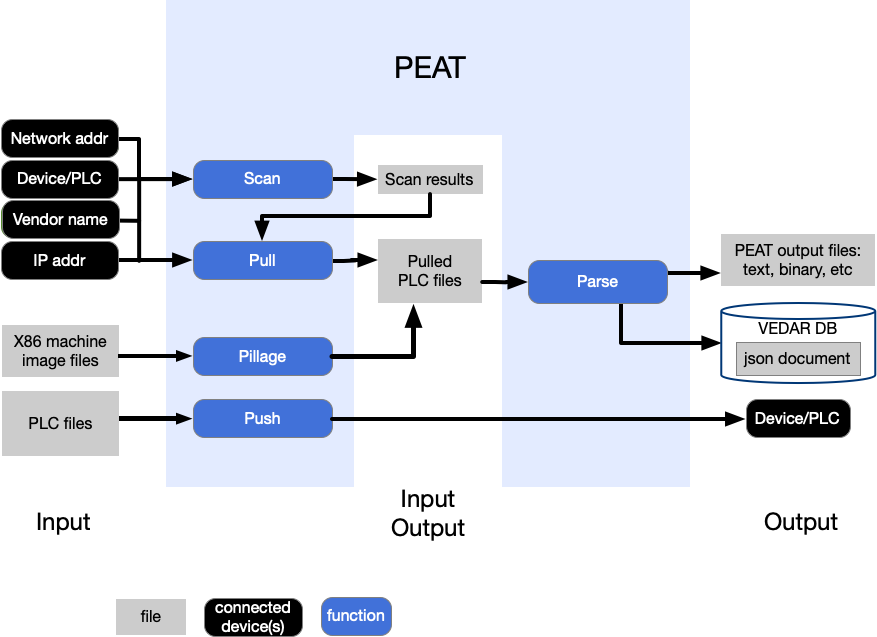
7.4. System Diagram
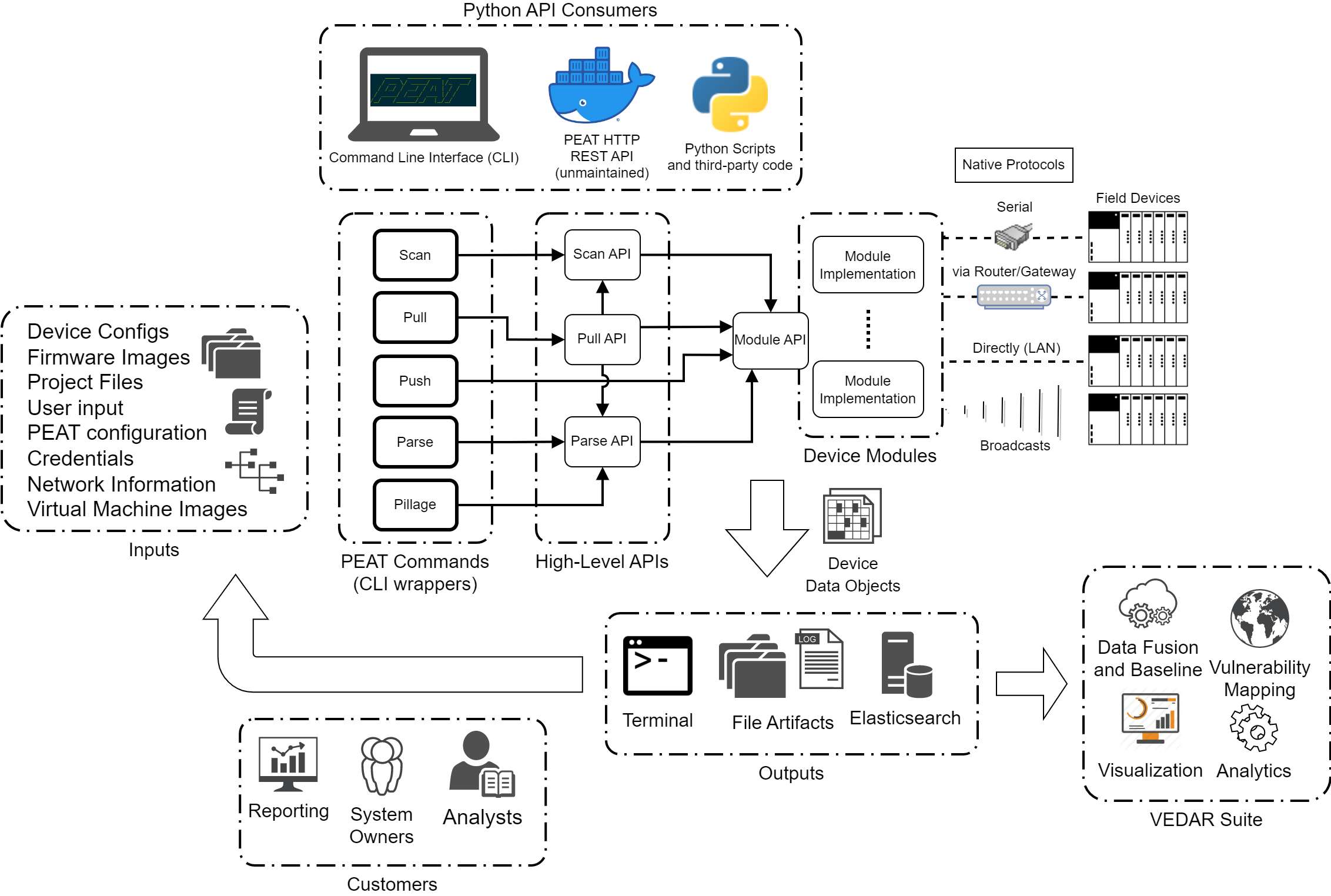
7.5. How scanning and fingerprinting works
This is a high-level descriptive summary of how scanning (aka fingerprinting or verification) works in PEAT. Refer to the code in peat.api.scan_api for the technical details.
7.5.1. Unicast IP scanning
Unicast IP scanning sends packets directly to devices.
Generate target IP list. An ordered list of unique IP addresses is generated from the user-specified targets. This list is sorted from lowest to highest, e.g.
10.0.0.92will be before10.10.0.1.Collect applicable PEAT modules. By default, this is all modules that are currently imported and have a non-empty
ip_methodsattribute. This list is further filtered by the modules specified by the-dcommand line argument.Check what hosts are online
Online checks are multi-threaded, with one thread per host. By default, there is a maximum limit of 260 threads at any one time. The maximum number of threads is configurable by the user (
config.MAX_THREADS).If PEAT is running with
rootor Administrator rights (which enables PEAT to use raw sockets):If PEAT is running as a regular user (NOT with
rootor Administrator rights):Online status will be checked by sending a TCP connect to port 80, and if the device responds, then it’s online. The port used for this check is configuring via
config.SYN_PORT.
Collect identification methods to use. These are stored in the
ip_methodslist attribute in the device module class. Identification methods are instancesIPMethod(a subclass ofIdentifyMethod), with atypeattribute value ofunicast_ip(this indicates it’s for unicast IP scanning, not broadcast). These instances contain a function to use for the fingerprinting (identify_function), the protocol name (protocol), it’s default port (default_port), the method’s reliability (reliability), and a few other pieces of information.There may also be a custom port check method (
port_function) used to check if the port is open. This is for special cases, such as especially sensitive services that are prone to toppling over.The
reliabilityis determined by the author of the method, as a rough indicator of how consistent the method is on producing results, how fast it is, and it’s load on the device. Higher reliability generally means faster response, less load, and more reliable results.
Determine what ports to check. The protocols are extracted from the methods, and configuration options are looked up, enabling users to override the port used for a particular protocol. If not configured, then the
default_portfor each method is used. The ports are collected into a set of unique ports to check. For example, even if there are 5 methods use port 80, the port open check for 80 will only occur once, not 5 times.Check what ports are open, using the set of unique ports from the previous stage.
Port checks are multi-threaded, with one thread per device. By default, there is a maximum limit of 260 threads at any one time. The maximum number of threads is configurable by the user (
config.MAX_THREADS).By default, a TCP full connect is used to check if a port is open. If a custom
port_functionis defined, then it will be used instead.For each host,
dev._is_activeis set to True, and is added to the datastore (Datastore).
Run fingerprinting for each target IP (aka “target host”).
This is NOT multi-threaded, and is done in order from lowest IP to highest IP.
During this step, each method’s
identify_functionis executed.The methods are sorted in order of
reliability.If intensive scanning is enabled (
--intensive-scan,config.INTENSIVE_SCAN):ALL methods are used, regardless of what ports are open.
ALL methods will be checked, even after a successful verification, potentially resulting in multiple successful verifications.
If intensive scanning is NOT enabled:
The process finishes as soon as a method is successful.
For each successful verification, a service is stored in the data model for the host as a
Serviceinstance. If an instance already exists from port scanning, then the existing instance will be updated. The service’sstatusfield will be set toverified.For each host,
dev._is_verifiedis set to True, anddev._moduleis set to the module class that the identify method was associated with.
Generate a summary of the scan. The summary contains:
Metadata, including PEAT version, the run ID, duration, and scan type.
What PEAT modules were used
What hosts were checked (the full list of IPs, as well as original targets the user specified)
What hosts were online (responded to online checks, e.g. ARP/ICMP/TCP check), but NOT verified (fingerprinting failed, peat doesn’t know what they are).
What hosts were verified (fingerprinting was successful)
Export the generated summary of the scan.
If file output is enabled, then it’s saved in JSON format to
peat_results/<run-name>/summaries/scan-summary.json.If terminal results output is enabled, it’s printed to the terminal (this is disabled by default as of July 2024).
If Elasticsearch output is enabled, it’s saved to
peat-scan-summaries-*.
7.5.2. Broadcast scanning
Generate broadcast target list. An ordered list of unique broadcast addresses is generated from the user-specified targets. This list is sorted from lowest to highest.
Collect applicable PEAT modules. By default, this is all modules that are currently imported and have a non-empty
ip_methodsattribute. This list is further filtered by the modules specified by the-dcommand line argument.Collect identification methods to use. These are stored in the
ip_methodslist attribute in the device module class. Identification methods are instancesIPMethod(a subclass ofIdentifyMethod), with atypeattribute value ofbroadcast_ip(this indicates it’s for broadcast IP scanning, not unicast). These instances contain a function to use for the fingerprinting (identify_function), the protocol name (protocol), it’s default port (default_port), the method’s reliability (reliability), and a few other pieces of information.The
reliabilityis determined by the author of the method, as a rough indicator of how consistent the method is on producing results, how fast it is, and it’s load on the device. Higher reliability generally means faster response, less load, and more reliable results.
Run fingerprinting for each broadcast target
During this step, each method’s
identify_functionis executed.The methods are sorted in order of
reliability.Broadcast methods result in a broadcast packet being sent, and then results are waited for. This is handled by the
identify_functionlogic, and not by the scan API.Unlike with
unicast_ipscans, theidentify_functionfor broadcast scans returns a list of hosts that responded. These are then stored in the data model, along with the services.For each host,
dev._is_verifiedanddev._is_activeis set to True,dev._moduleis set to the module class that the identify method was associated with, and the device data object is added to the datastore (Datastore).
Generate a summary of the scan. The summary contains:
Metadata, including PEAT version, the run ID, duration, and scan type.
What PEAT modules were used
What broadcast IPs were checked (the full list of broadcast IPs, as well as original targets the user specified)
What hosts were verified (hosts that responded to the broadcast packet and fingerprinting was successful)
Export the generated summary of the scan.
If file output is enabled, then it’s saved in JSON format to
peat_results/<run-name>/summaries/scan-summary.json.If terminal results output is enabled, it’s printed to the terminal (this is disabled by default as of July 2024).
If Elasticsearch output is enabled, it’s saved to
peat-scan-summaries-*.
7.5.3. Serial port scanning
Note: currently, only RS-232 is supported for serial (as of June 2024).
Generate target serial port list. An ordered list of unique serial ports is generated from the user-specified targets, sorted by name.
On Windows, these are usually named
COM*.On Linux, these are usually named
/dev/ttyS*or/dev/ttyUSB*(for USB to RS-232 adapters).
Collect applicable PEAT modules. By default, this is all modules that are currently imported and have a non-empty
serial_methodsattribute. This list is further filtered by the modules specified by the-dcommand line argument.Collect identification methods to use. These are stored in
serial_methodsattribute in the device module class. These methods are instances ofSerialMethod(a subclass ofIdentifyMethod). These instances have to a function to use for the fingerprinting (identify_function), the method’s reliability (reliability), and a few other pieces of information.Run fingerprinting for each serial port (aka verification or identification).
Serial fingerprinting is multi-threaded, with one thread per serial port. By default, there is a maximum limit of 260 threads at any one time. The maximum number of threads is configurable by the user (
config.MAX_THREADS).Methods are executed in order of
reliability, highest to lowest.During this step, the
identify_functionis executed from theSerialMethodinstance.The
reliabilityis determined by the author of the method, as a rough indicator of how consistent the method is on producing results, how fast it is, and it’s load on the device. Higher reliability generally means faster response, less load, and more reliable results.Note that the state of the serial port is NOT checked before starting fingerprinting. This can result in long scan times if there are a lot of serial ports that aren’t connected to anything. There is a TODO to implement this checking, to speed up the process and improve reliability. If this is something that’s useful to you, please reach out and we can implement it.
For each host,
dev._is_verifiedanddev._is_activeis set to True, anddev._moduleis set to the module class that the identify method was associated with, and the device data object is added to the datastore (Datastore).
Generate a summary of the scan. The summary contains:
Metadata, including PEAT version, the run ID, duration, and scan type.
What PEAT modules were used
What serial ports were checked (the full list of serial ports, as well as original targets the user specified)
What serial ports were verified (fingerprinting was successful)
Export the generated summary of the scan.
If file output is enabled, then it’s saved in JSON format to
peat_results/<run-name>/summaries/scan-summary.json.If terminal results output is enabled, it’s printed to the terminal (this is disabled by default as of July 2024).
If Elasticsearch output is enabled, it’s saved to
peat-scan-summaries-*.
7.6. Distributions
PEAT is a cross-platform Python program that is packaged and distributed in multiple formats to support a variety of platforms.
These formats include:
Linux executable (
peat)Windows executable (
peat.exe)Docker container
Python package
The high-level goals of the distribution formats are the following:
Ease of use: PEAT should be able to run anywhere it’s needed with minimal fuss (e.g., copy a binary file onto the system and run it)
Compatibility: PEAT should be able to run on platforms that are relevant to PEAT’s use cases, are commonly used by our customers, or are used in deployments.
Portability: PEAT should be a reasonable size and easy to get onto a system
PEAT supports certain common Linux distributions as well as Windows, and all of the platforms supported have seen some or extensive PEAT use at one point or another.
RHEL: used in certain deployments
Ubuntu: Commonly used Linux distro heavily used by PEAT developers
Kali: relevant for exercises and sensors in emulated environments
Windows: common in real-world environments. If you drop into a ICS network and want to run PEAT against the devices on that network, there is probably a Windows machine somewhere on the network that has direct connections to the devices (e.g., a Engineering Workstation). Pop PEAT onto a flash drive or via a file transfer/data diode/email, then run that bad boy and get some data. Avoids many, many issues with trying to get a Linux system on the network.
OSX: partial compatibility with OSX is maintained on a best-effort basis to support PEAT developers who use Macs.