Users may contribute to the Rattlesnake project by cloning or forking the Rattlesnake repository.
Only authorized collaborators can push directly to the Rattlesnake repository. Because the project is open source, all other contributors work from their own copy, made by forking the repository.
Cloning
Cloning is a Git action.
It creates a copy of a repository on your physical computer.
It allows you to edit files and run code locally. Collaborators “clone” the original repository directly because they have permission to “push” (save) their changes directly back to the main project.
External contributors usually “clone” their own fork.
Forking
Forking is a GitHub action.
It creates a personal copy of the entire project on your own GitHub account.
It acts as a bridge for external contributors. You can make any changes you want to your fork without affecting the original project. When you are ready to share those changes, you submit a Pull Request to the original repository.
Getting the Source Code
Collaborators and team members should clone the repository:
git clone git@github.com:sandialabs/rattlesnake-vibration-controller.gitOthers should first fork the repository to their own GitHub account. Once forked, you can then clone your personal version of the repo to work on it locally.
Installation
A virtual environment is highly recommended. This ensures project dependencies do not conflict with the system-wide Python installation.
Two approaches are documented below:
the traditional
venv+pipworkflow, anduv, a faster, modern alternative that every other command in this document (testing, linting, formatting) assumes is installed. New contributors are encouraged to useuvand we present that first.
Using uv (Recommended)
uv is a fast, modern Python package and project manager, written in Rust. It replaces pip, venv, and several other tools with a single command-line interface.
Compared to pip and venv, uv:
Is significantly faster at resolving and installing dependencies, thanks to a Rust-based resolver and aggressive caching.
Manages the virtual environment for you. Commands like
uv runanduv synccreate and use a.venvautomatically, so there is no separate activate/deactivate step.Uses a lockfile (
uv.lock) to guarantee that everyone — and CI — installs the exact same dependency versions, which plainpipdoes not do without extra tooling.Can install and manage Python itself, so a separate Python version manager is not required.
Installing uv
Follow the official installation guide for your platform, or use one of the quick install commands:
# macOS / Linux
curl -LsSf https://astral.sh/uv/install.sh | sh
# Windows (PowerShell)
powershell -ExecutionPolicy ByPass -c "irm https://astral.sh/uv/install.ps1 | iex"Setting Up the Environment
From the repository root:
uv sync --all-extras --devThis creates a .venv automatically (if one does not already exist), installs Rattlesnake in editable mode, installs all [dev] dependencies, and pins everything to the versions recorded in uv.lock.
To run a command inside that environment without manually activating it, prefix it with uv run, e.g.:
uv run python -c "import rattlesnake; print(rattlesnake.__file__)"This uv run <command> pattern is used throughout the rest of this document.
Using venv and pip (if uv is not an option)
Create a new virtual environment folder within your project directory. It is conventional to name this folder .venv.
# macOS / Linux / Windows
python3 -m venv .venv
Activate the environment to tell your shell to use the Python interpreter and pip packages located inside the .venv folder using the command appropriate to your system:
source .venv/bin/activate   # macOS / Linux
.venv\Scripts\Activate.ps1  # Windows (PowerShell)
.venv\Scripts\activate.bat  # Windows (Command Prompt)
Once activated, your terminal prompt will typically show (.venv). You can now install dependencies safely.
# Install Rattlesnake in editable mode, with its development dependencies
pip install -e ".[dev]"

# Additional packages can be installed on an as-needed basis.  For example, to install
# the "requests" package
pip install requests
Confirm that your shell is pointing to the correct Python binary.
# macOS / Linux
which python

# Windows
where python
The output should point to a path inside your project’s .venv folder.
To exit the virtual environment and return to the global system stack:
deactivateBest Practice: Never commit the
.venvdirectory to version control. Add.venv/to your.gitignorefile.
Development
Before pushing changes, contributors should check code quality locally rather than relying solely on CI to catch problems. This means running the test suite (pytest), linting (pylint), format checking (ruff), code coverage, and confirming that the Jupyter Book documentation still builds — all on your own machine. Catching issues locally is faster than waiting on a CI run, and it keeps the CI pipeline green for everyone else.
Test
Rattlesnake uses pytest for its test suite. Tests are split into groups based on how long they take to run:
tests/
tests/short/
tests/long/
tests/long contains slower, heavier tests (e.g., full qualification runs), while tests/short and the top-level tests/ files run quickly and are meant to give fast feedback during development.
To run the full test suite locally with uv:
uv run pytest tests/To run only the fast tests, matching CI’s default scope:
uv run pytest tests/shortTo run a single test file, e.g.,
uv run pytest tests/short/test_environment_manager.pyTo also collect a coverage report for the entire repository while testing:
uv run pytest tests/ --cov=rattlesnake --cov-report=term-missingTo collect a coverage report for a single test file, e.g.,
uv run pytest tests/short/test_environment_manager.py --cov=rattlesnake.environment_manager --cov-report=term-missingLint
Rattlesnake uses pylint for static code analysis and ruff for code formatting. Both tools are configured to work together with uv to catch issues early and maintain consistent code quality.
Pylint
To lint the source code locally, use uv to run pylint:
# Lint a specific file, e.g.,
uv run pylint src/rattlesnake/utilities.py

# Lint the entire source directory
uv run pylint src/rattlesnake

# Lint and show only line-too-long warnings
uv run pylint src/rattlesnake --disable=all --enable=line-too-long
Ruff Format
# Auto-format a specific file, e.g.,
uv run ruff format src/rattlesnake/utilities.py

# Auto-format the entire source directory
uv run ruff format src/rattlesnake/
Checking Formatting Without Modifying Files
Before pushing, you can check whether any files are out of compliance with the project’s formatting rules without actually rewriting them by adding the --check flag:
uv run ruff format --check src/rattlesnakeThis is the same command the lint job in ci.yml runs on every push that changes code, and on every push to main or dev. It is intentionally non-blocking in CI — a formatting drift surfaces as a warning annotation on the workflow run rather than failing the job, so it will not block a merge. If it reports files that need formatting, run uv run ruff format src/rattlesnake locally (as shown above) to fix them before committing.
Documentation
The online documentation is made with Jupyter Book. Start from the
rattlesnake-vibration-controller/documentationfolder.
Generated User Interface Pages
Seventeen pages under book/src/_generated document the Rattlesnake user interface. The script documentation/generate_ui_documentation.py writes them. It opens each environment’s user interface, walks its widget tree, screenshots every widget, and produces one Markdown page per interface along with the figures that page references.
These pages are not checked into the repository. documentation/.gitignore excludes book/src/_generated/**. The docs_ui_generate job in .github/workflows/ci.yml regenerates them on every documentation build. Its Generate UI documentation step runs the script. Do not update the book/src/_generated/** files.
Hand-written chapters cross-reference the generated figures. environment_mimo_random.md links to fig:random_vibration_definition:cpsd_parameters_groupbox, for example. A working tree without the generated pages therefore fails a book build twice over: seventeen table of contents entries do not resolve, and the cross-references from the hand-written chapters do not resolve either.
Generate the pages locally by running this from the repository root:
uv run python documentation/generate_ui_documentation.pyThe script opens real Qt windows and screenshots them, so it needs a desktop session rather than a headless one. It also takes a while, roughly half an hour on the CI Windows runner. Run it once. The output then persists in your working tree, and you can rebuild the book as often as you like without regenerating the screenshots.
Local Build
Within the documentation folder, the myst.yml file specifies how Jupyter Book should build the documentation. Importantly, it links to Markdown files that contain the book’s content.
Generate the user interface pages first, as described in Generated User Interface Pages. A fresh clone does not contain them, and the build fails without them.
jupyter book build --html --strictThis will build the Jupyter Book documentation.
The output will be similar to:
building myst-cli session with API URL: https://api.mystmd.org
(node:93011) Warning: `--localstorage-file` was provided without a valid path
(Use `node --trace-warnings ...` to show where the warning was created)
🌎 Building Jupyter Book (via myst) site
📖 Built book/src/_generated/random_vibration_run_doc.md in 64 ms.
📖 Built book/src/introduction.md in 124 ms.
📖 Built book/src/notation.md in 117 ms.
📖 Built book/src/contributing.md in 117 ms.
<--(snip)-->
📚 Built 32 pages for project in 813 ms.
To view the Jupyter Book output locally:
jupyter book startThe output will be similar to:
📚 Built 32 pages for project in 974 ms.
<--(snip)-->
🔌 Server started on port 3000!  🥳 🎉

        👉  http://localhost:3000  👈
In a local web browser, navigate to the web address indicated above.
Bibliography
The documentation uses MyST’s built-in bibliography support.
Prepare your bibliography file:
References are stored in documentation/book/bibliography.bib using the standard BibLaTeX (.bib) format. Populate the file with references, e.g.,
@book{knuth1986computer,
  title={The Computer Science of TeX and Metafont: An Inaugural Lecture},
  author={Knuth, Donald E},
  year={1986},
  publisher={American Mathematical Society}
}
Configure
myst.yml
The bibliography is configured in documentation/myst.yml under the project.bibliography section:
project:
  bibliography:
    - book/bibliography.bib
Add in-text citations
In a markdown file, use the cite role to reference an entry by its key:
{cite} knuth1986computer
Build the book
Run the jupyter book build command from the documentation directory. The build system will automatically process the citations and generate the bibliography.
cd documentation
jupyter book build
Large Data Files
Rattlesnake downloads its large example data files on demand. The files stay in the repository under version control. They are left out of the wheel and sdist that we publish to PyPI. The rattlesnake.data module fetches each file the first time code needs it. The module uses the Pooch library. This section explains the reasons for this design and how it works. It also lists the safeguards we verified. Issue #139 records the original discussion.
Motivation
The repository holds 39 example data files under src/rattlesnake/examples: 23 .nc4 (20.2 MB), 13 .npz (12.9 MB), and 3 .npy (14.5 MB).
Together they take 47.6 MB on disk. We want to keep them in the repository. Tests, examples, and the documentation use them, and Git records every change to them.
We do not want them in the published distribution. Every release uploads a new wheel and sdist to PyPI, and PyPI keeps every past release. Release 4.0.0rc3 shipped 41 data files. Two of them were run outputs that the repository no longer tracks. The 41 files took 19.9 MB of its 20.9 MB wheel, or 96%. The other 244 files in that wheel took 1.0 MB. Each new release would add another 20 MB copy of unchanged data.
Alternatives considered
Table 1:Alternatives considered for large data files.
| Approach | Decision |
|---|---|
| Keep shipping the files in the wheel | Rejected. Every release adds about 20 MB to PyPI. |
| Download at install time | Not possible. pip runs no package code when it installs a wheel. A build hook could download files during an sdist install. We rejected that, because a build should not depend on the network, and many build environments block it. |
Separate data package, installed as an extra (pip install "rattlesnake-vibration-controller[examples]") | Rejected. It needs a second PyPI project, a second Trusted Publisher entry, and a second publish job in release.yml. Our version comes from the git tag through hatch-vcs, so pinning the data package to the main package’s version needs extra build code. Both wheels would also write into the same rattlesnake/ directory. |
Archive on a GitHub release, plus a download-data command | Rejected for now. Users must remember to run an extra command before the examples work. A single archive suits datasets too large to fetch file by file. Our largest file is 7.7 MB (frame_wing/data/sdynpy_fem_shapes.npy). |
| Git LFS | Rejected. A raw GitHub URL for an LFS file returns a small pointer file, not the data. The development team has also had experiences with LFS acting unreliably. |
| Write our own downloader | Rejected. It would need hash checks, retries, atomic writes, and a cache directory on each operating system. Pooch already provides all four, and SciPy and scikit-image rely on it. |
| Download on demand with Pooch | Chosen. |
Pooch adds two packages to an install, pooch and platformdirs. Pooch’s other dependencies, requests and packaging, are already Rattlesnake dependencies. Both new packages are pure Python.
Who else uses Pooch
Fatiando a Terra maintains Pooch. The Pooch README lists 40 projects that use it:
Core scientific Python (4): SciPy, scikit-image, xarray, and napari
Earth sciences and geospatial analysis (17):
Neuroscience and biology (8): MNE-Python, MOABB, Brainrender, cellfinder, histolab, Scirpy, scXpand, and BioCypher
Electron microscopy (4): HyperSpy, RosettaSciIO, eXSpy, and pyxem
Visualization and images (4): PyVista, GeoViews, seaborn-image, and rembg
As an illustrative example, scikit-image adopted Pooch in PR #3945, merged in March 2020. That PR moved its test data and new datasets onto Pooch and kept 7 MB of legacy data in the wheel. The PR author measured the wheel at 41 MB before the change and 27 MB after it.
How rattlesnake.data.fetch works
Code asks for a file by its path relative to src/rattlesnake/examples:
from rattlesnake import data

path = data.fetch(name="hardware/data/sdynpy_system.npz")
data.fetch returns the local path of a file whose SHA-256 hash matches the registry. It looks in three places, in order:
The package tree. A git checkout still contains every data file. If the file is there and its hash matches,
fetchreturns it with no network access. Developers and CI therefore never download anything.The local cache. Pooch returns a cached copy if its hash matches.
GitHub. Pooch downloads the file, checks its hash, and saves it to the cache.
The download URL depends on the installed version:
Table 2:Git ref that each kind of Rattlesnake version downloads from.
| Version | Example | Downloads from |
|---|---|---|
No .dev segment, a release built at its tag | 4.0.0rc4 | The git tag v4.0.0rc4 |
Has a .dev segment, every other build | 4.0.0rc4.dev2 | The commit the build came from, such as f998f9ac20a5031b3e2e4a3360db9514694b13ff |
hatch-vcs adds the .dev segment to any build made from a commit after the latest tag. That covers pip install . on any branch, including main, dev, and feature branches. A release tag that has its own .dev segment, such as v4.1.0.dev1, also downloads from its commit.
Downloads come from a branch only as the fallback described in the next paragraph. A branch moves, so its files can stop matching the registry of an older build. A tag or a commit names fixed file contents. An old install therefore keeps receiving the data that matches its own code.
hatch_build.py at the repository root records the commit. This Hatch build hook runs git rev-parse HEAD during every build. It writes the full SHA to src/rattlesnake/_commit.py, which .gitignore lists. The sdist carries that file, so a wheel built from the sdist records the same SHA. A build with no recorded commit falls back to the dev branch.
src/rattlesnake/data/_registry.py maps each file name to its SHA-256 hash. The registry pins each Rattlesnake version to specific file contents, not just to file names. A changed data file gets a new hash. Older versions of Rattlesnake keep their own registry and their own tag, so they still fetch the old file. A tag ruleset stops anyone from deleting or moving a release tag. See Release Tag Protection.
Downloads go to a per-ref directory in the user cache, or to the directory named by the RATTLESNAKE_DATADIR environment variable. The user-facing section Section 2.3 lists the cache directory for each operating system and explains how to work offline. The command rattlesnake-data --all puts every registered file in that directory in one step. pyproject.toml maps the command to main in src/rattlesnake/data/__main__.py, so python -m rattlesnake.data --all runs the same code. See Section 2.3.3.
Safeguards
We checked each safeguard below on macOS, with Pooch 1.9.0, in a clean virtual environment. Most rows used a locally built wheel that excluded all three file types. At the time, the registry held 41 entries. Two of them were run outputs, which we later removed from the registry. The two rows about the download source describe their own setups.
Table 3:Download safeguards and how each was verified.
| Safeguard | What happens | What we verified |
|---|---|---|
| Files are not in the distribution | The exclude globs in pyproject.toml drop every .nc4, .npz, and .npy file under examples/. | The wheel and sdist contain 0 of the 41 data files. |
| Download on first use | fetch downloads a file only when code asks for it. Importing an example module downloads nothing. | The first pass over all 41 names downloaded 40 files in 59.7 s. The 41st file was already cached from an earlier test. |
| Hash check on download | Pooch computes the SHA-256 of each download and compares it with the registry. | All 41 downloaded files matched the registry. |
| Cache reuse | A second fetch returns the cached file without contacting GitHub. | The second pass over all 41 names took 0.1 s and downloaded nothing. |
| Corrupt cache repair | Pooch hashes the cached file before it returns it. On a mismatch it downloads a fresh copy. | We overwrote a cached file with junk. The next fetch downloaded the original file again, and its hash matched. |
| Wrong hash rejected | Pooch retries a download whose hash does not match. After the last attempt it raises ValueError. | We replaced a registry hash with 64 zeros. Pooch made four download attempts, then raised ValueError: SHA256 hash of downloaded file (srs_specification.npz) does not match the known hash. |
| Retries | fetch sets retry_if_failed=3. Pooch makes 1 + 3 = 4 attempts. It waits 1 s, 2 s, then 3 s between them. | We counted four calls to Pooch’s HTTP downloader in the wrong-hash test. |
| Download from the release tag | A tagged release downloads from its own git tag. | We installed 4.0.0rc4 from TestPyPI into a clean virtual environment. fetch downloaded frame_wing/data/transient_specification.npz from the v4.0.0rc4 tag in 3.9 s, into ~/Library/Caches/rattlesnake/v4.0.0rc4. Its hash matched, and a second fetch took 0.01 s. |
| Download from the build’s commit | A development build downloads from the commit it was built from. | We built a wheel and an sdist with uv build at commit 6c7224ca, version 4.0.0rc5.dev5. Both recorded the full SHA, and so did a second wheel built from the sdist. In a clean virtual environment, fetch downloaded environment/time/time_signal.npy from raw/6c7224ca3fdb489fad2b3f53637634a0cf5906f2/ in 1.5 s. Its hash matched. |
| Atomic writes | Pooch downloads to a temporary file in the cache directory. It moves the file into place only after the hash matches. | After the failed wrong-hash test, the good cached file was unchanged. |
Distribution size
Table 4:Data files and archive sizes of 4.0.0rc3 and 4.0.0rc4.
| Release | Data files in package | Wheel | sdist |
|---|---|---|---|
| 4.0.0rc3 (TestPyPI) | 41 | 20,907,340 bytes | 20,964,518 bytes |
| 4.0.0rc4 (TestPyPI) | 0 | 972,909 bytes | 895,879 bytes |
The 4.0.0rc4 wheel is 95.3% smaller than the 4.0.0rc3 wheel. The 4.0.0rc4 sdist is 95.7% smaller than the 4.0.0rc3 sdist. The 4.0.0rc4 registry lists 39 data files (41 original files less the two output files that were removed), none of which ship in either archive.
Managing data files
The registry lists every file that git tracks under src/rattlesnake/examples and whose suffix the exclude list in pyproject.toml names, currently .nc4, .npz, and .npy. An untracked file, such as a run output, never enters the registry. A file with any other suffix, such as .xlsx, ships in the wheel and the sdist and stays out of the registry. To fetch a new file type, add a glob for its suffix, such as "/src/rattlesnake/examples/**/*.xlsx", to the exclude list under [tool.hatch.build] in pyproject.toml. Then follow the steps for every change below. The regenerated registry picks up the new files.
pyproject.toml is the single source of truth for the suffixes. Hatchling reads exclude as static TOML when it builds the wheel and the sdist. It cannot import the list from Python code. A build hook such as hatch_build.py can add files to an archive, but hatchling gives a hook no way to remove them. So the list lives in pyproject.toml, and registry.py reads it from there.
The list sits in [tool.hatch.build], not under a single build target, because hatchling applies a top-level option to every target. One list covers both the wheel and the sdist.
suffixes_read also rejects a glob that is not /src/rattlesnake/examples/**/* followed by a single suffix, such as .nc4. suffixes_read could not tell which files such a glob excludes. The same two safeguards then catch the mistake.
Steps for every change
Each change below ends with these three steps:
Regenerate the registry from the repository root:
uv run python -m rattlesnake.data.registryTo check the registry without writing it, add
--check:uv run python -m rattlesnake.data.registry --checkWhen the registry matches the files on disk, the command exits with status 0 and prints:
<repository>/src/rattlesnake/data/_registry.py is up to dateWhen the registry is stale, the command exits with status 1. It prints one line per difference, then the command that fixes it. For example, this output shows a checkout where
environment/data/time_signal.npyis on disk but missing from the registry:missing environment/data/time_signal.npy <repository>/src/rattlesnake/data/_registry.py is stale. Run: python -m rattlesnake.data.registryEach difference line starts with one of three words:
missing: a file on disk that the registry does not list.stale: a registry entry whose file is gone.changed: a file whose hash no longer matches its registry entry.
The command exits with status 2 when the examples directory or
pyproject.tomlis missing, or whensuffixes_readrejects theexcludelist.Commit the
_registry.pyand data files together.Push the commit. A non-editable build can download a file only from a commit already on GitHub.
Add a file
Put the file under
src/rattlesnake/examples.Stage the file with
git add. The registry lists only files that git tracks, so the next step would skip an unstaged file.Read the file through
data.fetch(name=...). The name is the path relative tosrc/rattlesnake/examples. Do not build the path fromdefaults.DIRECTORY. A path built fromdefaults.DIRECTORYpoints into the installed package, and the published package does not contain the file. Usedata.fetchonly for a file that Rattlesnake reads, never for a path that Rattlesnake writes, such as the destination of aSAVE_CONTROL_DATAprofile event. Rattlesnake would overwrite the cached copy, and its hash would no longer match.Call
data.fetchinside the function that needs the file, not at module level. A module-level call downloads the file whenever someone imports the module.Follow the steps for every change.
Change a file
Replace the file in place, under the same name.
Follow the steps for every change.
Older releases keep downloading the old version from their own tag. Changing a file never breaks them.
Git keeps every version of a binary file in the repository history. Every clone downloads all of those versions. Commit a new version of a large file only when its contents matter, and avoid a series of small edits.
Rename or move a file
Move the file with
git mv.Update every
data.fetch(name=...)call that uses the old name.grep -rn "<old name>" srcfinds them.Follow the steps for every change.
--checkreports the old name asstaleand the new name asmissinguntil you regenerate the registry.
Older releases keep downloading the old name from their own tag. The repository needs no alias for the old name.
Delete a file
Remove the file with
git rm.Remove or replace every
data.fetch(name=...)call that uses its name.Follow the steps for every change.
Older releases keep downloading the file from their own tag.
Tests that catch a missed step
Four tests catch a missed step in CI:
test_registry_matches_repository_fileintests/short/test_data.pyguards against the case where someone edits a data file and forgets to regenerate the registry. Without the test, CI would stay green, and the release would ship the old hash. Every user’sfetchwould then fail with aValueErrorafter four attempts. This test prevents that scenario.test_registry_file_exists_in_checkoutintests/short/test_data.pyfails when someone renames or deletes a registered file and forgets to regenerate the registry.test_committed_registry_matches_files_on_diskintests/short/test_registry.pyfails when someone stages a data file withgit addand forgets to regenerate the registry. The wheel leaves the file out, and the registry does not list it, so the file would ship nowhere.test_fetch_names_are_registeredintests/short/test_data.pyfails when adata.fetchcall uses a name that the registry lacks. After a rename or delete, a missed call site would otherwise fail only when its example runs, with aKeyError.
Continuous Integration/Continuous Deployment (CI/CD)
The CI/CD pipeline comprises two GitHub Actions workflows, ci.yml and release.yml, described in detail below.
Synopsis
ci.yml — Continuous Integration
Triggered by:
A push to any branch
A pull request targeting
main/devManual
workflow_dispatchExample: re-running CI on demand from the GitHub Actions UI, such as forcing the full
pytest_matrixviatest_level=fullon a branch that wouldn’t otherwise trigger it.
workflow_callExample:
release.ymlinvokesci.ymlas itstestjob through theworkflow_callmechanism.
Seven jobs, five of which share a gate:
pytest_matrix,lint,coverage— run whencode_changed == 'true'or the branch (or PR base branch) ismain/dev.docs_ui_generate,docs_jupyter_book— run whendocs_changed == 'true'or the branch (or PR base branch) ismain/dev.docs_ui_generateproduces the pages underbook/src/_generated.docs_jupyter_bookconsumes them.docs_jupyter_bookdeclaresneeds: docs_ui_generate, so it waits for the producing job to finish before it builds the book.deploy— runs onmain/devregardless of whethercode_changedistrueorfalse, and regardless of whetherdocs_changedistrueorfalse.
changes
Uses dorny/paths-filter to detect whether docs and/or code files changed. Sets the job outputs
docs_changedandcode_changed(eachtrue/false), which downstream jobs use to streamline the CI process by skipping unnecessary jobs.
pytest_matrix
Runs tests after
pip install .[dev]. PyQt wheel compatibility requires use ofpipinstead ofuv.The operating systems, Python versions, and test scope depend on the branch. See Matrix scope.
lint
Runs
uv run ruff format --check src/rattlesnakefirst. This step is non-blocking — a formatting drift surfaces as a::warning::annotation on the workflow run instead of failing the job, so it never turns the workflow red.Then runs
pylint src/rattlesnakeviauv, captures output, then callsreport_lint.pyto generate an HTML lint report artifact.Both checks share one job (checkout +
uv sync) instead of running in separate jobs, saving a redundant environment setup per workflow run.
coverage
Runs
pytest --covviauvwith the same adaptive test scope, then callsreport_coverage.pyto generate an HTML coverage report artifact.
docs_ui_generate
Runs on
windows-latest. Executesdocumentation/generate_ui_documentation.py, which opens each environment’s user interface, screenshots its widgets, and writes the seventeen pages and their figures intodocumentation/book/src/_generated.Uploads that folder as the
ui-generated-docsartifact. The upload usesif-no-files-found: error, so an empty generation fails here rather than silently breaking the book downstream.This job is why
book/src/_generatedis not checked into the repository. See Generated User Interface Pages.The job takes roughly half an hour, so the docs gate matters here more than anywhere else.
docs_jupyter_book
Downloads the
ui-generated-docsartifact intodocumentation/book/src/_generated, updatesmyst.ymlmetadata viareport_jupyter_book.py, validates the table of contents viatoc.py, then builds the Jupyter Book.The table of contents check and the scan of the build log for MyST’s
⛔️error marker both exist because--strictalone does not fail the job on every error. The--strictwarning under Local Build explains the gap.
deploy
Assembles all artifacts into a
pages/tree, generates the dashboard (report_dashboard.py), creates SVG badges, then clones thegh-pagesbranch, replaces only the current branch’s subdirectory (main/ordev/), and pushes the result back with plaingit(notpeaceiris/actions-gh-pagesoractions/deploy-pages— see the comments inci.ymlfor why both were rejected).
release.yml — Release Pipeline
Triggered by a v* tag push, but never a branch push (not even a branch push to main or dev). Once triggered, two conditions (both checked in validate_tag) decide where, if anywhere, the release publishes to:
Branch: the tag must be reachable from
mainordev. A tag on any branch that is notmain/devfails thevalidate_tagjob; a failedvalidate_tagjob prevents any releases to TestPyPI or PyPI.Version string: a prerelease version (
a/b/rc/.devsegments) publishes to TestPyPI; a stable or.postversion publishes to PyPI.The
mainbranch can publish to either TestPyPI or PyPI.The
devbranch can publish to either TestPyPI or PyPI.
Six sequential jobs:
validate_tag
Verifies the tag was created on the
mainordevbranch, that it conforms to PEP 440, and that it is strictly newer than all existing tags.Computes an
is_prereleasejob output usingpackaging.version.Version(...).is_prerelease. This is the single source of truth consumed by every downstream job that needs to distinguish a prerelease from a production release — nothing downstream re-derives it with its own tag matching.
test
Calls
ci.ymlas a reusable workflow (workflow_call).
build
Runs
uv buildand generates a Supply chain Levels for Software Artifacts (SLSA, aka “salsa”) provenance attestation for the dist artifacts.
github-release
Creates a GitHub Release with auto-generated notes and attaches the
distfiles.prerelease:is set directly fromvalidate_tag’sis_prereleaseoutput.
publish_testpypi / publish_pypi
Two separate jobs, mutually exclusive via
if: needs.validate_tag.outputs.is_prerelease == 'true'/'false'.Each has a hardcoded
environment:(testpypi/pypi) and hardcoded publish target — no ternary expression to read or evaluate.In the Actions UI this shows as one job succeeding and the other skipped, so which registry a run published to is visible at a glance from the job list alone, and each job’s last step also writes an explicit one-line status (e.g., “📦 Published
v1.2.3to production PyPI”) to the run’s Summary tab.
Splitting into two jobs (rather than two steps in one job) is required because GitHub Actions environments (including the
pypienvironment’s required-reviewers approval gate) are configured per-job, not per-step.
Efficiency
When a user pushes to the repository, the changes job in the main workflow
determines the types of the files that were committed. The job determines
if only docs (documentation) files changed, only code (source code, project code)
files changed, or both.
Updates to docs only
For example, upon pushing updates only to a markdown file (i.e., *.md),
the job makes this determination:
📂 Docs changed: true
📂 Docs files: documentation/book/src/contributing.md
💻 Code changed: false
💻 Code files:
In this scenario, only jobs that rely on updates to documentation file types are run. This avoids running unnecessary tests that don’t rely on documentation updates.
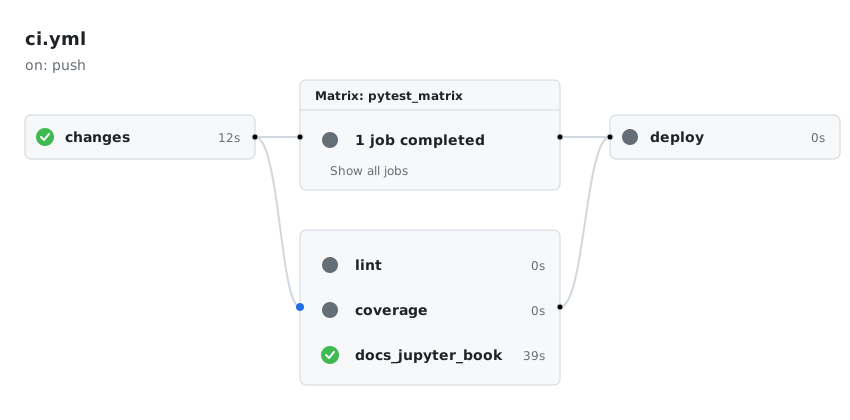
Figure 1:CI/CD workflow execution for documentation-only changes.
Updates to code only
For example, upon pushing updates to source code (e.g., *.py),
the job makes this determination:
📂 Docs changed: false
📂 Docs files:
💻 Code changed: true
💻 Code files: src/rattlesnake/cicd/report_dashboard.py src/rattlesnake/cicd/report_jupyter_book.py src/rattlesnake/cicd/report_lint.py tests/test_cicd_utilities.py
Only the pytest_matrix, lint, and coverage jobs will be run. The docs_ui_generate, docs_jupyter_book, and deploy jobs will be skipped.
All tests
Regardless of the file type, if either the main or the dev branch is the target
of an update, all tests are run, for example,
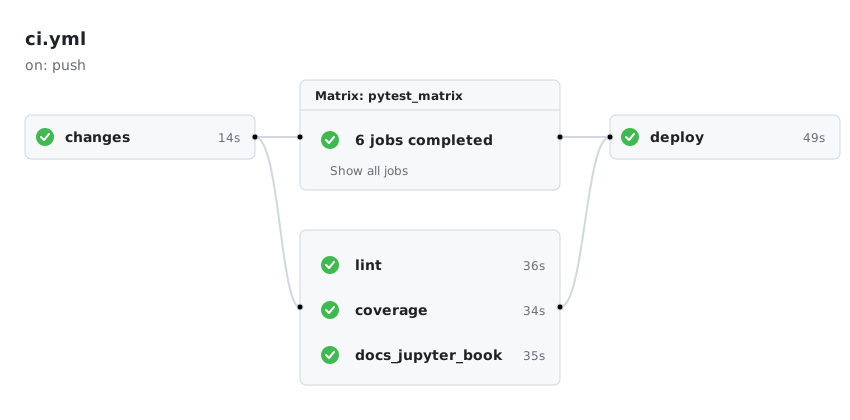
Figure 2:Full suite of CI/CD jobs triggered for main or dev branch updates.
Running the full suite is significantly more time-consuming than executing only the specific tests relevant to the modified files.
Matrix scope
The pytest_matrix job runs across combinations of operating systems and Python versions. The pytest_matrix and coverage jobs also choose which tests to run. Both scale up together in full mode, which applies to any of these:
a push to
mainordeva pull request targeting
mainordeva manual dispatch with
test_level=full[all tests]in the commit message or the pull request title
Table 5:Test modes in continuous integration.
| Mode | Runners | Tests |
|---|---|---|
| Fast, every other push | ubuntu-latest × 3.12 (1 runner) | tests/short |
| Full | macos-latest, ubuntu-latest, and windows-latest × 3.11 and 3.12 (6 runners) | tests, including tests/long |
Fast mode keeps per-push feedback fast. Full mode enforces cross-platform coverage before anything reaches a release branch.
This means OS-specific or Python-version-specific bugs are caught on main/dev before a release, without slowing down every feature branch push.
Preflight
The preflight command is a local CI/CD readiness check. It mirrors the checks that GitHub Actions would run on a push, allowing developers to catch errors before they reach the pipeline.
uv run preflightThis command largely automates the manual steps listed above in the Development section.
Modes and options
By default, preflight matches CI’s scope on non-main/dev branches: ruff format check and full pylint on src/rattlesnake/. When pytest is re-enabled, the default scope will also run tests/ --ignore=tests/long; use --all-tests to include tests/long/ (matching CI on main/dev).
Table 6:Options of the preflight command.
| option | description |
|---|---|
| (none) | Default scope: ruff format check + pylint (+ pytest tests/ --ignore=tests/long when re-enabled) |
--all-tests | Full suite including tests/long/; matches CI on main/dev |
--coverage | Adds --cov=rattlesnake --cov-report=term-missing to the pytest run (no effect while pytest is disabled) |
--tag TAG | Validates TAG before pushing a release: checks current branch is main or dev, that the tag conforms to PEP 440, and that it is strictly newer than all existing tags. Runs before lint and tests. |
--docs | Validates the table of contents, then builds the Jupyter Book with --strict and scans the log for errors --strict ignores; matches the docs_jupyter_book CI job. Requires network access to api.mystmd.org. |
--no-sync | Skips uv sync (useful when offline or behind a firewall) |
--skip-network-check | Skips the initial PyPI connectivity check |
--force | Continues even if the network or sync checks fail |
Examples
uv run preflight                            # default scope
uv run preflight --all-tests                # full suite
uv run preflight --coverage                 # default scope + coverage report
uv run preflight --all-tests --coverage     # full suite + coverage report
uv run preflight --tag v1.0.0rc1            # validate tag, then default scope
uv run preflight --tag v1.0.0 --all-tests   # validate tag, then full suite
uv run preflight --docs                     # build Jupyter Book
uv run preflight --no-sync                  # skip dependency sync
uv run preflight --force                    # continue past network/sync failures
uv run preflight --skip-network-check       # skip initial PyPI connectivity check
Trusted Publishing
In release.yml we have removed the manual -p ${{ secrets.PYPI_TOKEN }}. The industry standard is now Trusted Publishing (also called OpenID Connect or OIDC). You configure this in your PyPI project settings once, and GitHub Actions authenticates securely without you needing to store and rotate secrets.
OpenID Connect (OIDC) provides a flexible, credential-free mechanism for delegating publishing authority for a PyPI package to a trusted third party service, like GitHub Actions. PyPI users and projects can use trusted publishers to automate their release processes, without needing to use API tokens or passwords.
To configure Trusted Publishing, you tell PyPI, “Trust any code from this specific GitHub repository and workflow.” This removes the need to manage long-lived API tokens or passwords in your secrets.
Steps:
release.ymlpublishes through two jobs, each tied to one environment. Synopsis explains howvalidate_tagpicks one:
  publish_testpypi:
    environment: testpypi
    if: needs.validate_tag.outputs.is_prerelease == 'true'

  publish_pypi:
    environment: pypi
    if: needs.validate_tag.outputs.is_prerelease == 'false'
The GitHub repository itself must have both a pypi and a testpypi environment:
On the GitHub repo:
Click on the Settings tab (usually the last tab on the right in the top navigation bar).
On the left-hand sidebar, look for the Environments link (it’s under the “Code and automation” section).
If the environment doesn’t exist yet:
Click the New environment button.
Name the environment
pypi(and then make a second item calledtestpypi) and click Configure environment.
If it does exist but is named differently, you can click on it to rename it or delete it and create a new one.
For a basic setup using Trusted Publishing, you don’t actually need to add any secrets or configuration on this page. Having both the
pypiandtestpypienvironments exist is enough to link them to your workflow.Optionally, we add the following protections:
Under the Deployment branches and tags, under the No Restriction button, select Selected branches and tags.
Click Add deployment branch or tag rule.
Select Ref type: Tag.
Set the Name Pattern: to
v*. This ensures that only version tags can ever use this environment, adding a layer of security.
Finally, the PyPI (respectively, Test PyPI) site needs to be configured.
Go to your project’s Manage page (or your account’s Publishing settings if you are setting it up for the first time)
Look for the Publishing tab
Click Add new publisher
Select GitHub as the source
Enter the following details:
Owner: sandialabs
Repository name: rattlesnake-vibration-controller
Workflow name:
release.yml(this must match your filename in your.github/workflows/directory)Environment name: You can leave this blank or name it
pypi(if you use it in your YAML). We usedpypifor live publishing to the PyPI site, andtestpypifor test publishing to the TestPyPI site.
Click the Add button
Tags and Semantic Versioning
We follow PEP 440 (the Python standard for versioning), which requires version strings to follow this specific structure:
N.N.N[{a|b|rc}N][.postN][.devN]The validate_tag job in release.yml rejects a tag that does not follow PEP 440. Synopsis lists its other checks.
Example Tags
Following are prerelease tags:
A release candidate is made during the final testing stage before a full release.
Following are stable release tags (e.g., starting from the v1.0.0 release):
Following are Development and Post-Release tags:
Release on Tag
Following is an example of creating a release with a tag.
Create a Prerelease
To create a prerelease on TestPyPI:
The tag must be pushed from main or dev (see Synopsis); the convention (but not requirement) is to tag from dev, so that release-candidate tags can be tested before merging to main.
On the
devbranch, create a tag and then push, e.g.,
# Ensure you are on the dev branch
git checkout dev
git pull

# View existing tags, if any
git tag

# Create the new tag, e.g.,
git tag -a v1.0.0rc1 -m "Test of prerelease version 1.0.0, release candidate 1"

# Push the tag to GitHub
git push origin v1.0.0rc1
Create a Release
To create a release on PyPI:
The tag must be pushed from main or dev (see Synopsis); the convention (but not requirement) is to cut production PyPI releases from main, after merging in the validated work from dev, so that main reliably reflects what has actually shipped.
Merge the
devbranch into themainbranch.On the
mainbranch, create a tag usinggit tagand push the tag to GitHub, e.g.,
# Ensure you are on the main branch
git checkout main
git pull

# View existing tags, if any
git tag

# Create the new tag, e.g.,
git tag -a v1.0.0 -m "Release version 1.0.0"

# On the main branch, push the tag to GitHub
git push origin v1.0.0
Release Tag Protection
A GitHub tag ruleset named release tags protects every release tag. The ruleset matches tags that start with v, the same pattern that triggers release.yml. GitHub refuses any push that deletes or moves a matching tag, and it blocks deleting one in the web interface. Tags that do not start with v are not protected.
The ruleset does not restrict creating a tag, so the release steps above work unchanged.
Each release downloads its data files from its own tag (see Large Data Files). A deleted or moved tag would break every install of that release. Each data.fetch call would fail after four attempts, and users could not repair it.
The ruleset has no bypass list, so it also blocks repository admins. To fix a wrong tag, such as one pushed on the wrong commit, an admin must turn the ruleset off first:
Go to Settings → Rules → Rulesets → release tags.
Set Enforcement status to Disabled, and save.
Delete the tag on GitHub and locally:
git push origin :refs/tags/v1.0.0rc1
git tag -d v1.0.0rc1
Set Enforcement status back to Active, and save.
We accept this extra effort as the cost of the protection. Fix a wrong tag right after you push it, before anyone installs that release. A pushed tag also starts release.yml, so check whether the run published the version. PyPI and TestPyPI never accept the same version twice. If a release was published, leave its tag alone, and release a new version instead.
Manual Approval Gate
By default, a tag push triggers the full release pipeline automatically — including the final publish to PyPI — with no human checkpoint. The manual approval gate pauses the publish_pypi job and requires a named reviewer to explicitly approve before the package is uploaded to PyPI.
This is an industry-standard safeguard for production releases. It gives a release manager a final opportunity to confirm that the correct tag is being published, the changelog looks right, and no last-minute issues have been flagged.
The approval gate applies only to the production pypi environment. The testpypi environment (used for prereleases) does not require approval, since prereleases are low-risk by design.
Setup (GitHub Settings UI)
No changes to release.yml are required. publish_pypi is hardcoded to environment: pypi and publish_testpypi is hardcoded to environment: testpypi — GitHub uses whichever environment name the running job declares as the hook to enforce the approval rule, so it only ever applies to publish_pypi.
Navigate to the repository on GitHub.
Click the Settings tab.
In the left sidebar under Code and automation, click Environments.
Click on the pypi environment.
Under Deployment protection rules, check the box next to Required reviewers.
In the text field that appears, type the GitHub username(s) or team name(s) who are authorized to approve a PyPI release. Add up to 6 reviewers.
Click Save protection rules.
When a release tag is pushed, the pipeline will run validate_tag, test, build, and github-release automatically. For a stable/.post tag, the publish_pypi job will then pause with status Waiting (publish_testpypi is skipped, since is_prerelease is false). The designated reviewer(s) will receive a GitHub notification and must click Review deployments → Approve and deploy before the package is uploaded to PyPI.
If no reviewer approves within 30 days, the deployment times out and must be re-triggered.