2Acquiring and Running Rattlesnake
Users can acquire Rattlesnake in three ways, depending on the use case:
Install from PyPI as a Python package. Choose this to run Rattlesnake without changing its source code.
Clone the GitHub repository and install from source. Choose this to read the source, contribute changes, or write custom control laws.
Download a standalone executable from the GitHub Releases page (coming soon). Choose this to avoid installing Python.
Installing from PyPI and installing from a clone both need Python 3.11 or later. CI tests Python 3.11 and 3.12. The standalone executable needs no Python.
2.1Choosing pip or uv
Python ships with the two tools that this guide uses. venv creates a virtual environment, and pip installs packages into it. uv is an optional alternative to both. It is a fast, modern Python package and project manager, written in Rust. It replaces pip, venv, and several other tools with a single command-line interface.
Each install step below shows the standard command first and its uv equivalent second. Both give the same result. Pick one tool and use it for every step. Do not mix them. uv venv creates an environment without pip in it, so after uv venv, install with uv pip install.
Compared to pip and venv, uv:
Is significantly faster at resolving and installing dependencies, thanks to a Rust-based resolver and aggressive caching.
Can install Python itself. If your computer lacks Python 3.11 or later,
uv python install 3.12installs it, so a separate Python version manager is not required.
Contributors should use uv. The Contributing chapter recommends it, and its commands for testing, linting, and formatting assume it.
2.1.1Installing uv
Follow the official installation guide for your platform, or use one of the quick install commands:
# macOS / Linux
curl -LsSf https://astral.sh/uv/install.sh | sh
# Windows (PowerShell)
powershell -ExecutionPolicy ByPass -c "irm https://astral.sh/uv/install.ps1 | iex"2.2Acquiring the Software
2.2.1Installing from PyPI
Rattlesnake is published on PyPI under the package name:
rattlesnake-vibration-controllerThis is the recommended option for users who:
already have a Python installation available,
want the easiest Python-based installation route, and
do not need to modify the Rattlesnake source code directly.
Install it in three steps.
Create a working folder, and move into it. Any folder name works.
my_projectis an example. The virtual environment in the next step goes in this folder.mkdir my_project cd my_projectCreate and activate a virtual environment, before you install anything. A virtual environment isolates Rattlesnake and its dependencies from the rest of the Python installation on the computer. This avoids version conflicts and makes upgrades or removal easier. Create it with one of two equivalent commands:
# Run only one of these two commands.  Both create the same .venv folder.
python -m venv .venv   # Option 1: Python's built-in venv module
uv venv                # Option 2: uv, if you have it installed
Then activate it with the command for your shell:
source .venv/bin/activate       # bash / zsh
source .venv/bin/activate.fish  # fish
.\.venv\Scripts\activate        # Windows PowerShell / CMD
Activate it again in every new terminal before you run Rattlesnake.
Install Rattlesnake into the active environment.
pip install rattlesnake-vibration-controllerUsers of
uvmay prefer:uv pip install rattlesnake-vibration-controller
Once installed, the package exposes two console entry points for users:
| Command | Purpose |
|---|---|
rattlesnake | Launches the main application. |
rattlesnake-data | Puts every example data file in the cache. See Section 2.3.3. |
2.2.2Installing from a GitHub Clone
Users who intend to inspect the source, contribute changes, or develop custom control laws may prefer installing from a clone of the repository. The source code is hosted at https://
Install it in three steps.
Clone the repository, and move into it.
git clone https://github.com/sandialabs/rattlesnake-vibration-controller.git
cd rattlesnake-vibration-controller  # Important for the next steps
Create and activate a virtual environment inside the clone, before you install anything. Run these commands from the repository directory, so that
.venvsits inside it.uv syncand the development tools in Contributing expect.venvthere. A virtual environment isolates Rattlesnake and its dependencies from the rest of the Python installation on the computer. Create it with one of two equivalent commands:# Run only one of these two commands. Both create the same .venv folder. python -m venv .venv # Option 1: Python's built-in venv module uv venv # Option 2: uv, if you have it installedThen activate it with the command for your shell:
source .venv/bin/activate       # bash / zsh
source .venv/bin/activate.fish  # fish
.\.venv\Scripts\activate        # Windows PowerShell / CMD
Activate it again in every new terminal before you run Rattlesnake.
Install Rattlesnake from the repository directory.
pip install .Users of
uvmay prefer:uv pip install .This installs the package and its dependencies from the local checkout.
2.2.2.1Editable Installation
For development work, it is often preferable to install in editable mode:
pip install -e .or with uv:
uv pip install -e .The -e (--editable) flag tells Python to install the package in a way that points back to the source tree rather than copying the files into site-packages. This means:
edits to the source code take effect immediately,
reinstalling after every small code change is unnecessary,
local development and debugging are much more convenient.
If developer tools are also needed, such as pytest, pylint, or documentation tooling, the optional development dependencies can be installed with:
pip install -e ".[dev]"or with uv:
uv pip install -e ".[dev]"The [dev] install is the recommended setup for developers and advanced users.
2.2.3Downloading a Standalone Executable
A standalone executable distribution is planned for future releases, to support users who do not wish to install Python or manage package dependencies manually.
When available, executables will be distributed through the GitHub Releases page https://
This is intended to be the most accessible option for non-Python users.
2.3Example Data Files
The bundled examples in rattlesnake.examples read data files, such as specifications, system models, and saved NetCDF setups. Together the files take about 48 MB. The package on PyPI does not contain these files. Rattlesnake downloads each file from GitHub the first time an example needs it. The Rattlesnake application itself needs no data files and never downloads anything.
2.3.1First use needs network access
The first run of an example downloads the files that example reads. Later runs reuse the downloaded copies and need no network access. Rattlesnake checks the SHA-256 hash of every file against a list built into the package, so a corrupt or altered download is rejected.
Each release downloads the files from its own git tag. Version 4.0.0rc4, for example, reads from the tag v4.0.0rc4. An older install therefore keeps receiving the files that match its own code.
A pip install . from a clone also leaves the files out, so it downloads them too. It downloads them from the exact commit it was built from, so that commit must be on GitHub. An editable install (pip install -e .) and running from the source tree both read the files straight from the clone and download nothing.
2.3.2Where the files are stored
Rattlesnake stores downloaded files in the user cache, in a separate directory for each release or commit:
Table 2.1:Cache directory for each operating system.
| Operating system | Cache directory |
|---|---|
| macOS | ~/Library/Caches/rattlesnake/<ref> |
| Linux | ~/.cache/rattlesnake/<ref>, or $XDG_CACHE_HOME/rattlesnake/<ref> |
| Windows | C:\Users\<user>\AppData\Local\rattlesnake\rattlesnake\Cache\<ref> |
<ref> is the git tag for a release, such as v4.0.0rc4. For any other build, <ref> is the full 40-character SHA of the commit the build came from. To print the <ref> for your install, run:
python -c "from rattlesnake import data; print(data.git_ref())"For example, a build of commit f998f9ac20a5031b3e2e4a3360db9514694b13ff, which merged pull request #149 into dev, the command prints that full SHA. The cache directory on macOS is then ~/Library/Caches/rattlesnake/f998f9ac20a5031b3e2e4a3360db9514694b13ff.
To print the full cache directory for your install, run:
python -c "from rattlesnake import data; print(data.cache_directory(ref=data.git_ref()))"Releases and other builds share no downloads. Each release or commit gets its own directory, because a file can change from one commit to the next. A release directory takes a readable name, such as v4.0.0rc4. Any other build’s directory takes a 40-character commit SHA, such as f998f9ac20a5031b3e2e4a3360db9514694b13ff.
This matters if you install from a clone with pip install . more than once. Suppose you install at one commit, pull new commits, and install again. The second install gets a new directory and downloads every file again, even the unchanged ones. The old directory stays on disk, at up to 48 MB each. An editable install avoids this, because it reads the files from the clone.
Deleting any of these directories is safe. Rattlesnake downloads the files again the next time an example needs them.
2.3.3Working offline
Set the RATTLESNAKE_DATADIR environment variable to store the files in a directory of your choice. Rattlesnake then reads and writes that directory instead of the user cache.
To use the examples on a machine without network access:
On a machine with network access, run the command below. It puts every data file in the directory that
RATTLESNAKE_DATADIRnames. Start with an empty directory.RATTLESNAKE_DATADIR=/path/to/stage rattlesnake-data --allpython -m rattlesnake.data --allruns the same command. Use it when therattlesnake-datascript is not on yourPATH.Copy the directory to the offline machine.
On the offline machine, set
RATTLESNAKE_DATADIRto the copied directory.
The command prints one line per file, then the cache directory and the total time. It handles each registered file in one of three ways:
A file that the directory already holds, with the correct hash, stays where it is. A rerun skips these files, so you can repeat the command after an interruption.
A file that the installed Rattlesnake package holds, with the correct hash, is copied into the directory. A clone or an editable install holds every file, so the command downloads nothing there.
Any other file downloads from GitHub.
If the machine cannot reach GitHub, the command stops at the first download, prints Cannot reach GitHub, and exits with status 1. If the machine can reach GitHub but GitHub rejects a file or the file fails its hash check, the command continues with the other files. It then lists the failed files and exits with status 1. Files that already arrived stay in the RATTLESNAKE_DATADIR directory.
Both machines must run the same build of Rattlesnake, because each build checks for its own file hashes. For a release, that means the same version. For any other build, it means a build from the same commit.
2.3.4Troubleshooting downloads
Each download prints a line such as:
Downloading file 'environment/time/time_signal.npy' from 'https://github.com/sandialabs/rattlesnake-vibration-controller/raw/v4.0.0rc4/src/rattlesnake/examples/environment/time/time_signal.npy' to '/Users/<user>/Library/Caches/rattlesnake/v4.0.0rc4'.This line is normal and is not an error.
A failed download is retried three times, with waits of 1 s, 2 s, and 3 s, so a failure takes about 7 s to report. Each retry prints Failed to download '<file>'. Will attempt the download again N more times. After the last attempt, the example stops with one of three errors:
Table 2.2:Download errors, their likely causes, and what to do.
| Error | Likely cause | What to do |
|---|---|---|
requests.exceptions.ConnectionError | The machine cannot reach github.com. It may be offline, or a firewall may block it. | Connect to a network. Behind a proxy, set the HTTPS_PROXY environment variable. Without any network, follow Section 2.3.3. |
requests.exceptions.HTTPError: 404 Client Error | GitHub does not have the tag or commit. This happens for a build made from a commit that was never pushed. | Push the commit, or use an editable install, which reads the files from the clone. |
ValueError: SHA256 hash of downloaded file ... does not match the known hash | The downloaded file differs from the one this build expects. | Report it as a bug. The file on GitHub no longer matches this build’s registry. |
2.4Running the Software
2.4.1Running via Standard Python Execution
If Rattlesnake has been cloned from GitHub and the user wishes to run it directly from the source tree without using the installed entry point, the main application can be launched with:
python src/rattlesnake/main.pyThis is especially useful for development and debugging from a source checkout.
2.4.2Running via the Installed Console Script
When installed through pip install or pip install -e, Rattlesnake exposes the console script:
rattlesnakeSo in an activated environment, the application can typically be started simply with:
rattlesnakeOn Windows, a corresponding executable wrapper is placed into the Python environment’s Scripts directory. On Unix-like platforms, the script is installed into the environment’s bin directory.
If the environment is activated, this command should already be on the path. If not, it may still be launched directly from the environment’s script directory.
2.4.3Running Rattlesnake Without a User Interface
Advanced users wishing to automate workflows may wish to run Rattlesnake without a user interface and instead only use code to control the software. In this case, Rattlesnake can be imported like any other Python module. NEED A BRIEF DESCRIPTION HERE THAT POINTS TO THE API DOC MODULES
2.4.4Running a Standalone Executable
Once standalone executables are available on the Releases page, users will be able to launch Rattlesnake just like any other desktop application by executing the downloaded file.
2.5Notes on Execution from IDEs
Many users may prefer launching Rattlesnake from an integrated development environment (IDE) rather than from a command shell.
Because Rattlesnake uses multiprocessing and multiple cooperating subprocesses, IDE-integrated consoles do not always behave well. In general, if launching from an IDE:
prefer using an external system terminal rather than an embedded console,
keep the terminal open after execution,
and inspect traceback output there if the application exits unexpectedly.
If an error occurs, the command terminal is often the easiest place to capture useful diagnostics for troubleshooting or for reporting issues. If the terminal immediately closes after an unexpected exit, this diagnostic information is lost.
As before, Spyder users may find it helpful to configure execution through an external system terminal, as illustrated in Figure 2.1.
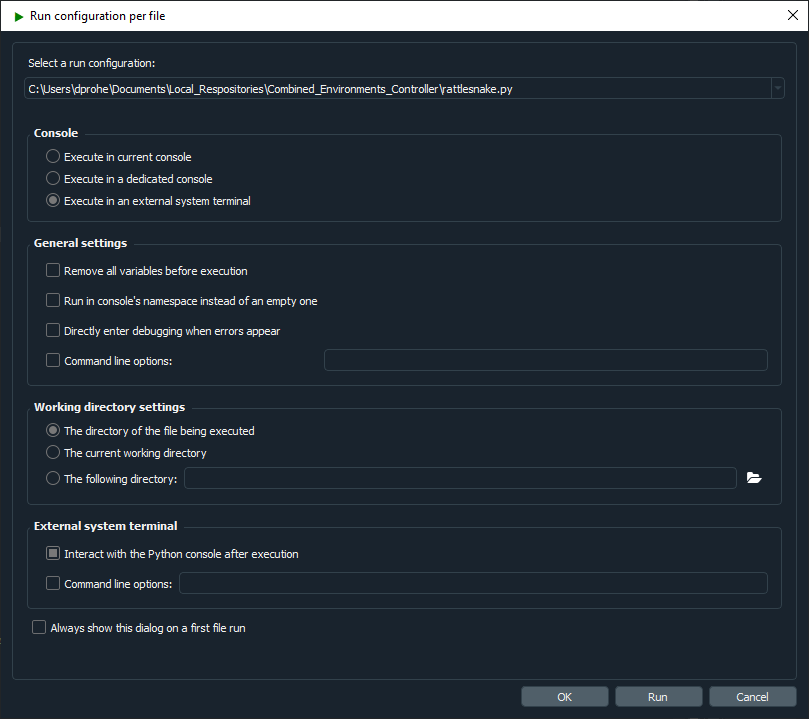
Figure 2.1:Spyder run configuration showing execution in an external system terminal as well as allowing interaction with the Python console after execution.
2.6Computational Requirements
Rattlesnake is process-heavy software. It spawns multiple cooperating processes for:
controller management,
acquisition,
output,
streaming,
environment execution,
and, for many environments, additional subprocesses for signal generation, spectral processing, and data analysis.
The exact computational requirements depend on:
the number of acquisition channels,
the number of control channels,
the number of outputs,
the type of environment being used,
whether system identification is required,
and whether virtual hardware is being used.
Virtual hardware can be especially demanding, because the acquisition process may need to simulate the structural response rather than simply read measured data from hardware.
As a rough guideline:
a 6-core CPU with 32 GB RAM has been more than sufficient for moderate multi-environment testing with roughly 20 control channels and 4 outputs,
a test with 200 acquisition channels, 50 control channels, and 8 outputs, have benefited from moving to something closer to a 16-core CPU with 32 GB RAM.
The Chapter 14 environment is particularly memory-intensive, so users running long sine sweeps over multiple channels may need to have a large amount of RAM available.
Users planning to run large MIMO tests or detailed virtual-hardware simulations should expect computational performance to matter.
2.7Obtaining Support
Rattlesnake is developed by a relatively small team and continues to evolve. As with any active research or engineering software, users should expect that bugs, rough edges, or incomplete features may still exist.
If an issue is encountered, support requests and bug reports should be submitted through the GitHub Issues page https://
The issue tracker supports different report types, including:
bug reports,
feature requests,
and user questions.
When reporting a bug, it is very helpful to include as much detail as possible, such as:
the operating system,
the installation method used,
any relevant input files,
screenshots of error dialogs,
and the
Rattlesnake.logfile produced during the run.
Clear reproduction steps greatly improve the chance that the issue can be diagnosed and fixed quickly.
Users are encouraged to consult both this documentation and the source repository before filing a question, but the issue tracker remains the primary place to request support or report problems.