In structural dynamics, bookkeeping is an incredibly important part of analyzing test or analysis data. Due to the prevelance of linear algebra operations, we often work with matrices where each row might represent a different measurement or analysis degree of freedom. If we mix up which row represents which channel, then the results of our analysis will be incorrect. Therefore, SDynPy labels its data objects with Coordinates, or degrees of freedom.
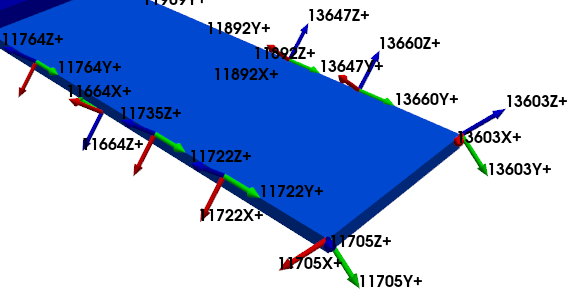
Representation of individual degrees of freedom plotted on a geometry
This document will describe how coordinates are defined and used in SDynPy. We will start by showing how we can define coordinates, and then walk through the different use-cases in SDynPy.
Let’s import SDynPy and start looking at Coordinates!
import sdynpy as sdpy
import numpy as np
SDynPy Coordinate Objects
In SDynPy, the object used to represent a coordinate or a degree of freedom in a test or analysis is the CoordinateArray. As the name implies, it is well suited for storing multiple coordinates in an array, which may be all the degrees of freedom from a test or analysis, or some subset thereof.
A CoordinateArray consists of two parts, a node identification number and a direction. When referenced to a Geometry object, these will define the location and direction of measurement or analysis data.
Node identification numbers are generally positive integers corresponding to a node identification number in a NodeArray in a Geometry object.
The direction corresponds to the local coordinate system direction of that node’s displacement coordinate system (recall that nodes have both a definition and displacement coordinate system referenced). The direction can be one of
X+- The positive directionX-- The negative directionY+- The positive directionY-- The negative directionZ+- The positive directionZ-- The negative directionRX+- A rotation about the positive directionRX-- A rotation about the negative directionRY+- A rotation about the positive directionRY-- A rotation about the negative directionRZ+- A rotation about the positive directionRZ-- A rotation about the negative direction(empty) - No direction
The empty direction is often used to represent what might be described as “scalar” degrees of freedom, for example a modal degree of freedom in a modal model, or a fixed-base modal degree of freedom in a Craig-Bampton substructure. This could also be used data from microphones or thermocouples which is not associated with a particular direction.
Creating Coordinates from Scratch
Coordinates are defined with the CoordinateArray object in SDynPy. As the name implies, this is a SdynpyArray subclass, and therefore has all of the capabilities of the SdynpyArray object and NumPy ndarray objects. Similarly to all other SdynpyArray subclasses, it has a function coordinate_array to help us construct CoordinateArray objects that uses the same name except with snake_case capitalization instead of CamelCase.
The coordinate_array function can be used in a few different ways. The first approach is to simply pass a node and a direction.
coords = sdpy.coordinate_array(
    node = 10,
    direction = 'Z-')
Let’s briefly explore the fields of the CoordinateArray object and their dtype before continuing.
coords.fields('node', 'direction')coords.dtypedtype([('node', '<u8'), ('direction', 'i1')])We can see that the node information is stored as an unsigned integer (an integer >= 0), and the direction field is also stored as an integer, though only an 8-bit integer. SDynPy encodes direction information as integers with the following scheme:
(empty)
To generate a CoordinateArray with multiple entries in it, we can simply pass multiple entries to the arguments of the coordinate_array function.
coords = sdpy.coordinate_array(
    node = [1,1,1,2,2,2],
    direction = ['X+','Y-','Z-','Y+','X-','Z+'])
To see a representation of the CoordinateArray, we can simply type the variable name into the terminal.
coordscoordinate_array(string_array=
array(['1X+', '1Y-', '1Z-', '2Y+', '2X-', '2Z+'], dtype='<U3'))The direction argument can also be passed integer values per the encoding. This can be more compact (no strings required, the five typed characters of 'RX+' becomes one character 4), but less explicit.
coords = sdpy.coordinate_array(
    node = [1,1,1,2,2,2],
    direction = [1,-2,-3,2,-1,3])
coords
coordinate_array(string_array=
array(['1X+', '1Y-', '1Z-', '2Y+', '2X-', '2Z+'], dtype='<U3'))Note that if the node and direction arguments are not the same sizes, a broadcast will be attempted using the usual NumPy broadcasting rules. For example, if we wanted all ['X+','Y+','Z+'] directions for all the nodes between one and ten, we could do something like this:
coords = sdpy.coordinate_array(
    node = (np.arange(10)+1)[:,np.newaxis],
    direction = [1,2,3])
coords
coordinate_array(string_array=
array([['1X+', '1Y+', '1Z+'],
['2X+', '2Y+', '2Z+'],
['3X+', '3Y+', '3Z+'],
['4X+', '4Y+', '4Z+'],
['5X+', '5Y+', '5Z+'],
['6X+', '6Y+', '6Z+'],
['7X+', '7Y+', '7Z+'],
['8X+', '8Y+', '8Z+'],
['9X+', '9Y+', '9Z+'],
['10X+', '10Y+', '10Z+']], dtype='<U4'))In the previous, we use np.arange to create a list of numbers from 0-9 to which we add 1, which makes an array from 1 to 10. Adding the np.newaxis in the second indexing position creates a new axis at that location, transforming the shape (10,) array into a shape (10,1) array. This can then be broadcast with the shape (3,) direction array, with the last dimension of the node array being expanded from length 1 to length 3, and the implicit length-1 dimension of the direction array being expanded to length 10. This then results in a shape (10,3) coordinate array.
coords.shape(10, 3)For a full treatment of NumPy’s broadcasting rules, see the relevant NumPy documentation.
Obviously, if the broadcasted arrays are not compatible, an error will be thrown.
coords = sdpy.coordinate_array(
    node = (np.arange(10)+1), # No np.newaxis, so arrays are incompatible
    direction = [1,2,3])
coords
---------------------------------------------------------------------------
ValueError Traceback (most recent call last)
File ~\Documents\Local_Repositories\sdynpy\src\sdynpy\core\sdynpy_coordinate.py:398, in coordinate_array(node, direction, structured_array, string_array, force_broadcast)
397 try:
--> 398 bc_node, bc_direction = np.broadcast_arrays(node, direction)
399 except ValueError:
File ~\AppData\Local\Python\pythoncore-3.14-64\Lib\site-packages\numpy\lib\_stride_tricks_impl.py:577, in broadcast_arrays(subok, *args)
575 args = [np.array(_m, copy=None, subok=subok) for _m in args]
--> 577 shape = _broadcast_shape(*args)
579 result = [array if array.shape == shape
580 else _broadcast_to(array, shape, subok=subok, readonly=False)
581 for array in args]
File ~\AppData\Local\Python\pythoncore-3.14-64\Lib\site-packages\numpy\lib\_stride_tricks_impl.py:452, in _broadcast_shape(*args)
450 # use the old-iterator because np.nditer does not handle size 0 arrays
451 # consistently
--> 452 b = np.broadcast(*args[:64])
453 # unfortunately, it cannot handle 64 or more arguments directly
ValueError: shape mismatch: objects cannot be broadcast to a single shape. Mismatch is between arg 0 with shape (10,) and arg 1 with shape (3,).
During handling of the above exception, another exception occurred:
ValueError Traceback (most recent call last)
Cell In[10], line 1
----> 1 coords = sdpy.coordinate_array(
2 node = (np.arange(10)+1), # No np.newaxis, so arrays are incompatible
3 direction = [1,2,3])
4 coords
File ~\Documents\Local_Repositories\sdynpy\src\sdynpy\core\sdynpy_coordinate.py:400, in coordinate_array(node, direction, structured_array, string_array, force_broadcast)
398 bc_node, bc_direction = np.broadcast_arrays(node, direction)
399 except ValueError:
--> 400 raise ValueError('node and direction should be broadcastable to the same shape (node: {:}, direction: {:})'.format(
401 node.shape, direction.shape))
403 # Create the coordinate array
404 coord_array = CoordinateArray(bc_node.shape)
ValueError: node and direction should be broadcastable to the same shape (node: (10,), direction: (3,))If the user doesn’t understand or can’t be bothered to learn about broadcasting in NumPy, they can provide the force_broadcast argument to force SDynPy to make it work. Note that all shape information will be lost as the input arrays will be flattened upon input to force the broadcasting to work. The author would however implore the user to reconsider and put forth the effort to learn how to broadcast arrays, as it can lead to very elegant handling of multidimensional arrays.
coords = sdpy.coordinate_array(
    node = (np.arange(10)+1), # No np.newaxis, so arrays are incompatible
    direction = [1,2,3],
    force_broadcast=True) # Tell SDynPy you don't care if the arrays are incompatible
coords
coordinate_array(string_array=
array(['1X+', '1Y+', '1Z+', '2X+', '2Y+', '2Z+', '3X+', '3Y+', '3Z+',
'4X+', '4Y+', '4Z+', '5X+', '5Y+', '5Z+', '6X+', '6Y+', '6Z+',
'7X+', '7Y+', '7Z+', '8X+', '8Y+', '8Z+', '9X+', '9Y+', '9Z+',
'10X+', '10Y+', '10Z+'], dtype='<U4'))The second approach to defining a CoordinateArray is hinted at in the representation we see when we type a CoordinateArray variable name into the terminal; we can pass a string array representing the CoordinateArray to the string_array argument. If proceeding with this approach, string_array must be explicitly specified as a keyword argument, otherwise the string array will be interpreted as the node argument and will try to be converted to an integer.
# This will throw an error
coords = sdpy.coordinate_array(['1X+','2Z-'])
---------------------------------------------------------------------------
ValueError Traceback (most recent call last)
Cell In[12], line 2
1 # This will throw an error
----> 2 coords = sdpy.coordinate_array(['1X+','2Z-'])
File ~\Documents\Local_Repositories\sdynpy\src\sdynpy\core\sdynpy_coordinate.py:405, in coordinate_array(node, direction, structured_array, string_array, force_broadcast)
403 # Create the coordinate array
404 coord_array = CoordinateArray(bc_node.shape)
--> 405 coord_array.node = bc_node
406 if not np.issubdtype(direction.dtype.type, np.integer):
407 bc_direction = _map_direction_array(bc_direction)
File ~\Documents\Local_Repositories\sdynpy\src\sdynpy\core\sdynpy_array.py:146, in SdynpyArray.__setattr__(self, attr, value)
141 except (ValueError, IndexError) as e:
142 # # Check and make sure you don't have an attribute already with that
143 # # name
144 if attr in self.dtype.fields:
145 # print('ERROR: Assignment to item failed, attempting to assign item to attribute!')
--> 146 raise e
147 super().__setattr__(attr, value)
File ~\Documents\Local_Repositories\sdynpy\src\sdynpy\core\sdynpy_array.py:140, in SdynpyArray.__setattr__(self, attr, value)
138 def __setattr__(self, attr, value):
139 try:
--> 140 self[attr] = value
141 except (ValueError, IndexError) as e:
142 # # Check and make sure you don't have an attribute already with that
143 # # name
144 if attr in self.dtype.fields:
145 # print('ERROR: Assignment to item failed, attempting to assign item to attribute!')
File ~\Documents\Local_Repositories\sdynpy\src\sdynpy\core\sdynpy_array.py:168, in SdynpyArray.__setitem__(self, key, value)
166 try:
167 if key in self.dtype.fields:
--> 168 self[key][...] = value
169 else:
170 super().__setitem__(key, value)
ValueError: invalid literal for int() with base 10: np.str_('1X+')The when passing a string array, we must explicitly use the string_array keyword argument.
coords = sdpy.coordinate_array(string_array = ['1X+','2Z-'])
coords
coordinate_array(string_array=
array(['1X+', '2Z-'], dtype='<U3'))Referencing Coordinates to Geometries
The entire point of the CoordinateArray is to store the location and the direction of the measurement or analysis data. Therefore, CoordinateArray objects are often used in conjuction with Geometry objects to specify the physical position and direction of the data in space. We will load in the Geometry object constructed in the previous document Geometry.
geometry = sdpy.geometry.load('geometry.npz')We may have hinted at the interaction of CoordinateArray objects with Geometry objects when we introduced the plot_coordinate method of the Geometry object. This was a method that plotted the geometry, but also drew arrows representing the local coordinate system directions. We will see that if we pass a CoordinateArray to this method, it will plot only those coordinates referenced. Various optional arguments define how the data is plotted.
coords = sdpy.coordinate_array(string_array=['102Z+','204X+'])
geometry.plot_coordinate(coords, label_dofs=True, arrow_scale = 0.1);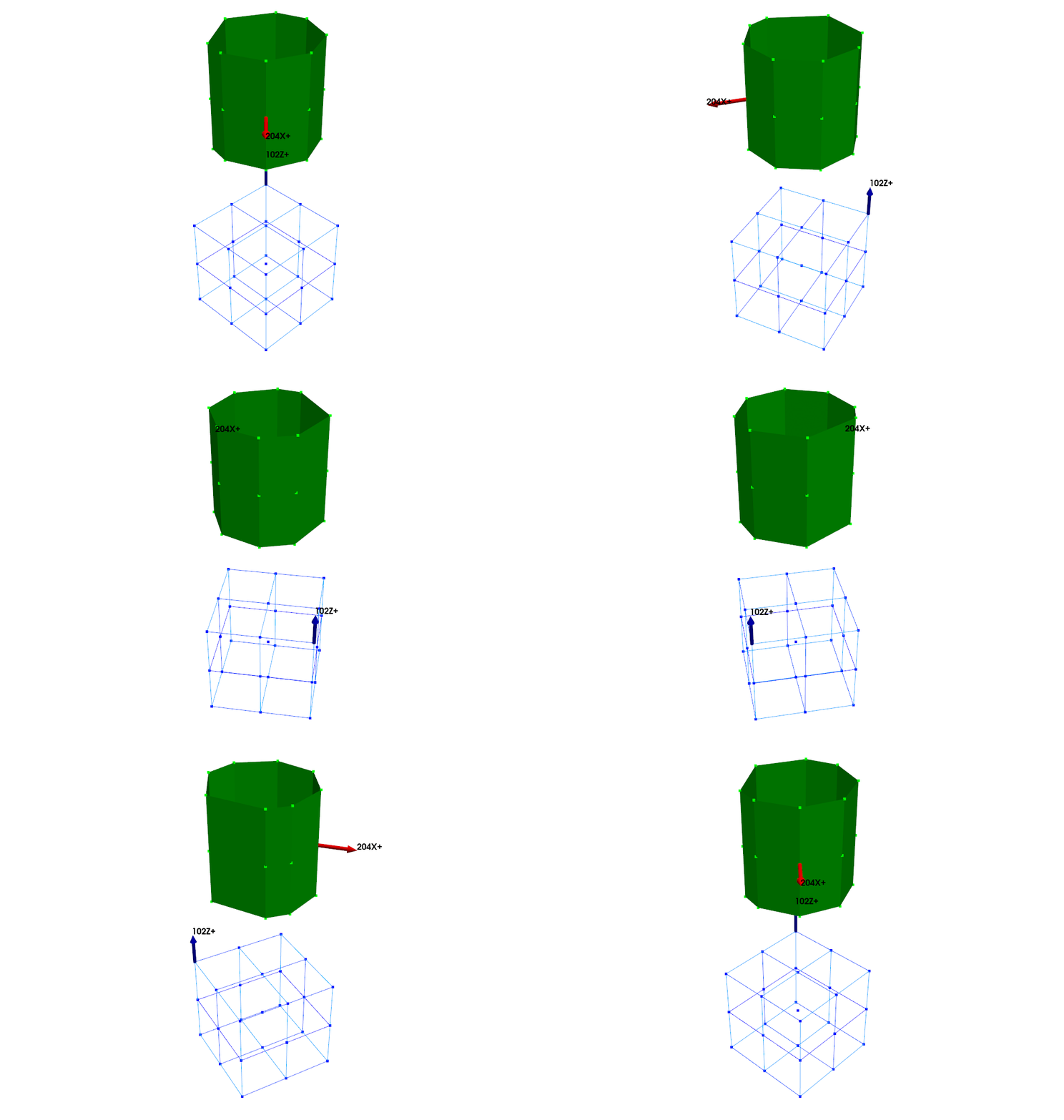
This method allows us to very quickly see where a specific degree of freedom came from on the geometry.
Set Operations with CoordinateArrays
Because CoordinateArray objects are inherited from NumPy ndarray, many NumPy functions work well with CoordinateArray objects. NumPy has a class of operations called set operations which deal with sets of items. These are generally useful for CoordinateArray objects, because we often try to compare sets of degrees of freedom.
Unique Coordinates
One common operation is to get just the unique set of coordinates from a test or an analysis. One might have duplicated coordinates if combining several datasets together. NumPy’s unique function will give us just the unique degrees of freedom.
coords = sdpy.coordinate_array([1,3,1,4],['X+','Y+','X+','Z+'])
coords
coordinate_array(string_array=
array(['1X+', '3Y+', '1X+', '4Z+'], dtype='<U3'))unique_coords = np.unique(coords)
unique_coordscoordinate_array(string_array=
array(['1X+', '3Y+', '4Z+'], dtype='<U3'))Finding Coordinates in a Second Coordinate Array
A second common operation is to check which degrees of freedom from a test are in some master list of degrees of freedom. For this we can use NumPy’s isin function. This will give a logical array with True values wherever a degree of freedom was found in the master list.
check_dofs = sdpy.coordinate_array([1,2,3,4],['X+','Y+','Z+'],force_broadcast=True)
check_dofs
coordinate_array(string_array=
array(['1X+', '1Y+', '1Z+', '2X+', '2Y+', '2Z+', '3X+', '3Y+', '3Z+',
'4X+', '4Y+', '4Z+'], dtype='<U3'))dofs_to_keep = sdpy.coordinate_array(string_array = ['1X+','2Z+','4Y+'])
dofs_to_keepcoordinate_array(string_array=
array(['1X+', '2Z+', '4Y+'], dtype='<U3'))keep_indices = np.isin(check_dofs,dofs_to_keep)
keep_indicesarray([ True, False, False, False, False, True, False, False, False,
False, True, False])Finding Common Coordinates Between Two Datasets
One common operation is to get the common degrees of freedom between two datasets. Perhaps we are comparing test data to analysis, or two analyses with different modeling assumptions. We can only compare equivalent degrees of freedom, so we would like to know which degrees of freedom the two sets have in common.
coords_1 = sdpy.coordinate_array([1,2,3,4],['X+','Y-','X+','Z+'])
coords_2 = sdpy.coordinate_array([1,2,4],['X+','Y+','Z+'])
We can use NumPy’s intersect1d function to get the intersection of the two sets of degrees of freedom.
common_dofs = np.intersect1d(coords_1,coords_2)
common_dofs
coordinate_array(string_array=
array(['1X+', '4Z+'], dtype='<U3'))Sometimes when we would like to compare degrees of freedom, we don’t actually care about a difference in polarity, because we can simply flip the sign on the data when making the comparison. Taking the absolute value of a CoordinateArray turns any negative polarity (e.g. ) to a positive polarity (e.g. ). We can then make comparisons on the absolute values of the arrays.
common_dofs_ignore_polarity = np.intersect1d(abs(coords_1),abs(coords_2))
common_dofs_ignore_polarity
coordinate_array(string_array=
array(['1X+', '2Y+', '4Z+'], dtype='<U3'))We see that if we ignore polarity, we find one more common coordinate between the two CoordinateArray objects.
Excluding Coordinates from a CoordinateArray
Sometimes we have a CoordinateArray object with many coordinates in it, and we want to exclude specific coordinates. NumPy’s setdiff1d will take the difference of two CoordinateArray objects, leaving only the coordinates which are not in the second array.
coords_1coordinate_array(string_array=
array(['1X+', '2Y-', '3X+', '4Z+'], dtype='<U3'))coords_2coordinate_array(string_array=
array(['1X+', '2Y+', '4Z+'], dtype='<U3'))remaining_coords = np.setdiff1d(coords_1,coords_2)
remaining_coordscoordinate_array(string_array=
array(['2Y-', '3X+'], dtype='<U3'))Again, we could take the absolute value to ignore polarity.
remaining_coords_ignore_polarity = np.setdiff1d(
    abs(coords_1),
    abs(coords_2))
remaining_coords_ignore_polarity
coordinate_array(string_array=
array(['3X+'], dtype='<U3'))Finding All Coordinates in Two CoordinateArrays
Finally, we may want to find all of the coordinates that exist between two CoordinateArray objects, though without duplicating items such as what might happen if we simply concatenated the arrays together. NumPy’s union function allows us to do just that.
coords_1 = sdpy.coordinate_array(string_array = [
    '1X+','2Y+','3Z+','4RX+'])
coords_1
coordinate_array(string_array=
array(['1X+', '2Y+', '3Z+', '4RX+'], dtype='<U4'))coords_2 = sdpy.coordinate_array(string_array = [
'1RX+','2RZ-','3Z+','1X+'])all_coords = np.union1d(coords_1,coords_2)
all_coordscoordinate_array(string_array=
array(['1X+', '1RX+', '2RZ-', '2Y+', '3Z+', '4RX+'], dtype='<U4'))In the above, we see that the common coordinates and do not appear more than once in the final array, which can come in handy.
Contrast this to concatination, where we simply append one CoordinateArray to the next CoordinateArray.
all_coords_concat = np.concatenate((coords_1,coords_2))
all_coords_concat
coordinate_array(string_array=
array(['1X+', '2Y+', '3Z+', '4RX+', '1RX+', '2RZ-', '3Z+', '1X+'],
dtype='<U4'))Here we see that the coordinates that appear in both CoordinateArray objects are now duplicated.
Sorting CoordinateArray Objects
Coordinate arrays in a random order can be difficult to parse, so it can be convenient to sort the CoordinateArray into a reasonable ordering. Because CoordinateArray objects are NumPy ndarray objects, we can simply use NumPy’s sort capability.
coords = sdpy.coordinate_array(np.arange(5,1,-1)[:,np.newaxis], np.arange(-6,7)).flatten()
coords
coordinate_array(string_array=
array(['5RZ-', '5RY-', '5RX-', '5Z-', '5Y-', '5X-', '5', '5X+', '5Y+',
'5Z+', '5RX+', '5RY+', '5RZ+', '4RZ-', '4RY-', '4RX-', '4Z-',
'4Y-', '4X-', '4', '4X+', '4Y+', '4Z+', '4RX+', '4RY+', '4RZ+',
'3RZ-', '3RY-', '3RX-', '3Z-', '3Y-', '3X-', '3', '3X+', '3Y+',
'3Z+', '3RX+', '3RY+', '3RZ+', '2RZ-', '2RY-', '2RX-', '2Z-',
'2Y-', '2X-', '2', '2X+', '2Y+', '2Z+', '2RX+', '2RY+', '2RZ+'],
dtype='<U4'))We have two options for sorting. We can sort the array into a new array. This occurs when you use NumPy’s sort function.
sorted_coords = np.sort(coords)
sorted_coords
coordinate_array(string_array=
array(['2RZ-', '2RY-', '2RX-', '2Z-', '2Y-', '2X-', '2', '2X+', '2Y+',
'2Z+', '2RX+', '2RY+', '2RZ+', '3RZ-', '3RY-', '3RX-', '3Z-',
'3Y-', '3X-', '3', '3X+', '3Y+', '3Z+', '3RX+', '3RY+', '3RZ+',
'4RZ-', '4RY-', '4RX-', '4Z-', '4Y-', '4X-', '4', '4X+', '4Y+',
'4Z+', '4RX+', '4RY+', '4RZ+', '5RZ-', '5RY-', '5RX-', '5Z-',
'5Y-', '5X-', '5', '5X+', '5Y+', '5Z+', '5RX+', '5RY+', '5RZ+'],
dtype='<U4'))We see that we have sorted the CoordinateArray by increasing node number then increasing direction (with the direction being its integer representation, so negative values (therefore polarities) come before positive ones.
We note that the original CoordinateArray has not changed due to the sorting operation.
coordscoordinate_array(string_array=
array(['5RZ-', '5RY-', '5RX-', '5Z-', '5Y-', '5X-', '5', '5X+', '5Y+',
'5Z+', '5RX+', '5RY+', '5RZ+', '4RZ-', '4RY-', '4RX-', '4Z-',
'4Y-', '4X-', '4', '4X+', '4Y+', '4Z+', '4RX+', '4RY+', '4RZ+',
'3RZ-', '3RY-', '3RX-', '3Z-', '3Y-', '3X-', '3', '3X+', '3Y+',
'3Z+', '3RX+', '3RY+', '3RZ+', '2RZ-', '2RY-', '2RX-', '2Z-',
'2Y-', '2X-', '2', '2X+', '2Y+', '2Z+', '2RX+', '2RY+', '2RZ+'],
dtype='<U4'))If we wanted to sort the CoordinateArray in place, we can use its sort method.
coords.sort()The sort method of the CoordinateArray object does not return a value, instead it modifies the original array in-place. If we look at the CoordinateArray after the indexing operation, we see that it has been modified.
coordscoordinate_array(string_array=
array(['2RZ-', '2RY-', '2RX-', '2Z-', '2Y-', '2X-', '2', '2X+', '2Y+',
'2Z+', '2RX+', '2RY+', '2RZ+', '3RZ-', '3RY-', '3RX-', '3Z-',
'3Y-', '3X-', '3', '3X+', '3Y+', '3Z+', '3RX+', '3RY+', '3RZ+',
'4RZ-', '4RY-', '4RX-', '4Z-', '4Y-', '4X-', '4', '4X+', '4Y+',
'4Z+', '4RX+', '4RY+', '4RZ+', '5RZ-', '5RY-', '5RX-', '5Z-',
'5Y-', '5X-', '5', '5X+', '5Y+', '5Z+', '5RX+', '5RY+', '5RZ+'],
dtype='<U4'))If the fact that the degree of freedom (-6) is sorted so far from (+6), then once again we can take the absolute value prior to sorting. Note that if we take the absolute value and then call the sort method , which modifies the array in place, without first storing the absolute value to a variable, apparently nothing will happen. This is because the output of the absolute value of the CoordinateArray is a new array, and if we modify the new array in place without it being stored, the changes are immediately garbage-collected by Python.
abs(coords).sort()
coords
coordinate_array(string_array=
array(['2RZ-', '2RY-', '2RX-', '2Z-', '2Y-', '2X-', '2', '2X+', '2Y+',
'2Z+', '2RX+', '2RY+', '2RZ+', '3RZ-', '3RY-', '3RX-', '3Z-',
'3Y-', '3X-', '3', '3X+', '3Y+', '3Z+', '3RX+', '3RY+', '3RZ+',
'4RZ-', '4RY-', '4RX-', '4Z-', '4Y-', '4X-', '4', '4X+', '4Y+',
'4Z+', '4RX+', '4RY+', '4RZ+', '5RZ-', '5RY-', '5RX-', '5Z-',
'5Y-', '5X-', '5', '5X+', '5Y+', '5Z+', '5RX+', '5RY+', '5RZ+'],
dtype='<U4'))We can see that coords is unchanged. To get the sorted array, we can either store the absolute value as an intermediate step, or use the sort function to create a new sorted list without modifying the original in place.
abs_coords_sorted = np.sort(abs(coords))
abs_coords_sorted
coordinate_array(string_array=
array(['2', '2X+', '2X+', '2Y+', '2Y+', '2Z+', '2Z+', '2RX+', '2RX+',
'2RY+', '2RY+', '2RZ+', '2RZ+', '3', '3X+', '3X+', '3Y+', '3Y+',
'3Z+', '3Z+', '3RX+', '3RX+', '3RY+', '3RY+', '3RZ+', '3RZ+', '4',
'4X+', '4X+', '4Y+', '4Y+', '4Z+', '4Z+', '4RX+', '4RX+', '4RY+',
'4RY+', '4RZ+', '4RZ+', '5', '5X+', '5X+', '5Y+', '5Y+', '5Z+',
'5Z+', '5RX+', '5RX+', '5RY+', '5RY+', '5RZ+', '5RZ+'], dtype='<U4'))One issue with the above is that we have lost the polarity references of the original list. For example, we have two coordinates in the final CoordinateArray, one from the coordinate and one from the coordinate. If we wish to maintain the polarities in the final CoordinateArray, we can use NumPy’s argsort function, which returns the indices of the array in the order that would sort the array. We can then use these indices to index the original array.
sorted_indices = np.argsort(abs(coords))
sorted_indices
array([ 6, 5, 7, 4, 8, 3, 9, 2, 10, 11, 1, 12, 0, 19, 18, 20, 17,
21, 16, 22, 15, 23, 24, 14, 25, 13, 32, 31, 33, 30, 34, 29, 35, 36,
28, 27, 37, 38, 26, 45, 44, 46, 43, 47, 48, 42, 49, 41, 50, 40, 39,
51])coords_sorted = coords[sorted_indices]
coords_sortedcoordinate_array(string_array=
array(['2', '2X-', '2X+', '2Y-', '2Y+', '2Z-', '2Z+', '2RX-', '2RX+',
'2RY+', '2RY-', '2RZ+', '2RZ-', '3', '3X-', '3X+', '3Y-', '3Y+',
'3Z-', '3Z+', '3RX-', '3RX+', '3RY+', '3RY-', '3RZ+', '3RZ-', '4',
'4X-', '4X+', '4Y-', '4Y+', '4Z-', '4Z+', '4RX+', '4RX-', '4RY-',
'4RY+', '4RZ+', '4RZ-', '5', '5X-', '5X+', '5Y-', '5Y+', '5Z+',
'5Z-', '5RX+', '5RX-', '5RY+', '5RY-', '5RZ-', '5RZ+'], dtype='<U4'))In this latter case, because we are comparing, for example to when we sorted the absolute value of the array, in the final array, the first item of these equivalent arrays will be the one that came first in the original array. Note that because came before in coords, it will also come before it in the sorted version of coords when the sorting is done based on the absolute value.
Converting CoordinateArrays to Strings
While we can get the representation of a CoordinateArray by typing it into the console, this is not very useful for putting that CoordinateArray into a document or something like that. Therefore, SDynPy gives a way to convert the CoordinateArray object into a string array, which can then be exported or formatted however the user wishes.
coordscoordinate_array(string_array=
array(['2RZ-', '2RY-', '2RX-', '2Z-', '2Y-', '2X-', '2', '2X+', '2Y+',
'2Z+', '2RX+', '2RY+', '2RZ+', '3RZ-', '3RY-', '3RX-', '3Z-',
'3Y-', '3X-', '3', '3X+', '3Y+', '3Z+', '3RX+', '3RY+', '3RZ+',
'4RZ-', '4RY-', '4RX-', '4Z-', '4Y-', '4X-', '4', '4X+', '4Y+',
'4Z+', '4RX+', '4RY+', '4RZ+', '5RZ-', '5RY-', '5RX-', '5Z-',
'5Y-', '5X-', '5', '5X+', '5Y+', '5Z+', '5RX+', '5RY+', '5RZ+'],
dtype='<U4'))By calling the string_array method of the CoordinateArray object, SDynPy will export the CoordinateArray as an array of strings.
string_array = coords.string_array()
string_array
array(['2RZ-', '2RY-', '2RX-', '2Z-', '2Y-', '2X-', '2', '2X+', '2Y+',
'2Z+', '2RX+', '2RY+', '2RZ+', '3RZ-', '3RY-', '3RX-', '3Z-',
'3Y-', '3X-', '3', '3X+', '3Y+', '3Z+', '3RX+', '3RY+', '3RZ+',
'4RZ-', '4RY-', '4RX-', '4Z-', '4Y-', '4X-', '4', '4X+', '4Y+',
'4Z+', '4RX+', '4RY+', '4RZ+', '5RZ-', '5RY-', '5RX-', '5Z-',
'5Y-', '5X-', '5', '5X+', '5Y+', '5Z+', '5RX+', '5RY+', '5RZ+'],
dtype='<U4')We can then use Python’s significant capabilities for string operations to format the string how we would like.
', '.join([string.lower() for string in string_array])'2rz-, 2ry-, 2rx-, 2z-, 2y-, 2x-, 2, 2x+, 2y+, 2z+, 2rx+, 2ry+, 2rz+, 3rz-, 3ry-, 3rx-, 3z-, 3y-, 3x-, 3, 3x+, 3y+, 3z+, 3rx+, 3ry+, 3rz+, 4rz-, 4ry-, 4rx-, 4z-, 4y-, 4x-, 4, 4x+, 4y+, 4z+, 4rx+, 4ry+, 4rz+, 5rz-, 5ry-, 5rx-, 5z-, 5y-, 5x-, 5, 5x+, 5y+, 5z+, 5rx+, 5ry+, 5rz+'Saving and Loading CoordinateArrays
Like all SdynpyArray subclasses, CoordinateArray is actually a NumPy ndarray, meaning it can be trivially stored to a NumPy .npy file. SDynPy therefore implements save and load methods for the CoordinateArray objects to save to and read from the disk.
coordscoordinate_array(string_array=
array(['2RZ-', '2RY-', '2RX-', '2Z-', '2Y-', '2X-', '2', '2X+', '2Y+',
       '2Z+', '2RX+', '2RY+', '2RZ+', '3RZ-', '3RY-', '3RX-', '3Z-',
       '3Y-', '3X-', '3', '3X+', '3Y+', '3Z+', '3RX+', '3RY+', '3RZ+',
       '4RZ-', '4RY-', '4RX-', '4Z-', '4Y-', '4X-', '4', '4X+', '4Y+',
       '4Z+', '4RX+', '4RY+', '4RZ+', '5RZ-', '5RY-', '5RX-', '5Z-',
       '5Y-', '5X-', '5', '5X+', '5Y+', '5Z+', '5RX+', '5RY+', '5RZ+'],
dtype='<U4'))coords.save('coords.npy')loaded_coords = coords.load('coords.npy')
loaded_coordscoordinate_array(string_array=
array(['2RZ-', '2RY-', '2RX-', '2Z-', '2Y-', '2X-', '2', '2X+', '2Y+',
'2Z+', '2RX+', '2RY+', '2RZ+', '3RZ-', '3RY-', '3RX-', '3Z-',
'3Y-', '3X-', '3', '3X+', '3Y+', '3Z+', '3RX+', '3RY+', '3RZ+',
'4RZ-', '4RY-', '4RX-', '4Z-', '4Y-', '4X-', '4', '4X+', '4Y+',
'4Z+', '4RX+', '4RY+', '4RZ+', '5RZ-', '5RY-', '5RX-', '5Z-',
'5Y-', '5X-', '5', '5X+', '5Y+', '5Z+', '5RX+', '5RY+', '5RZ+'],
dtype='<U4'))Using CoordinateArrays with Other SDynPy Objects
Every SDynPy object uses Coordinate to do its bookkeeping. NDDataArray objects keep track of which data is associated with each coordinate. ShapeArray objects keep track of the coordinates associated with each of their degrees of freedom. System objects keep track of the coordinates associated with the rows and columns of the system matrices.
These concepts and more will be described more fully in subsequent documentation pages.
Summary
This document has described the CoordinateArray object in SDynPy, which is used to track degree of freedom information in many of the other SDynPy objects. We showed how to create CoordinateArray objects from scratch, using both node/direction definitions, as well as string_array definitions. We showed how we could use broadcasting with the node/direction definition, otherwise we could also provide the force_broadcast=True keyword argument.
We showed how CoordinateArray objects refer to the displacement coordinate systems of the nodes in a Geometry object. We showed how we could easily visualized CoordinateArray objects on the Geometry by using its plot_coordinate method and passing a CoordinateArray object.
We discussed numerous set operations which could find unique coordinates and perform intersections, differences, and unions of coordinates in different CoordinateArray objects.
We showed how we could convert a CoordinateArray object to a simple string array. We also showed how we can save or load CoordinateArray objects.
Finally, we mentioned that CoordinateArray objects are used all across SDynPy as a way to track the coordinates associated with specific pieces of data. We will explore one of these types of objects in the next section.