2Acquiring and Running Rattlesnake
Rattlesnake can now be acquired in several ways depending on how a user intends to use the software:
Install from PyPI as a Python package
Clone the GitHub repository and install from source
Download a standalone executable from the GitHub Releases page
(coming soon)
The best choice depends on whether the user simply wants to run the software or also wants to inspect, modify, or extend the codebase.
2.1Acquiring the Software
2.1.1Installing from PyPI
Rattlesnake is published on PyPI under the package name:
rattlesnake-vibration-controllerThe simplest installation method is therefore:
pip install rattlesnake-vibration-controllerThis is the recommended option for users who:
already have a Python installation available,
want the easiest Python-based installation route, and
do not need to modify the Rattlesnake source code directly.
If desired, other Python package managers may also be used as long as they can install from PyPI. For example, users of uv may prefer:
uv pip install rattlesnake-vibration-controllerOnce installed, the package exposes a console entry point named:
rattlesnakewhich launches the main application.
2.1.2Installing from a GitHub Clone
Users who intend to inspect the source, contribute changes, or develop custom control laws may prefer installing from a clone of the repository.
The source code is hosted at https://
Clone it with Git:
git clone https://github.com/sandialabs/rattlesnake-vibration-controller.git
cd rattlesnake-vibration-controller
Then install it from the repository directory:
pip install .This installs the package and its dependencies from the local checkout.
2.1.2.1Editable Installation
For development work, it is often preferable to install in editable mode:
pip install -e .The -e flag tells Python to install the package in a way that points back to the source tree rather than copying the files into site-packages. This means:
edits to the source code take effect immediately,
reinstalling after every small code change is unnecessary,
local development and debugging are much more convenient.
If developer tools are also needed, such as pytest, pylint, or documentation tooling, the optional development dependencies can be installed with:
pip install -e .[dev]or with uv:
uv pip install -e .[dev]This is the recommended setup for developers and advanced users.
2.1.3Downloading a Standalone Executable
A standalone executable distribution is planned for future releases, to support users who do not wish to install Python or manage package dependencies manually.
When available, executables will be distributed through the GitHub Releases page https://
This is intended to be the most accessible option for non-Python users.
2.2Setting Up a Python Environment
When using the Python-package or source-install approaches, it is strongly recommended to use a virtual environment.
A virtual environment isolates Rattlesnake and its dependencies from the rest of the Python installation on the computer. This helps avoid version conflicts and makes upgrades or removal easier.
Examples:
# Option 1: standard library venv
python -m venv .venv

# Option 2: uv-managed venv
uv venv
Activate the environment before installing:
source .venv/bin/activate       # bash / zsh
source .venv/bin/activate.fish  # fish shell
.\.venv\Scripts\activate # Windows PowerShell / CMD2.3Running the Software
2.3.1Running via Standard Python Execution
If Rattlesnake has been cloned from GitHub and the user wishes to run it directly from the source tree without using the installed entry point, the main application can be launched with:
python src/rattlesnake/main.pyThis is especially useful for development and debugging from a source checkout.
2.3.2Running via the Installed Console Script
When installed through pip install or pip install -e, Rattlesnake exposes the console script:
rattlesnakeSo in an activated environment, the application can typically be started simply with:
rattlesnakeOn Windows, a corresponding executable wrapper is placed into the Python environment’s Scripts directory. On Unix-like platforms, the script is installed into the environment’s bin directory.
If the environment is activated, this command should already be on the path. If not, it may still be launched directly from the environment’s script directory.
2.3.3Running Rattlesnake Without a User Interface
Advanced users wishing to automate workflows may wish to run Rattlesnake without a user interface and instead only use code to control the software. In this case, Rattlesnake can be imported like any other Python module. NEED A BRIEF DESCRIPTION HERE THAT POINTS TO THE API DOC MODULES
2.3.4Running a Standalone Executable
Once standalone executables are available on the Releases page, users will be able to launch Rattlesnake just like any other desktop application by executing the downloaded file.
2.4Notes on Execution from IDEs
Many users may prefer launching Rattlesnake from an integrated development environment (IDE) rather than from a command shell.
Because Rattlesnake uses multiprocessing and multiple cooperating subprocesses, IDE-integrated consoles do not always behave well. In general, if launching from an IDE:
prefer using an external system terminal rather than an embedded console,
keep the terminal open after execution,
and inspect traceback output there if the application exits unexpectedly.
If an error occurs, the command terminal is often the easiest place to capture useful diagnostics for troubleshooting or for reporting issues. If the terminal immediately closes after an unexpected exit, this diagnostic information is lost.
As before, Spyder users may find it helpful to configure execution through an external system terminal, as illustrated in Figure 2.1.
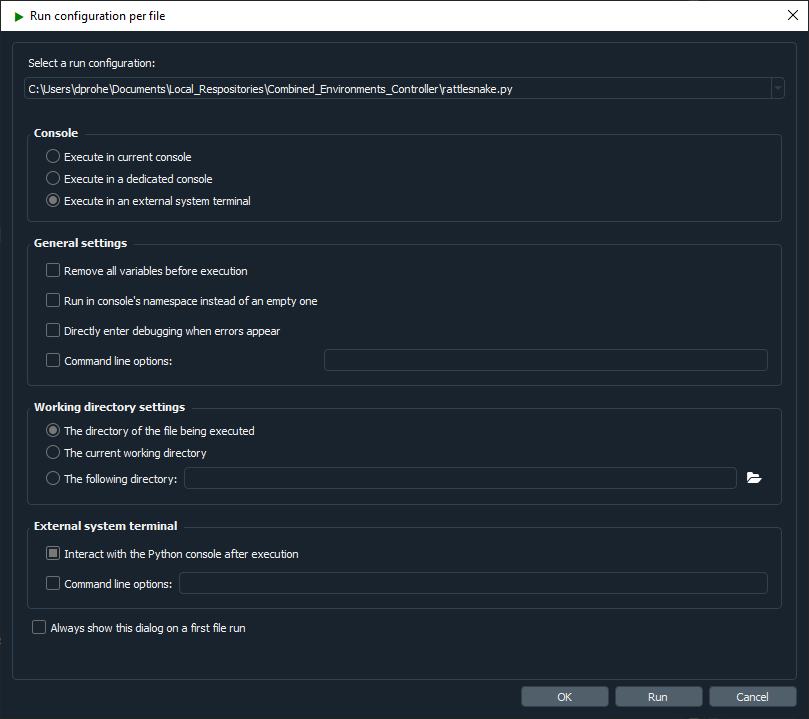
Figure 2.1:Spyder run configuration showing execution in an external system terminal as well as allowing interaction with the Python console after execution.
2.5Computational Requirements
Rattlesnake is process-heavy software. It spawns multiple cooperating processes for:
controller management,
acquisition,
output,
streaming,
environment execution,
and, for many environments, additional subprocesses for signal generation, spectral processing, and data analysis.
The exact computational requirements depend on:
the number of acquisition channels,
the number of control channels,
the number of outputs,
the type of environment being used,
whether system identification is required,
and whether virtual hardware is being used.
Virtual hardware can be especially demanding, because the acquisition process may need to simulate the structural response rather than simply read measured data from hardware.
As a rough guideline:
a 6-core CPU with 32 GB RAM has been more than sufficient for moderate multi-environment testing with roughly 20 control channels and 4 outputs,
a test with 200 acquisition channels, 50 control channels, and 8 outputs, have benefited from moving to something closer to a 16-core CPU with 32 GB RAM.
The Chapter 14 environment is particularly memory-intensive, so users running long sine sweeps over multiple channels may need to have a large amount of RAM available.
Users planning to run large MIMO tests or detailed virtual-hardware simulations should expect computational performance to matter.
2.6Obtaining Support
Rattlesnake is developed by a relatively small team and continues to evolve. As with any active research or engineering software, users should expect that bugs, rough edges, or incomplete features may still exist.
If an issue is encountered, support requests and bug reports should be submitted through the GitHub Issues page https://
The issue tracker supports different report types, including:
bug reports,
feature requests,
and user questions.
When reporting a bug, it is very helpful to include as much detail as possible, such as:
the operating system,
the installation method used,
any relevant input files,
screenshots of error dialogs,
and the
Rattlesnake.logfile produced during the run.
Clear reproduction steps greatly improve the chance that the issue can be diagnosed and fixed quickly.
Users are encouraged to consult both this documentation and the source repository before filing a question, but the issue tracker remains the primary place to request support or report problems.