2Acquiring and Running Rattlesnake
Two methods are provided to acquire the Rattlesnake software. The software can be downloaded as an executable and run directly with no other dependencies. Alternatively, the software can be downloaded in its Python script form and run using a Python interpreter. The former approach is simpler, but results in a larger file size and longer software loading time due to the necessity to pack the Python ecosystem into the executable for distribution and unpack it prior to execution. The latter approach is more suited to users who wish to utilize the full functionality of the Rattlesnake framework, which would include activities such as coding up custom control laws. In this case, it will be advantageous to have a Python ecosystem installed on the user’s computer, so simply downloading the source code and executing it similarly to other Python scripts will potentially be easier than the executable approach.
2.1Running from an Executable
Python code can be compiled into a single executable file, which makes it easier to distribute Python code. The user need not have a Python distribution installed on their computer to simply run the executable, as the executable will contain the required Python interpreter and libraries compiled within it. The executable approach has a few disadvantages. The file size of the executable will generally be larger than the raw source code. Additionally, the executable will generally be slower to start due to the necessary unpacking of the Python ecosystem from it. Still, if a user is not familiar with Python, the executable will be the easiest approach to run the software.
2.1.1Downloading the Executable
Executables for Rattlesnake are generally stored in the GitHub Project on the GitHub Releases page. A user can simply download the executable corresponding to the user’s operating system and save it to their computer. No installation is necessary to run this executable.
2.1.2Running the Executable
Running Rattlesnake from an executable is as simple as running any other program. Simply double click on the executable (or otherwise execute it) and the program will run. Note that there may be a significant delay between executing the executable and the program appearing, as the executable will unpack a Python distribution into the user’s temporary space in order to run the included Python code.
As with any other executable program, users may create links to the program to put on the desktop or in the start menu to make accessing the program easier.
It may be beneficial to run the executable through the command terminal, as otherwise if an error occurs in the program, the program may simply disappear without the user being aware of any errors. When running through the command terminal, the user will be able to view any error messages if the program unexpectedly exits, which will be useful in diagnosing the issue if submitted to the issue tracker in the GitHub Issues (See Section 2.4 for more information).
2.2Running from the Python script
The alternative to running the Rattlesnake as an executable is to run it as a Python script, which users familiar with the Python programming language should be accustomed to. This approach provides the user the ability to modify code directly without needing to recompile an executable. Additionally, if the user plans on developing custom control laws for the Rattlesnake (see, e.g., Section 12.7 for more information), they will generally require a Python ecosystem installed on their computer, so the running of the code as a script is not a great burden.
2.2.1Setting up a Python Ecosystem
The first step to running Rattlesnake from its Python script is to install Python. This can be done in multiple ways. Python can be downloaded and installed from the Python website directly. When installed this way, Python will not include any of the numeric or scientific libraries such as NumPy or SciPy. For this reason, many users will prefer to download a scientific Python distribution which contains many numeric or scientific libraries. Anaconda or WinPython are popular distributions.
2.2.2Virtual Enrivonment
It is a best practice to install Rattlesnake within a virtual environment. A virtual environment is a self-contained directory that contains a specific Python installation, along with additional packages. It allows users to create an isolated environment, ensuring that dependicies and libraries do not interfere with each other.
Create a virtual environment with either pip or uv. pip is already included with Python, whereas uv must be installed separately. uv is significantly faster than pip (often 10–100x) and is recommended, though not required.
# Option 1: pip method
python -m venv .venv

# Option 2: uv method
uv venv

# For both methods, prior to installation, activate the environment, depending on which shell is in use:

source .venv/bin/activate       # bash / zsh
source .venv/bin/activate.fish  # fish shell
.\.venv\Scripts\activate # Windows (PowerShell/CMD)2.2.3Installation
Regardless of the distribution and virtual environment generation method selected, users will need to install the dependencies
required by Rattlesnake. The project uses a pyproject.toml file to manage its
environment. Install the package and its dependencies directly using pip:
For standard users:
pip install .For developers (includes tools like
pytestdefined in thedevextra):pip install -e .[dev]oruv pip install -e .[dev]
The -e flag installs the project in editable mode, ensuring that any changes you make
to the source code are reflected immediately in the environment.
If running through a corporate or university firewall, the proxy may need to be specified in pip. Additionally, on some networks the Python package repositories must be added as trusted hosts. Such a command may look like
pip --proxy <proxy_address> install --trusted-host pypi.org --trusted-host files.pythonhosted.orgwhere <proxy_address> is the address of the proxy.
2.2.4Downloading the Python Code
With Python installed the Rattlesnake code can be downloaded from the GitHub project repository. For users who aim to develop the Rattlesnake software, the preferred approach to acquire the software is to use Git to clone the repository. For users who only wish to use the software, the code can be downloaded in a zip file or other archive format and extracted to the user’s computer.
2.2.5Running Rattlesnake
If Python is on the user’s path, the user can simply call
python rattlesnake.pyfrom a command line in the directory in which Rattlesnake was downloaded to execute the software. If Python is not on the user’s path, it will be necessary to provide the command line the full path to the Python executable.
Many users will find it more comfortable to forgo the command line and launch Rattlesnake directly from their favorite integrated development environment (IDE). Note that the Rattlesnake uses the multiprocessing Python package to spawn several processes, and these processes sometimes do not play nice with IDE consoles. Therefore if running from an IDE, the IDE should be instructed to run the rattlesnake.py script from an external system terminal rather than a terminal inside the IDE. When executing in an external terminal, it is again useful to keep the terminal active after execution in case of errors occurring. The error message and traceback displayed in the terminal will be instrumental in debugging the source of the error. In Spyder, this can be configured per file from the Run menu, so the run settings for rattlesnake.py should be set as shown in Figure 2.1.
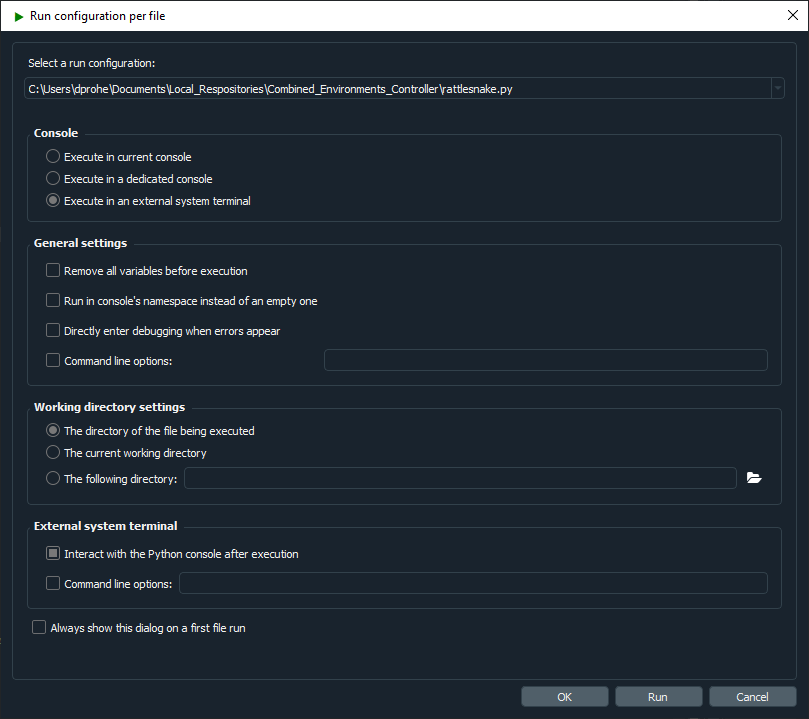
Figure 2.1:Spyder run configuration showing execution in an external system terminal as well as allowing interaction with the Python console after execution.
2.3Computational Requirements
Rattlesnake is a process-heavy software; it spawns processes for each environment, as well as for various portions of the controller that should operate in parallel. In general, the core controller utilizes 2-3 full processes. Various environments will also utilize multiple processes; for example, the MIMO Random Vibration uses 3 main processes to compute spectral quantities (FRFs, CPSDs, etc.), perform control calculations, and generate time histories simultaneously. If running virtual control, keep in mind that acquisition processes will be more fully subscribed due to the need to integrate the equations of motion rather than just read data off the data acquisition hardware.
While the exact computational requirements will depend on the channel count of the test and size of the control computations, the authors have had success using a 6-core processor with 32 GB RAM for multi-environment control approximately 20 control channels and 4 outputs. For a 200 acquisition channel test with 50 control channels and 8 outputs, the authors needed to upgrade to a 16 core, 32 GB RAM computer.
2.4Obtaining Support
Rattlesnake was developed by a small team as a research tool, and as such will not be as polished as commercial vibration software. Therefore, it should be expected that bugs and errors will occur from time to time. If a bug occurs, please report it by creating a new issue in the GitHub issues board. This will notify the development team of the issue and they can work to solve it. If users have a feature request, these can also be submitted to the GitHub issues board.
The issue tracker provides templates for Bugs, Feature Requests, and Questions. The more thoroughly that these can be filled out, the greater the chance that the development team can solve the issue. For bug reports, files can also be attached to the issue, so the users can include the Rattlesnake.log file that is generated for each run of the Rattlesnake, as well as any screenshot of error messages that get shown in dialog boxes or the command window. The question template can be used for basic support questions, which will be answered by the developers as their time permits. Users should certainly consult this User’s Manual and the Rattlesnake Source Code first to ensure their question is not covered by it.