17. Implementing New Environment Types
WARNING: This chapter contains advanced Rattlesnake operations that require a very good understanding of the Rattlesnake software architecture. Understanding this chapter is not required to run the software successfully, and therefore this chapter can be skipped if the user is not interested in implementing new environments. Implementing an environment is a serious undertaking that will involve potentially thousands of lines of code depending on its complexity (the MIMO Random Vibration environment is over 3,000 lines of code), so this chapter will only present the basic concepts and minimum required coding, leaving the reader to dig into the code to understand the actual details required to implement the environment.
17.1. Overview of Environments
In Rattlesnake, an environment is the portion of the code that generates the signal that will be output, perhaps using previously acquired data to inform the next output signal. In order to use environments interchangeably or simultaneously, Rattlesnake abstracts its environments so the interface between an environment and the main controller is common regardless of the type of environment used. In general, an environment will consist of three main parts, and each of these parts inherits from an abstract base class defined in the components/abstract_environment.py source file in the GitHub Repository.
- Environment Metadata or Parameters: Each environment requires defining an object that contains all of the parameters that completely define that environment, e.g. frame lengths, window functions, averaging, control targets, etc.
- Environment-specific UI: Each environment requires defining a
UIinto its functionality. This includes both the actualGUIthat appears on the screen, as well as the code to handle the operations performed when the user interacts with theGUI. - Environment Implementation: Each environment requires defining its operations. These operations will involve, for example, computing transfer functions between excitation and responses on the part, computing various metrics, and must at the end determine the next signal that will be output to the excitation devices in the test.
17.2. Overview of Environment Interactions with the Controller
Rattlesnake runs most of its tasks on separate processes in order to perform operations simultaneously. Figure 17-1 shows a high-level overview of the controller processes.
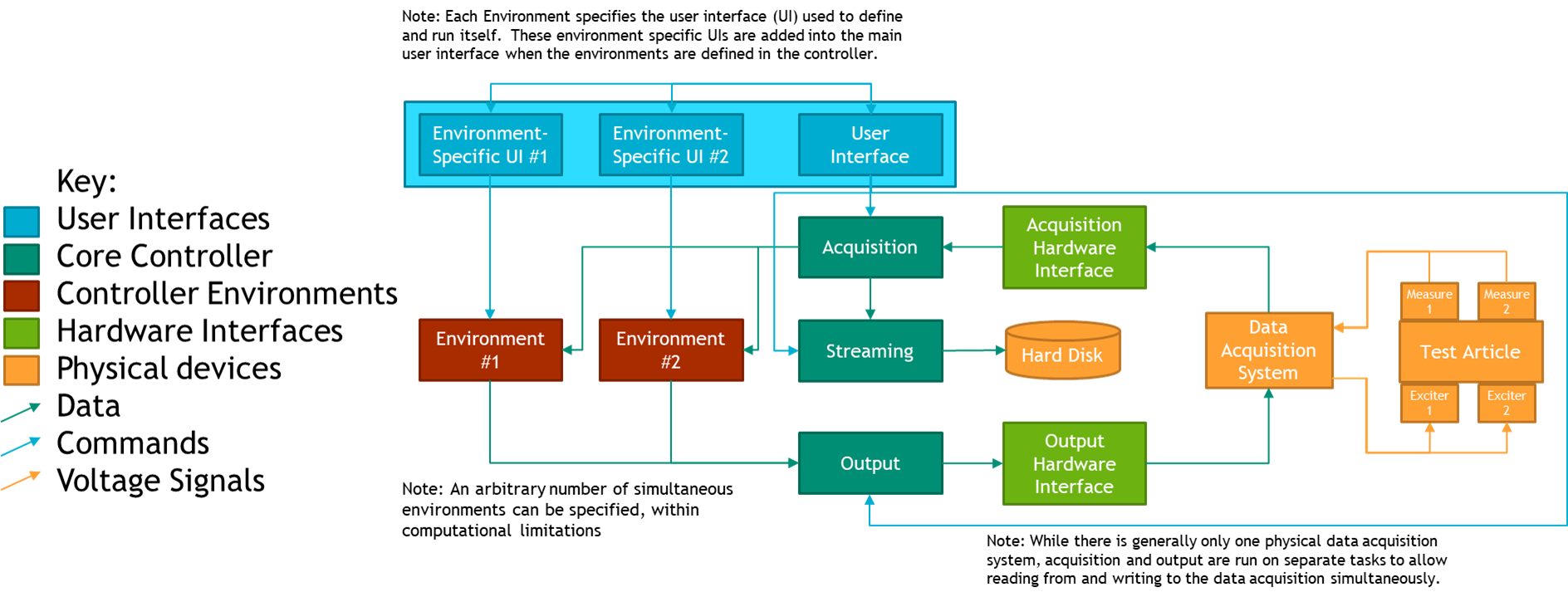
Figure 17-1. High-level flow chart of the Rattlesnake software
The UI of the controller exists on the main Rattlesnake process. Therefore, any environment-specific UI components are also run on this process. At run-time after the environments in a given test have been selected, the controller assembles the GUI, combining it with the environment-specific interfaces of each environment used in the test. Typically, the constructor for each environment's UI class will handle adding the environment-specific portion of the GUI to the main GUI. The class implementing the UI should inherit from the AbstractUI class in the components/abstract_environment.py file.
The class implementing the environment computations should inherit from the AbstractEnvironment class in the components/abstract_environment.py file. Each environment is run on a separate process to enable environments to run simultaneously with the acquisition and output processes. Because of this, environments communicate with the rest of the controller primarily via queue objects from the Python multiprocessing module. Messages put to and received from these queues are generally of the form (message,data) where message specifies the operation that the receiving process should perform, and the data is any parameters or input data required by that operation. For example, a message might be START_CONTROL and the data might be a test level such as -6 dB. It is up to the environment to define what operations to perform when it receives the START_CONTROL message.
Each environment will interact with many data streams, and therefore will interact with many queues. Each environment will have an input_queue or command_queue that it will pull these instructions and data from. To enable the environments to pass messages back to the controller, a controller_communication_queue is provided where the environment can put its own messages and data to be read by the controller. A gui_update_queue also exists for environments to put updates to the GUI; this would be used to tell the controller to update a plot or set the value of some widget.
The environment will receive acquired data through a data_in_queue, so it can use previously measured data to compute control decisions. Similarly, the environment will put its next output data set to a data_out_queue, which will be read by the output process and put to the data acquisition system through the output hardware interface.
Finally, the environment can put messages to a log_file_queue which will be written to the Rattlesnake log file, which is useful for debugging environment behavior.
In general, the environment parameters will be loaded, selected, or otherwise defined in the environment-specific GUI in the main process, but need to be passed to the environment implementation running on a separate process. Rattlesnake requires that these parameters be packaged into an object that contains all the parameters to define the environment. The class defining this object should inherit from the AbstractMetadata class in the components/abstract_environment.py file.
17.3 Writing an AbstractMetadata Subclass
In general, the first step to defining an environment is to define the parameters that define the environment. These will be specified in a subclass of the AbstractMetadata class.
This class is for the most part just a container for the parameters, but it does require the definition of a store_to_netcdf method, as the controller needs to know how to take the different parameters defining an environment and store them to a netCDF file as output from Rattlesnake. For example, in the MIMO Random Vibration environment, this function defines the output structure described in Section 12.6 Output NetCDF File Structure. The Streaming process will call this function when it creates a netCDF file for output from Rattlesnake.
In many cases it can be helpful to specify other properties that are derived from the environment parameters as part of this class. For example, if one environment specifies a ramp time between test levels, one common computation would be to compute the number of time samples this ramping event takes from the ramp time and the sample rate of the data acquisition system.
17.4. Designing the Envionment-Specific GUI
With the parameters defining the environment defined in an AbstractMetadata subclass, GUI components can be designed that allows a user of the software to specify these parameters and control the environment. At run-time, these components will be added to the main GUI as shown in Figure 17.2.
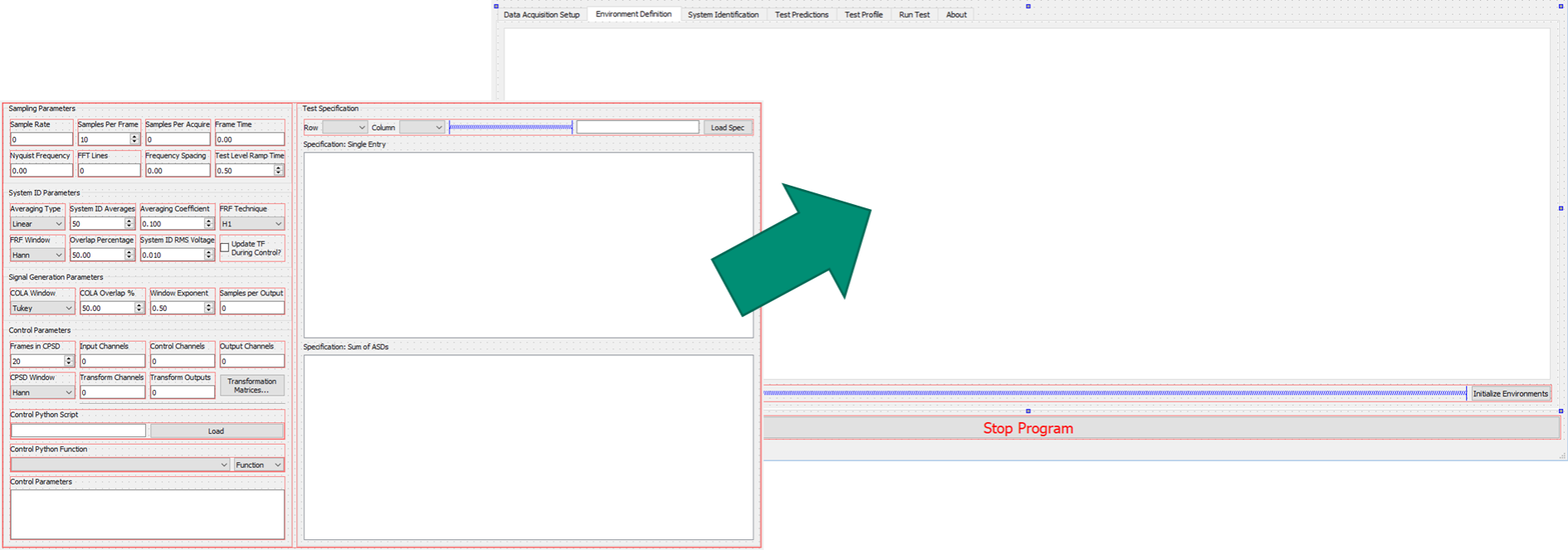
Figure 17-2. Graphical representation of adding a GUI element defining the MIMO Random Vibration environment into the main controller GUI.
These GUI elements can be designed using a software such as QtDesigner and loaded at run-time, or assembled programmatically in the constructor for the environment. Up to four GUI components can designed, though two of the components are optional.
17.4.1. Environment Definition GUI
The first GUI component that should be created is the interface in the Environment Definition tab. Essentially, the author of the environment should define a GUI element that contains all the parameters to define a specific environment, including signal processing parameters and the control targets. This is a required portion of the GUI as all the environment parameters must be defined before the controller can be run.
17.4.2. System Identification and Test Predictions GUI
The second and third GUI components are system identification and test predictions. These are optional, as not all environments will require system identification (e.g. the Time History Generator environment described in Chapter 14 Time History Generator).
The system identification portion of the GUI is generally common between different controller types, as techniques for developing a transfer function between excitation and response are fairly universal. The user should be able to start and stop acquisition of transfer function data, as well as visualize the transfer functions as they are computed. Both the MIMO Random and MIMO Transient environments utilize a common system identification framework, which is defined in the abstract_sysid_environment.py and abstract_sysid_data_analysis.py. If users wish to utilize this system identification framework for their own environments, they are welcome to make their environment inherit from this class, which will save a significant amount of coding to write a new system identification framework.
When the system identification is performed, generally an environment can compute a prediction of the responses that could be achieved. Thought should be given as to the best way to present the predicted responses on the Test Predictions GUI component. The user must be able to determine if a given test is feasible, so they should be aware of the required excitation as well as the accuracy the environment expects to achieve.
17.4.3. Environment Run GUI
The final GUI component controls running the test. Here the user should be able to start and stop the environment, as well receive a visual of how well the environment is controlling the response of the test article. Generally this will entail some type of overview plot or table. This might also provide the functionality to visualize individual response or excitation channels.
17.4.4. Writing an AbstractUI Subclass
With the GUI components defined, the code containing the UI logic and callbacks can be written. This will generally inherit from the AbstractUI class in the components/abstract_environment.py file.
17.4.4.1. Abstract Methods in the AbstractUI class
Because it inherits from the AbstractUI base class, classes defining environment-specific UIs in Rattlesnake require definition of a number abstract methods:
- __init__: The class constructor that calls the superclass constructor, adds the
GUIelements to the main controller'sGUItabs, and connects callback functions to theGUIwidgets. This function will also set up the command map as described below. - collect_environment_definition_parameters: This function gathers the environment parameters from the current values of the
GUIwidgets and constructs the correspondingAbstractMetadatasubclass object. - initialize_data_acquisition: This function is called when the Data Acquisition parameters are initialized (channel table, sample rate, etc.). It should set up the environment user interface accordingly.
- initialize_environment: This function is called when the Environment Parameters are initialized. It should set up the user interface and environment appropriately based off parameters specified in the environment's definition
GUIcomponents. It must also return an object of theAbstractMetadatasubclass corresponding to the present environment, so the controller can send it to the environment. - retrieve_metadata: This function retrieves parameters from a netCDF dataset that was written by the controller during streaming. It must populate the widgets in the user interface with the proper information. Where the
store_to_netcdffunction in theAbstractMetadatasubclass writes parameters to the netCDF file, this function must be able to read that data back into the controller. - create_environment_template: This function creates a template worksheet in an Excel workbook where users can specify environment parameters that are loaded in via the
Load Profile...button on theEnvironment Selectordialog box. This function should be defined using the@staticmethoddecorator. - set_parameters_from_template: This function reads the template generated by the
create_environment_templatefunction after a user has filled in the required information. - start_control: The function containing the logic to start the environment controlling.
- stop_control: The function containing the logic to gracefully shut down the environment.
- update_gui: This function receives data from the
gui_update_queuethat specifies how the user interface should be updated. Data is typically recieved as(instruction,data)pairs stored as a tuple, where theinstructionspecifies which operation to perform or which widget to modify, anddataprovides additional information to use in the operation (a signal to plot, the value to update a widget to, etc.).
17.4.4.2. Command Map for the UI
As described in Section 3.6 Test Profiles, Rattlesnake can automate a sequence of operations for combined environments tests. To define such a sequence, the user creates a table of operations that occur at a given time in the test. Each environment must therefore define which operations it can perform, as well as defining what happens when each of the operations is triggered. To define these profile operations, each environment-specific UI class contains a command_map dictionary that maps strings to functions in the class. The main controller UI reads the strings in this command_map object to populate the drop-down lists in the Test Profile table. Then, when one of the operations is triggered, the controller calls the function mapped to that string in the command_map object. In this way, the main controller UI needs only to access the command_map object to know which operations can be automated using the test profile. Figure 17-3 shows how specific entries in the command_map translate to operations in the Test Profile table.
Note that the AbstractUI class defines two entries in the command_map, "Start Control" and "Stop Control", which map to the start_control and stop_control functions that are required to be defined. Because new environment UI classes will inherit from AbstractUI, they will also have these operations defined in their command_map. Therefore, every environment will be able to be started and stopped via the Test Profile functionality. Authors of new environments are then able to add additional operations to their subclasses if required.

Figure 17-3. The command_map dictionary in each AbstractUI subclass maps functions in the subclass to strings that will appear in the Test Profile tab as available operations that can be automated in a combined environments test.
17.5. Writing an AbstractEnvironment Subclass
The environment implementation is what performs the control calculations to generate the next output signal required by the controller. It generally is started as a separate process from the main controller and communicates to the main controller using queues. This enables multiple environments to be run simultaneously for combined environments tests.
The environment implementation will generally inherit from the AbstractEnvironment abstract base class. The AbstractEnvironment defines the minimum functionality required for an environment to interact with the controller; the author of a new environment is expected to significantly expand on this minimum functionality to produce a useful and functional environment in Rattlesnake.
The AbstractEnvironment class defines the following methods:
- log: Writes a message to the
log_file_queueso it will eventually be put to the log file along with a timestamp of the message and the name of the environment putting the message to the queue. The parallel nature of Rattlesnake means that messages written to the log file might be out of order depending on what is happening when the messages are written, so it is important to include the source and time of the message so operations can be reconstructed. - run: The main looping function that defines the environment's subprocess. It continually waits for
(message,data)instructions from thecommand_queueand then uses a command map to map themessages to functions defined in the class, passing thedataas the argument to the function:function = command_map[message]; output = function(data). This function will continue to run until theoutputfrom one of thecommand_mapfunctions returnsTrue. - quit: Returns
Trueto kick the class out of the loop in therunfunction so the process eventually exits. This function can be overwritten by an inheriting subclass to perform extra cleanup or shutdown operations. - map_command: A function that maps a
messagethat will be received by thecommand_queueto a function that will be called in the class.
The AbstractEnvironment class also specifies the following abstract methods that must be defined by any subclasses:
- initialize_data_acquisition_parameters: Gets the data acquisition parameters (sample rate, channel table) from the controller and sets the environment up appropriately.
- initialize_environment_test_parameters: Gets the environment parameters (as an object of a subclass of
AbstractMetadata) and sets up the enviornment appropriately - stop_environment: Defines operations to gracefully shut down the environment
Note that none of the functions above have anything to do with the actual generation of the signal in the environment. As described previously, the above is the minimum requirements to interact with the controller. It is up to the author to determine and implement the best approach to actually generate the signals and put them to the data_out_queue. It is recommended that authors of new environments look at existing environments in Rattlesnake to understand the flow of information in those environments.
As described above, the environment will sit in a loop in the run function waiting for (message,data) pairs to come down the command_queue. Therefore, in order for any of the other functions listed above to be called, they should be mapped to a specific instruction message, or otherwise called from within a function that is mapped to a specific instruction message. The environment classes that inherit from AbstractEnvironment utilize a similar command_map as the environment-specific UI classes that inherit from AbstractUI. However, instead of mapping strings to functions, the command_map for the actual environment implementation maps messages to functions. Therefore, when a specific message is received, the run function queries the command_map to get the function mapped to that message. That function is then called with data as the argument.
Note that when creating a new process, a function is specified that defines the operations that will be performed on the new process. Therefore a function must be defined that instantiates an object from the environment class and calls the run function of that object. Any environment-specific set-up or clean-up operations should be performed in this function as well.
17.6. Connecting the Environment to the Controller
To get Rattlesnake to recognize a new environment, it must be added to a number of data structures in the components/environments.py file. A "short name" for the environment should be added to the ControlTypes enumeration. A "long name" for the environment can be added to the environment_long_names dictionary. If the environment should be usable in combined environments, the corresponding ControlTypes enum should be added to the combined_environments_capable list. If *.ui files from QtDesigner are used to define environment UIs, the paths should be added to the corresponding environment_definition_ui_paths, environment_prediction_ui_paths, and environment_run_ui_paths dictionaries. Finally the UI class and target function that will be called by processes utilizing the given environment should be imported and assigned to the respective data containers.
- TODO: In the bibiography, discover why [3] RyanA.SchultzandGarrettD.Nelson. Inputsignal synthesis for open-loop multiple-input/multiple-output testing. In Chad Walber, PatrickWalter,andSteveSeidlitz, editors,Sensors and Instrumentation, Aircraft/Aerospace, Energy Harvesting & Dynamic Environments Testing, Volume 7,pages 245–257, Cham,2020. Springer International Publishing. is not being cited in the mdbook version, but exists in the LaTeX version.