Users may contribute to the Rattlesnake project by cloning or forking the Rattlesnake repository.
Direct cloning is reserved for authorized collaborators of the Rattlesnake repository; however, because the project is open-source, all other contributors can obtain their own copy by forking the repository.
Cloning
Cloning is a Git action.
It creates a copy of a repository on your physical computer.
It allows you to edit files and run code locally. Collaborators “clone” the original repository directly because they have permission to “push” (save) their changes directly back to the main project.
External contributors usually “clone” their own fork.
Forking
Forking is a GitHub action.
It is a personal copy of the entire project on your own GitHub account.
It acts as a bridge for external contributors. You can make any changes you want to your fork without affecting the original project. When you are ready to share those changes, you submit a Pull Request to the original repository.
Getting the Source Code
Collaborators and team members should clone the repository:
git clone git@github.com:sandialabs/rattlesnake-vibration-controller.gitOthers should first fork the repository to their own GitHub account. Once forked, you can then clone your personal version of the repo to work on it locally.
Installation
A virtual environment is highly recommended. This ensures project dependencies do not conflict with the system-wide Python installation.
Two approaches are documented below:
the traditional
venv+pipworkflow, anduv, a faster, modern alternative that every other command in this document (testing, linting, formatting) assumes is installed. New contributors are encouraged to useuvand we present that first.
Using uv (Recommended)
uv is a fast, modern Python package and project manager, written in Rust. It replaces pip, venv, and several other tools with a single command line interface, and it is what every other section of this document (testing, linting, formatting) assumes you are using.
Compared to pip and venv, uv:
Is significantly faster at resolving and installing dependencies, thanks to a Rust-based resolver and aggressive caching.
Manages the virtual environment for you. Commands like
uv runanduv synccreate and use a.venvautomatically, so there is no separate activate/deactivate step.Uses a lockfile (
uv.lock) to guarantee that everyone — and CI — installs the exact same dependency versions, which plainpipdoes not do without extra tooling.Can install and manage Python itself, so a separate Python version manager is not required.
Installing uv
Follow the official installation guide for your platform, or use one of the quick install commands:
# macOS / Linux
curl -LsSf https://astral.sh/uv/install.sh | sh
# Windows (PowerShell)
powershell -ExecutionPolicy ByPass -c "irm https://astral.sh/uv/install.ps1 | iex"Setting Up the Environment
From the repository root:
uv sync --all-extras --devThis creates a .venv automatically (if one does not already exist), installs Rattlesnake in editable mode, installs all [dev] dependencies, and pins everything to the versions recorded in uv.lock.
To run a command inside that environment without manually activating it, prefix it with uv run, e.g.:
uv run python -c "import rattlesnake; print(rattlesnake.__file__)"This uv run <command> pattern is used throughout the rest of this document.
Using venv and pip (if uv is not an option)
Create a new virtual environment folder within your project directory. It is conventional to name this folder .venv.
# macOS / Linux / Windows
python3 -m venv .venv
Activate the environment to tell your shell to use the Python interpreter and pip packages located inside the .venv folder using the command appropriate to your system:
source .venv/bin/activate  # macOS / Linux:
.venv\Scripts\Activate.ps1 # Windows (PowerShell):
.venv\Scripts\activate.bat # Windows (Command Prompt), DOS
Once activated, your terminal prompt will typically show (.venv). You can now install dependencies safely.
# Install the entire Rattlesnake development in editable mode
pip install -e .[dev]

# Additional packages can be installed on an as-needed basis.  For example, to install
# the "requests" package
pip install requests
Confirm that your shell is pointing to the correct Python binary.
# macOS / Linux
which python

# Windows
where python
The output should point to a path inside your project’s .venv folder.
To exit the virtual environment and return to the global system stack:
deactivateBest Practice: Never commit the
.venvdirectory to version control. Add.venv/to your.gitignorefile.
Development
Before pushing changes, contributors should check code quality locally rather than relying solely on CI to catch problems. This means running the test suite (pytest), linting (pylint), format checking (ruff), code coverage, and confirming that the Jupyter Book documentation still builds — all on your own machine. Catching issues locally is faster than waiting on a CI run, and it keeps the CI pipeline green for everyone else.
Test
Rattlesnake uses pytest for its test suite. Tests are split into groups based on how long they take to run:
tests/
tests/short/
tests/long/
tests/long contains slower, heavier tests (e.g., full qualification runs), while tests/short and the top-level tests/ files run quickly and are meant to give fast feedback during development.
To run the full test suite locally with uv:
uv run pytest tests/To run only the fast tests, matching CI’s default scope:
uv run pytest tests/shortTo run a single test file, e.g.,
uv run pytest tests/short/test_environment_manager.pyTo also collect a coverage report for the entire repository while testing:
uv run pytest tests/ --cov=rattlesnake --cov-report=term-missingTo collect a coverage report for a single test file, e.g.,
uv run pytest tests/short/test_environment_manager.py --cov=rattlesnake.environment_manager --cov-report=term-missingLint
Rattlesnake uses pylint for static code analysis and ruff for code formatting. Both tools are configured to work together with uv to catch issues early and maintain consistent code quality.
Pylint
To lint the source code locally, use uv to run pylint:
# Lint a specific file, e.g.,
uv run pylint src/rattlesnake/utilities.py

# Lint the entire source directory
uv run pylint src/rattlesnake

# Lint and show only line-too-long warnings
uv run pylint src/rattlesnake --disable=all --enable=line-too-long
Ruff Format
# Auto-format a specific file, e.g.,
uv run ruff format src/rattlesnake/utilities.py

# Auto-format the entire source directory
uv run ruff format src/rattlesnake/
Checking Formatting Without Modifying Files
Before pushing, you can check whether any files are out of compliance with the project’s formatting rules without actually rewriting them by adding the --check flag:
uv run ruff format --check src/rattlesnakeThis is the same command the lint job in ci.yml runs on every push. It is intentionally non-blocking in CI — a formatting drift surfaces as a warning annotation on the workflow run rather than failing the job, so it will not block a merge. If it reports files that need formatting, run uv run ruff format src/rattlesnake locally (as shown above) to fix them before committing.
Documentation
The online documentation is made with Jupyter Book. Start from the
rattlesnake-vibration-controller/documentationfolder.
Generated User Interface Pages
Seventeen pages under book/src/_generated document the Rattlesnake user interface. The script documentation/generate_ui_documentation.py writes them. It opens each environment’s user interface, walks its widget tree, screenshots every widget, and produces one Markdown page per interface along with the figures that page references.
These pages are not checked into the repository. documentation/.gitignore excludes book/src/_generated/**. The docs_ui_generate job in .github/workflows/ci.yml regenerates them on every documentation build. Its Generate UI documentation step runs the script. Do not update the book/src/_generated/** files.
Hand-written chapters cross-reference the generated figures. environment_mimo_random.md links to fig:random_vibration_definition:cpsd_parameters_groupbox, for example. A working tree without the generated pages therefore fails a book build twice over: seventeen table of contents entries do not resolve, and the cross-references from the hand-written chapters do not resolve either.
Generate the pages locally by running this from the repository root:
uv run python documentation/generate_ui_documentation.pyThe script opens real Qt windows and screenshots them, so it needs a desktop session rather than a headless one. It also takes a while, roughly half an hour on the CI Windows runner. Run it once. The output then persists in your working tree, and you can rebuild the book as often as you like without regenerating the screenshots.
Local Build
Within the documentation folder, the myst.yml file specifies how Jupyter Book should build the documentation. Importantly, it links to Markdown files that contain the book’s content.
Generate the user interface pages first, as described in Generated User Interface Pages. A fresh clone does not contain them, and the build fails without them.
jupyter book build --html --strictThis will build the Jupyter Book documentation.
The output will be similar to:
building myst-cli session with API URL: https://api.mystmd.org
(node:93011) Warning: `--localstorage-file` was provided without a valid path
(Use `node --trace-warnings ...` to show where the warning was created)
🌎 Building Jupyter Book (via myst) site
📖 Built book/src/_generated/random_vibration_run_doc.md in 64 ms.
📖 Built book/src/chapter_13.md in 124 ms.
📖 Built book/src/notation.md in 117 ms.
📖 Built book/src/contributing.md in 117 ms.
<--(snip)-->
📚 Built 32 pages for project in 813 ms.
To view the Jupyter Book output locally:
jupyter book startThe output will be similar to:
📚 Built 32 pages for project in 974 ms.
<--(snip)-->
🔌 Server started on port 3000!  🥳 🎉

        👉  http://localhost:3000  👈
In a local web browser, navigate to the web address indicated above.
Bibliography
The documentation uses the myst-nb and standard MyST bibliography support.
Prepare your bibliography file:
References are stored in documentation/book/bibliography.bib using the standard BibLaTeX (.bib) format. Populate the file with references, e.g.,
@book{knuth1986computer,
  title={The Computer Science of TeX and Metafont: An Inaugural Lecture},
  author={Knuth, Donald E},
  year={1986},
  publisher={American Mathematical Society}
}
Configure
myst.yml
The bibliography is configured in documentation/myst.yml under the project.bibliography section:
project:
  bibliography:
    - book/bibliography.bib
Add in-text citations
In a markdown file, use the cite role to reference an entry by its key:
{cite} knuth1986computer
Build the book
Run the jupyter book build command from the documentation directory. The build system will automatically process the citations and generate the bibliography.
cd documentation
jupyter book build
Continuous Integration/Continuous Deployment (CI/CD)
The CI/CD pipeline comprises two GitHub Actions workflows, ci.yml and release.yml, described in detail below.
Synopsis
ci.yml — Continuous Integration
Triggered by:
A push to any branch
A pull request targeting
main/devManual
workflow_dispatchExample: re-running CI on demand from the GitHub Actions UI, such as forcing the full
pytest_matrixviatest_level=fullon a branch that wouldn’t otherwise trigger it.
workflow_callExample:
release.ymlinvokesci.ymlas itstestjob through theworkflow_callmechanism.
Seven jobs, five of which share a gate:
pytest_matrix,lint,coverage— run whencode_changed == 'true'or the branch (or PR base branch) ismain/dev.docs_ui_generate,docs_jupyter_book— run whendocs_changed == 'true'or the branch (or PR base branch) ismain/dev.docs_ui_generateproduces the pages underbook/src/_generated.docs_jupyter_bookconsumes them.docs_jupyter_bookdeclaresneeds: docs_ui_generate, so it waits for the producing job to finish before it builds the book.deploy— runs onmain/devregardless of whethercode_changedistrueorfalse, and regardless of whetherdocs_changedistrueorfalse.
changes
Uses dorny/paths-filter to detect whether docs and/or code files changed. Sets the job outputs
docs_changedandcode_changed(eachtrue/false), which downstream jobs use to streamline the CI process by skipping unnecessary jobs.
pytest_matrix
Runs tests on all combinations of [macOS, Ubuntu, Windows] × [3.11, 3.12] of Python using
pip install .[dev]. PyQt wheel compatibility requires use ofpipinstead ofuv. Test scope is adaptive:Default:
tests/shortFull suite triggered by:
commit message containing
[all tests], ormanual dispatch with
test_level=full, orbranch is
mainordev
lint
Runs
uv run ruff format --check src/rattlesnakefirst. This step is non-blocking — a formatting drift surfaces as a::warning::annotation on the workflow run instead of failing the job, so it never turns the workflow red.Then runs
pylint src/rattlesnakeviauv, captures output, then callsreport_lint.pyto generate an HTML lint report artifact.Both checks share one job (checkout +
uv sync) instead of running in separate jobs, saving a redundant environment setup per workflow run.
coverage
Runs
pytest --covviauvwith the same adaptive test scope, then callsreport_coverage.pyto generate an HTML coverage report artifact.
docs_ui_generate
Runs on
windows-latest. Executesdocumentation/generate_ui_documentation.py, which opens each environment’s user interface, screenshots its widgets, and writes the seventeen pages and their figures intodocumentation/book/src/_generated.Uploads that folder as the
ui-generated-docsartifact. The upload usesif-no-files-found: error, so an empty generation fails here rather than silently breaking the book downstream.This job is why
book/src/_generatedis not checked into the repository. See Generated User Interface Pages.The job takes roughly half an hour, so the docs gate matters here more than anywhere else.
docs_jupyter_book
Downloads the
ui-generated-docsartifact intodocumentation/book/src/_generated, updatesmyst.ymlmetadata viareport_jupyter_book.py, validates the table of contents viatoc.py, then builds the Jupyter Book.The table of contents check and the scan of the build log for MyST’s
⛔️error marker both exist because--strictalone does not fail the job. MyST records some errors, a missing table of contents entry among them, againstmyst.ymlrather than against a page. MyST’s help text for--strictreads “Summarize build warnings and stop on any errors,” and MyST does log the missing entry at error level. The strict check simply never inspects errors recorded against the config file. So MyST prints them and exits zero (success). This is an upstream gap that our manually-createdtoc.pynow guards against.
deploy
Assembles all artifacts into a
pages/tree, generates the dashboard (report_dashboard.py), creates SVG badges, then clones thegh-pagesbranch, replaces only the current branch’s subdirectory (main/ordev/), and pushes the result back with plaingit(notpeaceiris/actions-gh-pagesoractions/deploy-pages— see the comments inci.ymlfor why both were rejected).
release.yml — Release Pipeline
Triggered by a v* tag push, but never a branch push (not even a branch push to main or dev). Once triggered, two conditions (both checked in validate_tag) decide where, if anywhere, the release publishes to:
Branch: the tag must be reachable from
mainordev. A tag on any branch that is notmain/devfails thevalidate_tagjob; a failedvalidate_tagjob prevents any releases to TestPyPI or PyPI.Version string: a prerelease version (
a/b/rc/.devsegments) publishes to TestPyPI; a stable or.postversion publishes to PyPI.The
mainbranch can publish to either TestPyPI or PyPI.The
devbranch can publish to either TestPyPI or PyPI.
Six sequential jobs:
validate_tag
Verifies the tag was created on the
mainordevbranch, that it conforms to PEP 440, and that it is strictly newer than all existing tags.Computes an
is_prereleasejob output usingpackaging.version.Version(...).is_prerelease. This is the single source of truth consumed by every downstream job that needs to distinguish a prerelease from a production release — nothing downstream re-derives it with its own tag matching.
test
Calls
ci.ymlas a reusable workflow (workflow_call).
build
Runs
uv buildand generates a Supply chain Levels for Software Artifacts (SLSA, aka “salsa”) provenance attestation for the dist artifacts.
github-release
Creates a GitHub Release with auto-generated notes and attaches the
distfiles.prerelease:is set directly fromvalidate_tag’sis_prereleaseoutput.
publish_testpypi / publish_pypi
Two separate jobs, mutually exclusive via
if: needs.validate_tag.outputs.is_prerelease == 'true'/'false'.Each has a hardcoded
environment:(testpypi/pypi) and hardcoded publish target — no ternary expression to read or evaluate.In the Actions UI this shows as one job succeeding and the other skipped, so which registry a run published to is visible at a glance from the job list alone, and each job’s last step also writes an explicit one-line status (e.g., “📦 Published
v1.2.3to production PyPI”) to the run’s Summary tab.
Splitting into two jobs (rather than two steps in one job) is required because GitHub Actions environments (including the
pypienvironment’s required-reviewers approval gate) are configured per-job, not per-step.
Efficiency
When a user pushes to the repository, the changes job in the main workflow
determines the types of the files that were committed. The job determines
if only docs (documentation) files changed, only code (source code, project code)
files changed, or both.
Updates to docs only
For example, upon pushing updates only to a markdown file (i.e., *.md),
the job makes this determination:
📂 Docs changed: true
📂 Docs files: documentation/book/src/contributing.md
💻 Code changed: false
💻 Code files:
In this scenario, only jobs that rely on updates to documentation file types are run. This avoids running unnecessary tests that don’t rely on documentation updates.
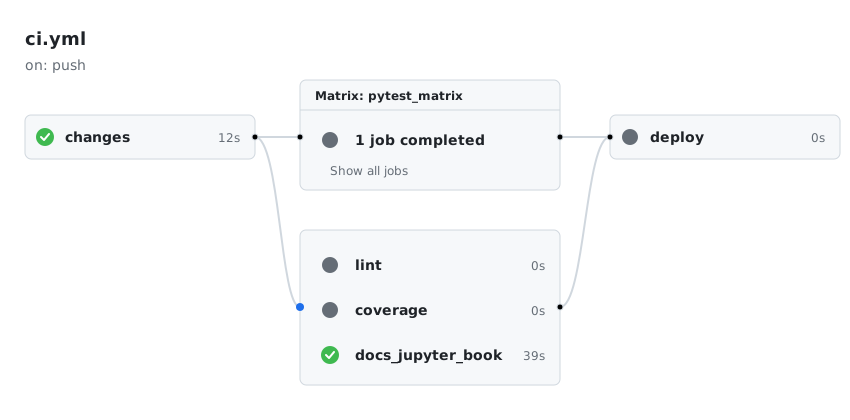
Figure 1:CI/CD workflow execution for documentation-only changes.
Updates to code only
For example, upon pushing updates to source code (e.g., *.py),
the job makes this determination:
📂 Docs changed: false
📂 Docs files:
💻 Code changed: true
💻 Code files: src/rattlesnake/cicd/report_dashboard.py src/rattlesnake/cicd/report_jupyter_book.py src/rattlesnake/cicd/report_lint.py tests/test_cicd_utilities.py
Only the pytest_matrix, lint, and coverage jobs will be run. The docs_jupyter_book and deploy jobs will be skipped.
All test
Regardless of the file type, if either the main or the dev branch is the target
of an update, all tests are run, for example,
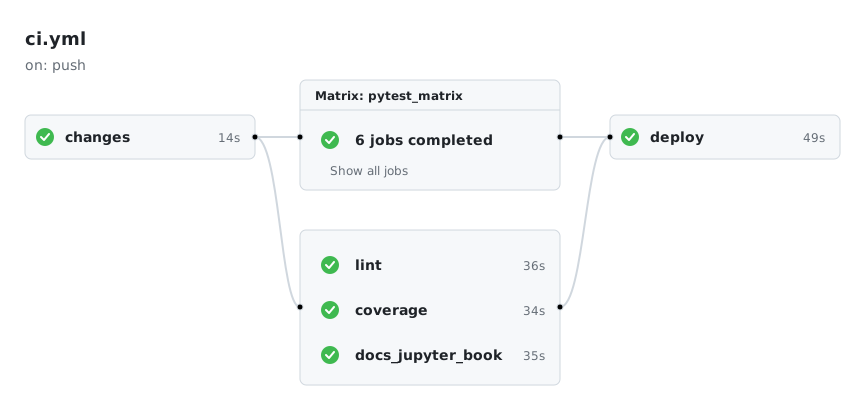
Figure 2:Full suite of CI/CD jobs triggered for main or dev branch updates.
Running the full suite is significantly more time-consuming than executing only the specific tests relevant to the modified files.
Matrix scope
The pytest_matrix job runs across combinations of operating systems and Python versions. The scope is adaptive:
Feature branches — runs only
ubuntu-latest×3.12(1 runner). This keeps per-push feedback fast.mainanddevbranches — runs the full matrix:macos-latest,ubuntu-latest, andwindows-latest×3.11and3.12(6 runners). Full cross-platform coverage is enforced before anything reaches a release branch.
This means OS-specific or Python-version-specific bugs are caught on main/dev before a release, without slowing down every feature branch push.
Preflight
The preflight command is a local CI/CD readiness check. It mirrors the checks that GitHub Actions would run on a push, allowing developers to catch errors before they reach the pipeline.
uv run preflightlargely automates the manual steps listed above in the Development section.
Modes and options
By default, preflight matches CI’s scope on non-main/dev branches: ruff format check and full pylint on src/rattlesnake/. When pytest is re-enabled, the default scope will also run tests/ --ignore=tests/long; use --all-tests to include tests/long/ (matching CI on main/dev).
| option | description |
|---|---|
| (none) | Default scope: ruff format check + pylint (+ pytest tests/ --ignore=tests/long when re-enabled) |
--all-tests | Full suite including tests/long/; matches CI on main/dev |
--coverage | Adds --cov=rattlesnake --cov-report=term-missing to the pytest run (no effect while pytest is disabled) |
--tag TAG | Validates TAG before pushing a release: checks current branch is main or dev, that the tag conforms to PEP 440, and that it is strictly newer than all existing tags. Runs before lint and tests. |
--docs | Validates the table of contents, then builds the Jupyter Book with --strict and scans the log for errors --strict ignores; matches the docs_jupyter_book CI job. Requires network access to api.mystmd.org. |
--no-sync | Skips uv sync (useful when offline or behind a firewall) |
--skip-network-check | Skips the initial PyPI connectivity check |
--force | Continues even if the network or sync checks fail |
Examples
uv run preflight                            # default scope
uv run preflight --all-tests                # full suite
uv run preflight --coverage                 # default scope + coverage report
uv run preflight --all-tests --coverage     # full suite + coverage report
uv run preflight --tag v1.0.0rc1            # validate tag, then default scope
uv run preflight --tag v1.0.0 --all-tests   # validate tag, then full suite
uv run preflight --docs                     # build Jupyter Book
uv run preflight --no-sync                  # skip dependency sync
uv run preflight --force                    # continue past network/sync failures
uv run preflight --skip-network-check       # skip initial PyPI connectivity check
Trusted Publishing
In release.yml we have removed the manual -p ${{ secrets.PYPI_TOKEN }}. The industry standard is now Trusted Publishing (also called OpenID Connect or OIDC). You configure this in your PyPI project settings once, and GitHub Actions authenticates securely without you needing to store and rotate secrets.
OpenID Connect (OIDC) provides a flexible, credential-free mechanism for delegating publishing authority for a PyPI package to a trusted third party service, like GitHub Actions. PyPI users and projects can use trusted publishers to automate their release processes, without needing to use API tokens or passwords.
To configure Trusted Publishing, you tell PyPI, “Trust any code from this specific GitHub repository and workflow.” This removes the need to manage long-lived API tokens or passwords in your secrets.
Steps:
In
release.yml,publish_testpypiandpublish_pypiare two separate jobs, each hardcoded to its own environment (testpypi/pypirespectively). Which one actually runs is decided once, upstream, invalidate_tag’sis_prereleaseoutput:
  publish_testpypi:
    environment: testpypi
    if: needs.validate_tag.outputs.is_prerelease == 'true'

  publish_pypi:
    environment: pypi
    if: needs.validate_tag.outputs.is_prerelease == 'false'
The GitHub repository itself must have both a pypi and a testpypi environment:
On the GitHub repo:
Click on the Settings tab (usually the last tab on the right in the top navigation bar).
On the left-hand sidebar, look for the Environments link (it’s under the “Code and automation” section).
If the environment doesn’t exist yet:
Click the New environment button.
Name the environment
pypi(and then make a second item calledtestpypi) and click Configure environment.
If it does exist but is named differently, you can click on it to rename it or delete it and create a new one.
For a basic setup using Trusted Publishing, you don’t actually need to add any secrets or configuration on this page. Just having the environment named testpypi exist is enough to link it to your workflow.
Optionally, we add the following protections:
Under the Deployment branches and tags, under the No Restriction button, select Selected branches and tags.
Click Add deployment branch or tag rule.
Select Ref type: Tag.
Set the Name Pattern: to
v*. This ensures that only version tags can ever use this environment, adding a layer of security.
Finally, the PyPI (respectively, Test PyPI) site needs to be configured.
Go to your project’s Manage page (or your account’s Publishing settings if you are setting it up for the first time)
Look for the Publishing tab
Click Add new publisher
Select GitHub as the source
Enter the following details:
Owner: sandialabs
Repository name: rattlesnake-vibration-controller
Workflow name:
release.yml(this must match your filename in your.github/workflows/directory)Environment name: You can leave this blank or name it
pypi(if you use it in your YAML). We usedpypifor live publishing to the PyPI site, andtestpypifor test publishing to the TestPyPI site.
Click the Add button
Tags and Semantic Versioning
We follow PEP 440 (the Python standard for versioning), which requires version strings to follow this specific structure:
N.N.N[{a|b|rc}N][.postN][.devN]The validate_tag job in release.yml enforces that a tag can be added only when the
branch is main or dev, that the tag follows PEP 440, and that the version is
strictly newer than all existing tags.
Example Tags
Following are prerelease tags:
| tag | description |
|---|---|
v1.1.0a1 | The first alpha for version 1.1.0 |
v1.1.0b2 | The second beta for version 1.1.0 |
v1.1.0rc1 | The first release candidate for version 1.1.0 |
A release candidate is made during the final testing stage before a full release.
Following are stable release tags (e.g., starting from the v1.0.0 release):
| tag | description |
|---|---|
v1.0.1 | Patch Release: Backwards-compatible bug fixes |
v1.1.0 | Minor Release: New features that are backwards-compatible |
v2.0.0 | Major Release: Significant changes or breaking API updates |
Following are Development and Post-Release tags:
| tag | description |
|---|---|
v1.1.0.dev1 | A version currently under development |
v1.0.0.post1 | Fix a minor error in the release process, such as a fix of a typo in the documentation, without changing the code |
Release on Tag
Following is an example of creating a release with a tag.
Create a Prerelease
To create a prerelease on TestPyPI:
The tag must be pushed from main or dev (see Synopsis); the convention (but not requirement) is to tag from dev, so that release-candidate tags can be tested before merging to main.
On the
devbranch, create a tag and then push, e.g.,
# Ensure you are on the dev branch
git checkout dev
git pull

# View existing tags, if any
git tag

# Create the new tag, e.g.,
git tag -a v1.0.0rc1 -m "Test of prerelease version 1.0.0, release candidate 1"

# Push the tag to GitHub
git push origin v1.0.0rc1
Create a Release
To create a release on PyPI:
The tag must be pushed from main or dev (see Synopsis); the convention (but not requirement) is to cut production PyPI releases from main, after merging in the validated work from dev, so that main reliably reflects what has actually shipped.
Merge the
devbranch into themainbranch.On the
mainbranch, create a tag usinggit tagand push it to themainbranch on GitHub, e.g.,
# Ensure you are on the main branch
git checkout main
git pull

# View existing tags, if any
git tag

# Create the new tag, e.g.,
git tag -a v1.0.0 -m "Release version 1.0.0"

# On the main branch, push the tag to GitHub
git push origin v1.0.0
Manual Approval Gate
By default, a tag push triggers the full release pipeline automatically — including the final publish to PyPI — with no human checkpoint. The manual approval gate pauses the publish_pypi job and requires a named reviewer to explicitly approve before the package is uploaded to PyPI.
This is an industry-standard safeguard for production releases. It gives a release manager a final opportunity to confirm that the correct tag is being published, the changelog looks right, and no last-minute issues have been flagged.
The approval gate applies only to the production pypi environment. The testpypi environment (used for prereleases) does not require approval, since prereleases are low-risk by design.
Setup (GitHub Settings UI)
No changes to release.yml are required. publish_pypi is hardcoded to environment: pypi and publish_testpypi is hardcoded to environment: testpypi — GitHub uses whichever environment name the running job declares as the hook to enforce the approval rule, so it only ever applies to publish_pypi.
Navigate to the repository on GitHub.
Click the Settings tab.
In the left sidebar under Code and automation, click Environments.
Click on the pypi environment.
Under Deployment protection rules, check the box next to Required reviewers.
In the text field that appears, type the GitHub username(s) or team name(s) who are authorized to approve a PyPI release. Add up to 6 reviewers.
Click Save protection rules.
When a release tag is pushed, the pipeline will run validate_tag, test, build, and github-release automatically. For a stable/.post tag, the publish_pypi job will then pause with status Waiting (publish_testpypi is skipped, since is_prerelease is false). The designated reviewer(s) will receive a GitHub notification and must click Review deployments → Approve and deploy before the package is uploaded to PyPI.
If no reviewer approves within 30 days, the deployment times out and must be re-triggered.