6Data Physics Quattro Devices
Rattlesnake is able to run Data Physics Quattro devices through the programming interface exposed by DPQuattro.dll, which is provided with installation materials for the Quattro device. Users must have the proper drivers installed in order to communicate with the Quattro device. Issues with device installation and licensing are outside the scope of the document; users are encouraged to contact Data Physics support for issues communicating with the hardware. If users can run the examples provided by Data Physics for the Quattro device, it should also work with Rattlesnake, as the same library calls are used.
6.1Setting up the Channel Table for Quattro Devices 
This section lists the channel table requirements specific to the Data Physics Quattro device.
The Quattro is a single standalone device, and therefore needs not be referenced by a specific name. However, Rattlesnake requires an entry in the Physical Device column for each channel to show that the channel is active. It is recommended to put Quattro in that space to make it clear that the connected device is a Quattro device. The Physical Channel column should contain the channel number from the device that the row in the channel table represents. For a Quattro device, this should range from 1--4. Channels in Rattlesnake do not need to be in the same order as channels on the data acquisition system for Quattro devices.
The Minimum Value (V) column is not used. The Maximum Value (V) column specifies both the minimum and maximum frequency. Valid Ranges for the Quattro device are 0.1, 1.0, 10.0, and 20.0 V for acquisition channels and 2.0 and 10.0 V for output channels.
The Coupling column is where the channel coupling is specified. Valid coupling values are
AC Differential specified by the entry
AC,AC Differential, orAC Diff(case insensitive)DC Differential specified by the entry
DC,DC Differential, orDC Diff(case insensitive)AC Single-Ended specified by the entry
AC Single,AC Single Ended, orAC Single-Ended(case insensitive)DC Single-Ended specified by the entry
DC Single,DC Single Ended, orDC Single-Ended(case insensitive)AC IEPE specified by the entry
IEPE,ICP,AC ICP, orCCLD(case insensitive)
The Quattro device handles all signal conditioning so there doesn’t need to be anything entered in the Current Excitation Source or Current Excitation Value columns.
Recall for output channels, users of Rattlesnake must tee the output signal back into an acquisition channel. This means using Quattro’s two outputs with Rattlesnake will leave only two acquisition channels remaining. The Feedback Device column must be populated in the row corresponding to the acquisition channel that the output is teed into, again using Quattro for convention, but otherwise any entry will suffice. The Feedback Channel will be the output channel on the Quattro that is used. This should range from 1--2. Outputs in Rattlesnake do not need to be in the same order as outputs on the data acquisition system for Quattro Devices.
6.2Hardware Parameters 
When the Quattro device is selected from the Hardware Selector, Rattlesnake will bring up a file dialog asking for a Data Physics API file. Users should navigate to the file DpQuattro.dll, which should have been delivered with the Quattro API media. This dll file contains the Quattro programming interface that Rattlesnake uses to communicate with the Quattro device. If users cannot find this file, please contact Data Physics support, as Rattlesnake maintainers cannot provide this file. Each file is licensed separately by Data Physics and cannot be shared. The dll file should be alongside a signal.001.qrt file, which is the license file specific to each Quattro device. If this license file is missing or is not the one paired to the Quattro hardware, the interface will not run.
The only other parameter specific to the Quattro device is the Sample Rate. Quattro devices used with Rattlesnake have discrete sampling rates available. These are 16, 20, 25, 32, 40, 50, 64, 80, 100, 128, 160, 200, 256, 320, 400, 512, 640, 800, 1024, 1280, 1600, 2048, 2560, 3200, 4096, 5120, 6400, 8192, 10240, 12800, 20480, 25600, 40960, 51200, 102400, or 204800 samples per second. This is a subset of the full set of Quattro sample rates, because Rattlesnake only deals with integer numbers of samples per second.
6.3Implementation Details 
This section contains details on the Quattro implementation in Rattlesnake, which may be helpful for users when diagnosing issues that arise in the controller.
6.3.1Drivers 
The Data Physics Quattro device connects to the computer via USB, and must have drivers installed to correctly connect. Drivers are found in the \Driver folder of the DpQuattro API package. If you have trouble finding or installing the drivers, please contact Data Physics support, as the Rattlesnake authors cannot provide these files.
6.3.2Programming API 
The Data Physics DpQuattro API is a 64-bit programming interface written in C/C++. It is compiled to a Windows dll, so it can be used by any other environment that can use a Windows-based C library. Therefore the Quattro device as implemented in Rattlesnake is only usable on 64-bit Windows operating systems, not Mac or Linux. Additionally, if you are not using a 64-bit Python executable, you will not be able to connect to the 64-bit dll, and will not be able to use the Quattro device.
The API is accessed using the Python ctypes module, by calling its WinDLL method on the path to the dll. The file components/data_physics_interface.py in the main Rattlesnake directory constructs an object-oriented Python interface from the functions in this dll. The file components/data_physics_hardware.py then defines the acquisition and output hardware objects with the correct methods that Rattlesnake will call.
6.3.3Debugging 
If issues with the Quattro devices are encountered, users can look at the Rattlesnake command prompt that appears when the software is loaded, or the command prompt from which Rattlesnake is run. The DpQuattro API will print messages to this prompt periodically that can be useful in debugging issues. These will generally be prefixed by CAceSys and provide some information on the issue encountered. Figure 6.1 shows an example that occurred if the Quattro devices is not connected to the computer. Other diagnostic messages are also printed, so a message appearing does not necessarily mean an error has occurred.
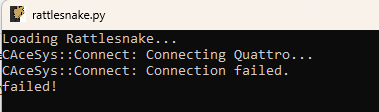
Figure 6.1:An example issue where the Quattro fails to connect.
For more debugging information, there is a DEBUG flag in the file components/data_physics_interface.py that is by default set to False. If users change the value to DEBUG = True, then the Quattro interface will output a log file with more information about its activities.